Loading
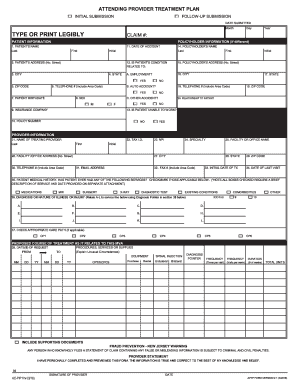
Get Attending Provider Treatment Plan
How it works
-

Open form follow the instructions
-

Easily sign the form with your finger
-

Send filled & signed form or save
How to fill out the Attending Provider Treatment Plan online
Completing the Attending Provider Treatment Plan online is an essential step for documenting patient care and treatment needs accurately. This guide will provide you with clear instructions to navigate each section of the form efficiently.
Follow the steps to complete the form accurately.
- Click ‘Get Form’ button to obtain the form and open it in an available editor.
- Begin by entering the initial submission type at the top of the form, choosing between 'initial submission' or 'follow-up submission.' This helps clarify the context of the treatment plan.
- Fill in the claim number and the date submitted in the designated fields to ensure proper tracking of your submission.
- Complete the patient information section by providing the patient's name, address, birthdate, and social security number. Ensure that all entries are accurate and legible.
- Indicate whether the patient’s condition is related to an accident by checking the appropriate box for either auto or other accidents. Include relevant details about the accident.
- In the provider information section, input the treating provider's name, tax identification number, specialty, and facility or office details.
- Document the patient’s medical history by checking applicable services that the patient has received in the past. Note that additional details must be attached if any boxes are checked.
- Complete the diagnosis sections by entering the primary, secondary, and additional diagnosis codes. Use the ICD-9 coding system as required.
- Outline the proposed course of treatment, specifying the dates of treatment requested and selecting the appropriate care paths.
- Request for services by entering the relevant CPT / HCPCS / NDC codes and filling in the required frequency and duration for each service.
- Indicate any attachments that will be provided alongside the form, such as SOAP notes, progress notes, or medical history.
- Finally, ensure to read the fraud prevention notice. Then, the provider must sign and date the form to affirm that the information is true and correct to the best of their knowledge.
- Once you have filled out the form, you can save the changes, download, print, or share it as needed.
Complete your documents online today for efficient processing and management.
Get form
Experience a faster way to fill out and sign forms on the web. Access the most extensive library of templates available.
Get This Form Now!
Use professional pre-built templates to fill in and sign documents online faster. Get access to thousands of forms.