Loading

Open form follow the instructions

Easily sign the form with your finger

Send filled & signed form or save
How to fill out the Quitclaim Deed Kentucky online
Filling out a Quitclaim Deed in Kentucky is a straightforward process that allows users to transfer property rights. This guide will help you through each step of completing the Quitclaim Deed online, making it accessible for everyone.
Follow the steps to complete your Quitclaim Deed online
- Click ‘Get Form’ button to obtain the Quitclaim Deed and open it in your preferred editing tool.
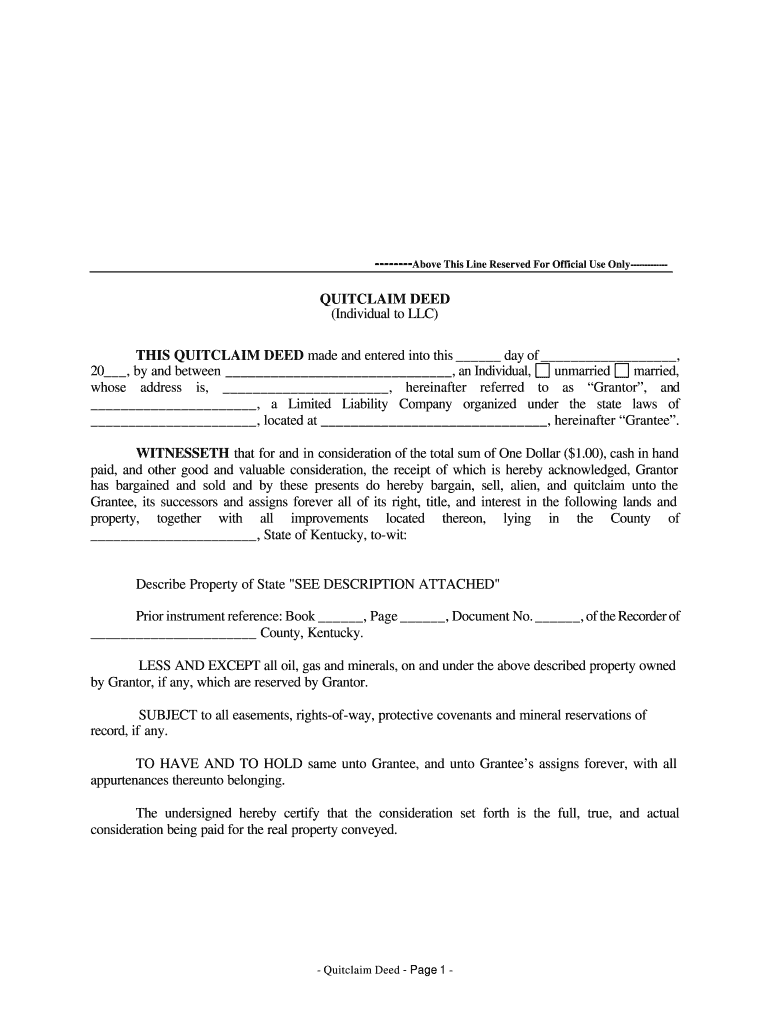
- Begin by entering the date of the deed in the first blank: ‘this ______ day of __________________, 20___.’
- Next, fill in the name of the Grantor (the person transferring the property) in the space provided, along with their marital status by checking ‘unmarried’ or ‘married’.
- Insert the Grantor's address in the designated section following the name.
- Fill in the name of the Grantee (the entity receiving the property), which is specified as a Limited Liability Company, followed by the state where it is organized and its full address.
- Indicate the county in Kentucky where the property is located, and describe the property in the space provided, noting if additional description is attached.
- Provide prior instrument reference by filling in the Book, Page, and Document Number if applicable.
- Include any reservations, such as oil, gas, and minerals by checking or noting specific exceptions.
- Add any easements or rights-of-way applicable to the property.
- Have the Grantor sign the document at the designated signature line, and type their name beneath it.
- Have the document notarized by entering the required details in the notary section, including the date it was acknowledged and the notary's information.
- Finally, provide the names and contact information of both Grantor and Grantee at the end of the document for official use, ensuring to send tax statements to the Grantee.
- Once completed, save your changes, and you may download, print, or share the filled Quitclaim Deed as needed.
Complete your Quitclaim Deed online today for a smooth property transfer process.
Experience a faster way to fill out and sign forms on the web. Access the most extensive library of templates available.
Related content
A deed of conveyance operating by way of release; that is, intended to pass any title...
by W Gilmer Jr · Cited by 3 — That case says that the dis- tinguishing characteristic...
Get answers to your most pressing questions about US Legal Forms API.
What is the best way to get a quit claim deed?
The best way to obtain a quitclaim deed in Kentucky is to use a trustworthy legal resource that offers templates and instructions, like US Legal Forms. This ensures you receive a professionally crafted deed that adheres to Kentucky laws. Additionally, having support during the preparation and filing process can minimize errors and make the experience easier for you.
How to file a quitclaim deed in Kentucky?
Filing a quitclaim deed in Kentucky requires you to take your completed deed to your local county clerk's office. You should present the deed along with any required fees to initiate the recording process. Utilizing the US Legal Forms platform can help you navigate this process more smoothly by providing step-by-step guidance on how to file your quitclaim deed effectively.
Can I prepare my own deed in Kentucky?
Yes, you can prepare your own quitclaim deed in Kentucky. The process involves filling out the required forms accurately, ensuring all necessary details are included. However, using a reliable resource, such as US Legal Forms, can simplify this process by providing templates designed specifically for Kentucky requirements. This way, you can ensure your quitclaim deed meets legal standards.
How to file a quit claim deed in Kentucky?
To file a quitclaim deed in Kentucky, start by filling out the necessary form with the correct property details and parties involved. After signing and having the document notarized, submit it to your local county clerk's office for recording. Make sure to obtain a stamped copy for your records after filing to confirm the deed's official status.
How do I file a quitclaim deed in Kentucky?
Filing a quitclaim deed in Kentucky is a straightforward process. First, complete the deed form and have it notarized. Then, take the signed document to your local county clerk's office for filing. Remember to keep a copy for your records after submitting it.
Does an attorney have to prepare a deed in Kentucky?
In Kentucky, an attorney is not legally required to prepare a quitclaim deed for you. Many individuals choose to handle it themselves using readily available templates and resources. However, seeking legal assistance can provide additional peace of mind and ensure your deed meets all legal requirements.
What is the best way to do a quitclaim deed?
The best way to execute a quitclaim deed in Kentucky involves obtaining the correct forms and ensuring all necessary information is filled out accurately. You may choose to consult with a legal professional to review your deed for compliance with Kentucky law. Additionally, it is crucial to have the document notarized and filed with your local county clerk to make the transfer official.
How do I file a quit claim deed in Kentucky?
To file a quitclaim deed in Kentucky, after completing the deed form and having it notarized, visit your local county clerk's office. Bring the signed deed along with any required filing fees. The clerk will review the document for accuracy and register it, making it part of the public record. Using platforms like UsLegalForms can help you ensure that your quitclaim deed meets all necessary legal requirements before filing.
How to get a quitclaim deed in Kentucky?
To get a quitclaim deed in Kentucky, first, you need to obtain a blank quitclaim deed form. You can easily find this form online or through platforms like UsLegalForms, which provide templates specific to Kentucky laws. After completing the form with the necessary information, both the grantor and grantee must sign it. Finally, you will need to have the deed notarized and then file it with the county clerk's office to complete the process.
What is a quitclaim deed most commonly used to?
A quitclaim deed is most commonly used to transfer property between family members or to clear up title issues. For example, in cases of divorce or inheritance, this deed simplifies ownership changes without the complexities of a traditional sale. The quitclaim deed Kentucky helps resolve matters quickly and efficiently. It’s also handy for transferring property to trusts or corporate entities.
Use professional pre-built templates to fill in and sign documents online faster. Get access to thousands of forms.
If you believe that this page should be taken down, please follow our DMCA take down process here.