Loading
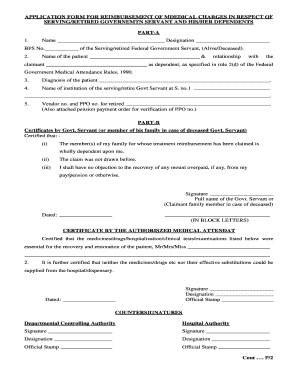
Get Medical Proforma
How it works
-

Open form follow the instructions
-

Easily sign the form with your finger
-

Send filled & signed form or save
How to fill out the Medical Proforma online
Completing the Medical Proforma online is a straightforward process. This guide will provide detailed instructions on how to fill out each section of the form, ensuring you provide all necessary information accurately and efficiently.
Follow the steps to complete your Medical Proforma online.
- Press the ‘Get Form’ button to access the Medical Proforma. This will allow you to open the form in the online editor.
- Begin by filling in Part A. Enter your name, designation, and BPS number of the Serving or Retired Federal Government Servant, indicating whether they are alive or deceased. Additionally, provide the name and relationship of the patient or claimant as their dependent, in accordance with the Federal Government Medical Attendance Rules, 1990.
- Specify the diagnosis of the patient in the appropriate field. Ensure this information is accurate and up-to-date, as it will be critical for processing your claim.
- In the next section of Part A, enter the name of the institution where the serving or retired government servant is associated. This is essential for verifying eligibility.
- Include the vendor number and PPO number for the retired government servant. Remember to attach a pension payment order for verification of the PPO number if applicable.
- Move on to Part B, which requires certifications by the government servant or, in the case of a deceased individual, a family member. Confirm that the claimants are wholly dependent on the applicant and that no claim has been previously filed for this reimbursement.
- Provide your signature and full name as the government servant or as the claimant family member in block letters, along with the date.
- Next, fill out the certification by the authorized medical attendant. Specify the treatments and medications required for the patient, confirming that they could not be provided by the hospital or dispensary.
- Obtain signatures from the authorized medical attendant and ensure the official stamp is affixed, along with the date.
- Finally, include the counter-signatures from the departmental controlling authority and the hospital authority with their respective designations and official stamps.
- List details of the bill, including the date, name of the chemist shop, hospital, clinic, or dispensary, and a description of the drugs/medicines along with quantities and total amounts in Rupees.
- After all sections of the Medical Proforma have been completed, save your changes. You can then download, print, or share the form as necessary.
Start completing your Medical Proforma online today for a smoother reimbursement process.
To get your medical research published, begin by identifying journals that align with your topic. Prepare your manuscript according to their specific guidelines, and consider using the Medical Proforma as a framework for your submission. US Legal Forms offers resources that can help you navigate the complexities of the submission process, ensuring you cover all necessary legal aspects.