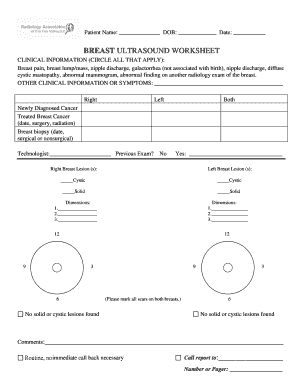
Get Breast Ultrasound Worksheet 2020-2026
How it works
-

Open form follow the instructions
-

Easily sign the form with your finger
-

Send filled & signed form or save
How to fill out and sign Breast Ultrasound Worksheet online?
Get your online template and fill it in using progressive features. Enjoy smart fillable fields and interactivity.Follow the simple instructions below:Legal, tax, and commercial papers along with other records require a higher degree of compliance with regulations and safeguarding.
Our documents are consistently refreshed in line with the most recent changes in laws.
Our service enables you to manage the entire process of completing legal documents online. As a result, you save substantial time (potentially days or even weeks) and eliminate unnecessary costs. From now on, fill out the Breast Ultrasound Worksheet from the convenience of your home, office, or while on the move.
- Access the document in our comprehensive online editor by clicking on Get form.
- Fill out the necessary sections that are highlighted in yellow.
- Press the arrow labeled Next to navigate from one section to another.
- Proceed to the e-signature option to affix an electronic signature to the document.
- Add the date.
- Review the entire electronic document to ensure you haven’t overlooked anything critical.
- Click Done and save the completed document.
Tips on how to fill out, edit and sign Breast Ultrasound Worksheet online
How to fill out and sign Breast Ultrasound Worksheet online?
Get your online template and fill it in using progressive features. Enjoy smart fillable fields and interactivity.Follow the simple instructions below:
Legal, tax, and commercial papers along with other records require a higher degree of compliance with regulations and safeguarding.
Our documents are consistently refreshed in line with the most recent changes in laws.
Our service enables you to manage the entire process of completing legal documents online. As a result, you save substantial time (potentially days or even weeks) and eliminate unnecessary costs. From now on, fill out the Breast Ultrasound Worksheet from the convenience of your home, office, or while on the move.
- Access the document in our comprehensive online editor by clicking on Get form.
- Fill out the necessary sections that are highlighted in yellow.
- Press the arrow labeled Next to navigate from one section to another.
- Proceed to the e-signature option to affix an electronic signature to the document.
- Add the date.
- Review the entire electronic document to ensure you haven’t overlooked anything critical.
- Click Done and save the completed document.
How to modify Get Breast Ultrasound Worksheet 2020: personalize forms online
Experience a hassle-free and digital approach to working with Get Breast Ultrasound Worksheet 2020. Utilize our dependable online option and save a significant amount of time.
Creating every document, including Get Breast Ultrasound Worksheet 2020, from the ground up is time-consuming, so having a proven platform of pre-loaded form templates can greatly enhance your productivity.
However, utilizing them can be challenging, particularly regarding files in PDF format. Fortunately, our extensive collection offers a built-in editor that allows you to swiftly fill out and modify Get Breast Ultrasound Worksheet 2020 without needing to exit our site, ensuring you don't waste valuable time completing your forms. Here’s what you can accomplish with your document using our resources:
Whether you need to edit Get Breast Ultrasound Worksheet 2020 or any other document available in our catalog, you’re on the right path with our online document editor. It's simple and secure and doesn’t necessitate any special skills. Our web-based tool is designed to manage practically everything you need regarding document editing and execution.
Forget about the conventional method of handling your documents. Embrace a more efficient solution to help you streamline your tasks and reduce your reliance on paper.
- Step 1. Locate the required form on our website.
- Step 2. Click Get Form to access it in the editor.
- Step 3. Utilize professional editing tools that enable you to insert, delete, annotate, and highlight or black out text.
- Step 4. Create and add a legally binding signature to your document using the sign option from the top toolbar.
- Step 5. If the document layout isn't as you require, use the tools on the right to remove, add, and rearrange pages.
- step 6. Insert fillable fields so other parties can be invited to complete the document (if applicable).
- Step 7. Distribute or circulate the form, print it out, or select the format in which you want to download the document.
Describing quadrants involves dividing the breast into four sections: upper outer, upper inner, lower outer, and lower inner. Using the Breast Ultrasound Worksheet can help you accurately document findings in each quadrant. For example, stating that a mass is in the lower inner quadrant provides clear information for assessment. This method ensures effective communication among healthcare professionals.