Loading
Get Naos Pay Stub 2020-2025
How it works
-

Open form follow the instructions
-

Easily sign the form with your finger
-

Send filled & signed form or save
How to fill out the Naos Pay Stub online
This guide provides you with clear and concise instructions on how to fill out the Naos Pay Stub online. Following these steps will help ensure that you complete the form accurately and efficiently.
Follow the steps to successfully complete your Naos Pay Stub online
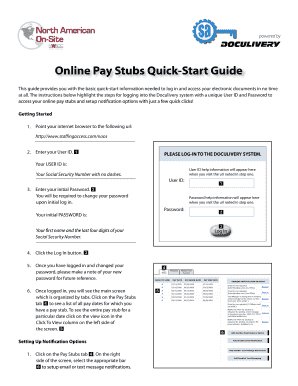
- Click the 'Get Form' button to obtain the Naos Pay Stub form and open it for editing.
- Enter your User ID, which will be required for accessing the Doculivery system. Make sure to have your unique User ID ready before starting.
- Input your initial Password. You will need to change this password after your first log in for security purposes.
- Press the Log In button to access your account. Once logged in, make note of your new password for future access.
- Locate the Pay Stubs tab on the main screen. Click on this tab to view a list of all pay dates corresponding to your pay stubs.
- To view a specific pay stub, click the view icon located in the Click To View column next to the desired pay date.
- Make any necessary updates or selections, such as setting up email notifications for new pay stubs, if applicable.
- Review the information entered for accuracy and completeness to ensure that your pay stub is correctly filled out.
- Once all fields are completed, you can save your changes, download the form, print it, or share it as needed.
Take the next step and complete your Naos Pay Stub online today!
To view your Naos Pay Stub in Oracle, start by logging into your Oracle account. Navigate to the payroll section on your dashboard, where you should find an option to access your pay stubs. Click on the 'Pay Stub' link to view and download your latest Naos Pay Stub. If you encounter any issues, consider using the US Legal Forms platform for assistance and additional resources.
Industry-leading security and compliance
US Legal Forms protects your data by complying with industry-specific security standards.
-
In businnes since 199725+ years providing professional legal documents.
-
Accredited businessGuarantees that a business meets BBB accreditation standards in the US and Canada.
-
Secured by BraintreeValidated Level 1 PCI DSS compliant payment gateway that accepts most major credit and debit card brands from across the globe.