Loading
Get Bmo Harris Close Account
How it works
-

Open form follow the instructions
-

Easily sign the form with your finger
-

Send filled & signed form or save
How to fill out the Bmo Harris Close Account online
Closing a bank account can be a straightforward process when you have the right guidance. This guide will walk you through the steps to fill out the Bmo Harris Close Account form online, ensuring that all necessary information is provided correctly for a smooth closure.
Follow the steps to complete the Bmo Harris Close Account form online.
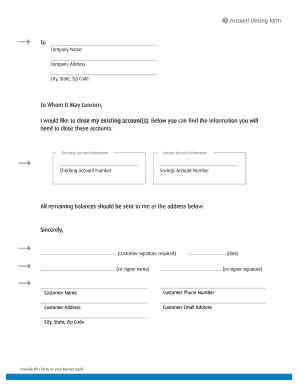
- Press the ‘Get Form’ button to access the Bmo Harris Close Account form and open it in your preferred editing program.
- Begin by filling out your personal information at the top of the form. This includes your full name, contact phone number, and your current address, including city, state, and zip code.
- Next, provide the account information for the accounts you wish to close. Specify your checking and savings accounts by entering the respective account numbers in the designated fields.
- Indicate how you would like to receive any remaining balances. Clearly write your address where the final balances should be sent.
- Finish the form by signing it and including the date. If there is a co-signer, ensure they also sign and print their name as required.
- After completing the form, review all entries for accuracy. Once confirmed, you can save your changes, download a copy, print the form, or share it as necessary.
Complete your Bmo Harris Close Account form online today and simplify your banking experience.
To close your bank account online, start by accessing your bank's online platform, like BMO's, and log into your account. Look for the account management options, where you will find the closure instructions. Following these steps will help you achieve your goal efficiently.