Loading
Open form follow the instructions
Easily sign the form with your finger
Send filled & signed form or save
How to fill out the Checklist For Qualification Of New Drivers online
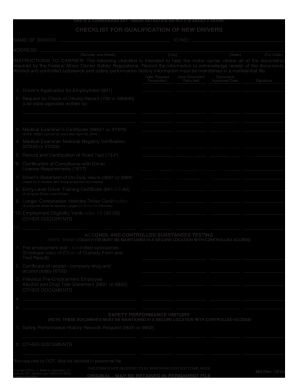
Filling out the Checklist For Qualification Of New Drivers is essential for ensuring compliance with federal regulations. This guide will walk you through the process of completing the form online with clarity and ease.
Follow the steps to complete the checklist effectively.
- Press the ‘Get Form’ button to obtain the checklist and open it in your preferred online editor.
- Begin by entering the name of the driver at the designated field labeled 'NAME OF DRIVER'. This identifies the individual for whom qualification is being assessed.
- Next, complete the 'ADDRESS' section, including the street number and name, city, state, and zip code for accurate location information.
- In the 'ID NO.' field, input the driver's identification number, ensuring it is recorded in the correct format.
- Follow the instructions to record the date the request is forwarded, the date the document is returned, and the document approval date. This helps maintain an accurate timeline.
- Record your signature in the appropriate field, acknowledging the receipt of all required documents.
- Proceed to complete each item in the checklist, beginning with the Driver’s Application for Employment, ensuring proper documentation is listed alongside any relevant notes.
- Fill out the other sections related to alcohol and controlled substances testing, as well as safety performance history, ensuring all information is accurate and complete.
- After finishing all fields, review the entire form for accuracy and completeness.
- Once satisfied, you can save the changes, download the document, print it, or share the completed form as needed.
Complete your documents online now to ensure compliance and efficiency.
Experience a faster way to fill out and sign forms on the web. Access the most extensive library of templates available.
Related content
A driver qualification file includes annual driving record review, medical exam...
Random Drug & Alcohol Enrollment. Date Completed: New hire question concerning positives...
MAKE COPIES OF DRIVERS LICENSE, DOT PHYSICAL CARD AND SS CARD. ☐ COLLECT CONSENT FORMS...
Get answers to your most pressing questions about US Legal Forms API.
What is a dq qualification?
A DQ qualification is the assessment of a driver's fitness to operate a commercial vehicle. This qualification involves reviewing a driver's experience, background, and training in alignment with regulatory standards. Staying diligent about the checklist for qualification of new drivers helps employers ensure only qualified individuals are hired and maintain high safety standards.
What is dq paperwork?
DQ paperwork refers to all the documents needed to assess a driver's qualifications and ensure compliance with regulations. This paperwork often includes forms, records, and certifications that verify a driver’s abilities and history. By organizing DQ paperwork efficiently, you can facilitate a straightforward checklist for qualification of new drivers, making the hiring process smoother.
What is DQF?
DQF stands for Driver Qualification File, which is a collection of documents related to a driver's qualifications. It includes everything from application forms to employment records and safety training documentation. Creating a DQF is essential for companies that want to maintain an effective checklist for qualification of new drivers, ensuring that they meet regulatory requirements.
What does a driver file consist of?
A driver file typically includes a range of documents that validate a driver's qualifications and compliance. This may encompass the DQ form, driving records, medical certificates, and training documentation. Maintaining a thorough driver file is vital, as it aligns with the checklist for qualification of new drivers and ensures adherence to industry standards.
What is a dq checklist?
A DQ checklist serves as a practical tool for verifying a driver's qualifications before hiring. It includes several key components, such as checks on driving experience, background screenings, and documentation validation. By following a comprehensive checklist for qualification of new drivers, employers can streamline their hiring process and enhance safety on the road.
What is a dq form?
A DQ form, or Driver Qualification form, collects essential information about a driver's qualifications. It includes details such as driving history, medical records, and training certifications. Completing this form is a crucial step in the checklist for qualification of new drivers, ensuring that all necessary information is documented and compliant with regulations.
Does the FMCSA require digital driver files?
The final rule allows—but does not require—the use of electronic documents and signatures. This means that the FMCSA will accept either printed or electronic copies. The rule does not impose any additional requirements on carriers and drivers.
What is required in a DOT employee file?
The following documents are to be included for each regularly employed driver: Driver application for employment. Motor vehicle record (MVR) from state(s), obtained at time of hire. Road test form and certificate, or license or certificate accepted in lieu of road test.
What additional documents are required in the DQ file?
some additional documents may be needed including: Entry-Level Driver Training Certificate. Longer Combination Vehicle (LCV) Driver Training Certificate. Longer Combination Vehicle (LCV) Certificate of Grandfathering. Multiple-Employer Drivers. Skill Performance Evaluation Certificate.
What is the DQF process?
A driver qualification file is an FMCSA-required collection of documents and records proving that a driver can safely and legally operate a commercial motor vehicle. A DQF is like a driver's professional biography.
Use professional pre-built templates to fill in and sign documents online faster. Get access to thousands of forms.
If you believe that this page should be taken down, please follow our DMCA take down process here.