Loading

Open form follow the instructions

Easily sign the form with your finger

Send filled & signed form or save
How to fill out the Sf 425 online
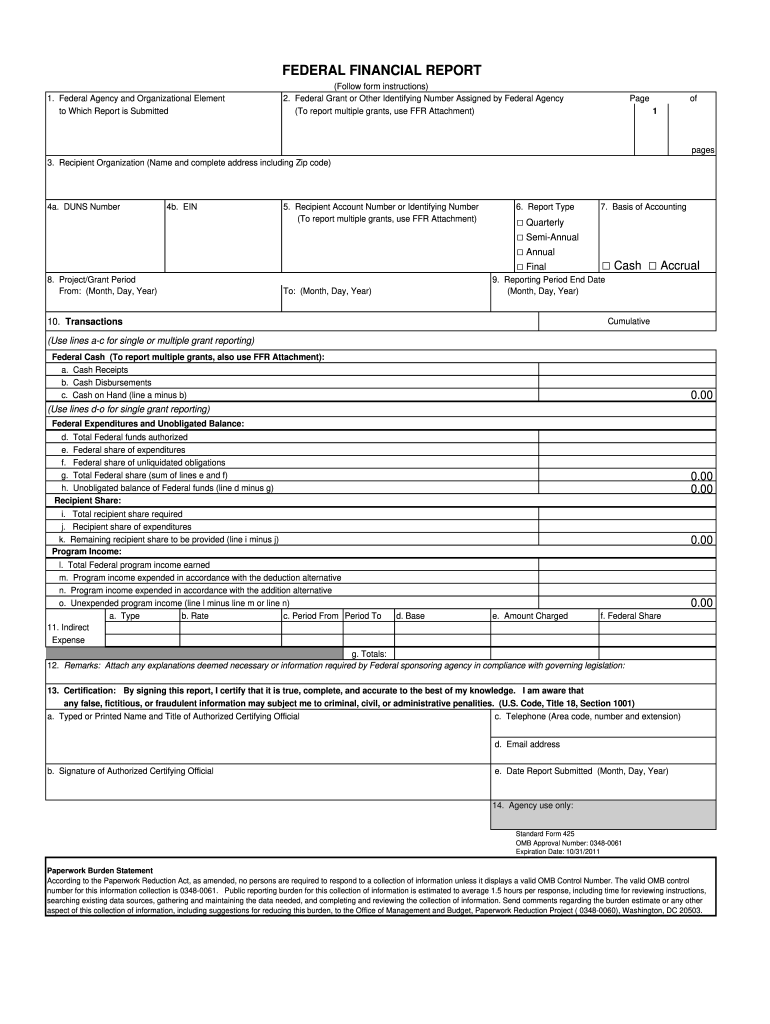
The Sf 425, also known as the Federal Financial Report, is an essential document for recipients of federal funds. This guide provides a clear and structured approach to assist you in completing the form accurately online.
Follow the steps to successfully fill out the Sf 425 online.
- Click the ‘Get Form’ button to access the Sf 425 and open it in your editor.
- In the first section, provide the federal agency and organizational element to which the report is being submitted.
- Enter the federal grant or other identifying number assigned by the federal agency. If reporting on multiple grants, refer to the FFR Attachment.
- Fill in the recipient organization’s complete name and address, including the Zip code.
- Input the DUNS number in field 4a and the Employer Identification Number (EIN) in field 4b.
- Specify the project or grant period by entering the start date in the 'From' section, using the format (Month, Day, Year).
- Enter the recipient account number or additional identifying number, if applicable.
- Select the report type and basis of accounting by checking the appropriate boxes for quarterly, semi-annual, annual, or final reporting, and indicate whether you are using cash or accrual accounting.
- Input the reporting period end date in the 'To' section (Month, Day, Year) and calculate the cumulative amount.
- In the transactions section, enter federal cash data including cash receipts, cash disbursements, and cash on hand.
- Continue with federal expenditures by completing the fields for total federal funds authorized, expenditures, unliquidated obligations, and unexpended balance.
- Provide details for the recipient share, including total recipient share required, expenditures, and remaining balance.
- Complete the program income section, indicating total federal program income earned and how it was expended.
- Fill out the indirect expense section, including type, rate, period, base, and the amount charged.
- In the remarks section, attach any necessary explanations or additional information required by the federal sponsoring agency.
- For certification, sign the report confirming its accuracy. Include the typed or printed name and title of the authorized certifying official, their contact number, email address, and the date the report is submitted.
- After completing all sections, save the changes made to the document. You can then download, print, or share the completed Sf 425 form.
Complete your Sf 425 form online today!
Experience a faster way to fill out and sign forms on the web. Access the most extensive library of templates available.
Related content
The SF-425 form requires fields for the Federal Agency, Grant Number, Recipient...
Standard Form 425. OMB Approval Number: 0348-0061. Expiration Date: 10/31/2011. Paperwork...
SF-425. 120V. 800W. 6.7A. 4 OZ. (118 ML.) 1 MIN. (APPROXIMATE). 6.5 MIN. (APPROXIMATE)...
Get answers to your most pressing questions about US Legal Forms API.
What are the minimum requirements for general-purpose external financial reporting?
Minimum requirements for general-purpose external financial reporting generally include clarity, accuracy, and adherence to prescribed formats. Financial reports should reflect all income and expenditures, including those reported on the SF 425. To meet these requirements, organizations can utilize platforms like USLegalForms, which offer templates and guidance to help ensure compliance and thorough reporting.
What is form 425 for?
Form 425 serves as a tool for grant recipients to report their financial status to federal agencies. This form helps ensure that funds are being used appropriately and provides a summary of financial transactions. Submitting the SF 425 allows organizations to maintain compliance and strengthen their funding opportunities for future projects.
What is an SF 425 form?
The SF 425 form, also known as the Federal Financial Report, is a standardized document used by grant recipients to report financial information. This form captures the financial activity related to federal grants, including expenditures and program income. Proper completion of the SF 425 is essential for accountability and helps in managing federal grant funds effectively.
What are the requirements for the SF 425?
The SF 425 requires accurate reporting of both the federal and non-federal share of expenditures. Additionally, it must include a summary of funds received and spent, along with any unliquidated obligations. Organizations must complete this form accurately and submit it in a timely manner to remain compliant with federal grant regulations, ensuring they meet all necessary requirements.
What are the financial reporting requirements?
Financial reporting requirements often include documentation of expenditures, income, and the overall status of grant-funded projects. The SF 425 is a key document that outlines these financial details, ensuring that organizations adhere to federal regulations. Meeting these requirements is crucial for securing future funding and maintaining trust with grantor agencies.
What is the federal financial report for grants?
The federal financial report for grants provides a comprehensive overview of the funds received and spent during a grant period. This report ensures accountability and transparency in the use of federal funds. By submitting the SF 425, organizations can demonstrate compliance with federal guidelines, allowing for better oversight and efficient use of financial resources.
What is the federal share of unliquidated obligations?
The federal share of unliquidated obligations refers to the portion of federal funds that remain outstanding and have yet to be disbursed. Understanding this share is essential for grant recipients, as it affects overall financial management and reporting. The SF 425 form aids in tracking these obligations, ensuring proper disclosure and compliance with federal regulations.
What are the minimum requirements for general purpose external financial reporting?
The minimum requirements for general purpose external financial reporting include accurate presentation of financial information, transparency in accounting practices, and adherence to regulatory standards. Entities must ensure that their reports reflect true financial status, including assets, liabilities, revenues, and expenses. Using the SF 425 form helps organizations meet these reporting obligations by providing a standardized format for financial data.
What is the purpose of the SF 425?
The primary purpose of the SF 425 is to provide a comprehensive overview of financial activity regarding federal funds. It serves as a crucial tool for accountability, enabling agencies to track expenditures and ensure compliance with funding agreements. Completing the SF 425 accurately builds trust between grant recipients and federal agencies.
What is Form 425?
Form 425, or the SF 425, is a financial report mandated for recipients of federal funding. This form captures information on expenditures, income, and unliquidated obligations. Essentially, the SF 425 acts as a tool for federal agencies to monitor how effectively the funds are being used by grantees.
Use professional pre-built templates to fill in and sign documents online faster. Get access to thousands of forms.
If you believe that this page should be taken down, please follow our DMCA take down process here.