Loading

Open form follow the instructions

Easily sign the form with your finger

Send filled & signed form or save
How to fill out the Usfsa Permission To Test Form online
Completing the Usfsa Permission To Test Form online is an essential step for skaters looking to participate in USFSA sanctioned events. This guide will provide you with step-by-step instructions to ensure the form is filled out accurately and efficiently.
Follow the steps to complete the Usfsa Permission To Test Form online.
- Click ‘Get Form’ button to access the Usfsa Permission To Test Form and open it in your preferred editor.
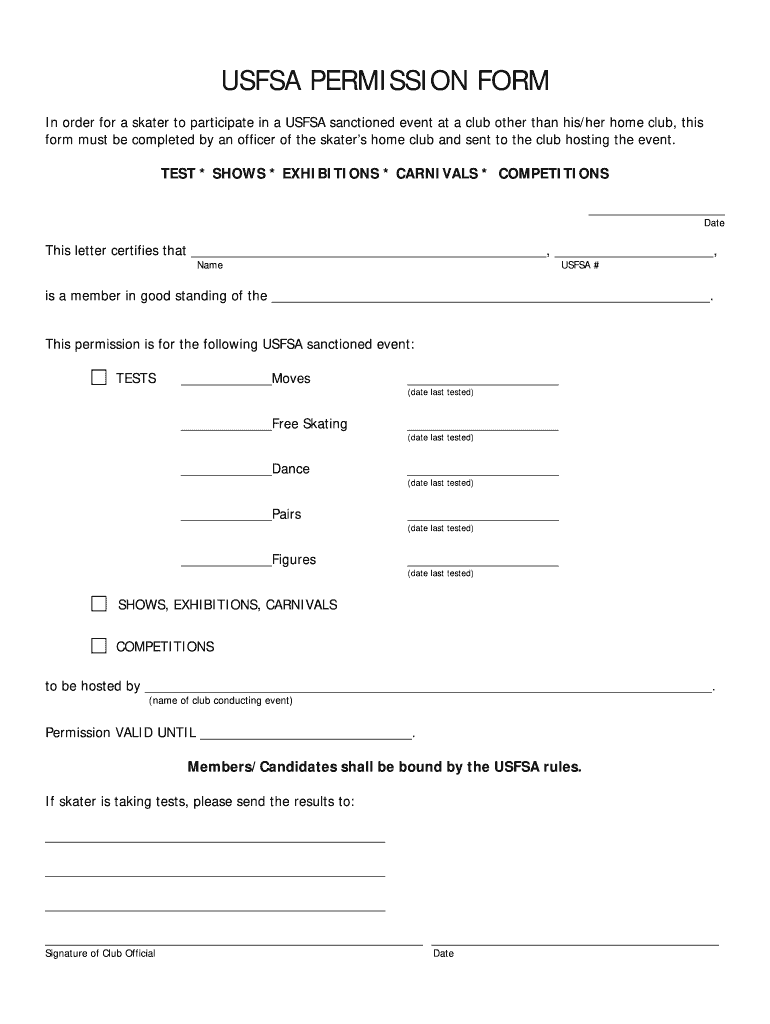
- Begin by entering the date at the top of the form, indicating when the permission request is being made.
- Fill in the name of the skater who is requesting permission, along with their USFSA membership number.
- Complete the section identifying the home club of the skater, ensuring that the name is accurately provided.
- Specify the USFSA sanctioned event the skater is attending by detailing which tests, shows, exhibitions, carnivals, or competitions they will participate in.
- For each type of test, enter the date the skater last tested, ensuring that all applicable fields are filled correctly.
- Indicate the name of the club conducting the event in the designated area.
- Note the expiration date of the permission, ensuring clarity on how long the approval is valid.
- If applicable, provide the contact information where the test results should be sent after completion.
- Have a club official sign and date the form to validate the permission request.
- Once all fields are completed, save your changes, then download, print, or share the form as needed.
Complete your documents online today to ensure a smooth application process.
Experience a faster way to fill out and sign forms on the web. Access the most extensive library of templates available.
Related content
Oct 24, 2017 — form. To request a copy of the complaint form, call (866) 632-9992...
If you are taking USFSA tests at other clubs, you must get a letter of permission from the...
Get answers to your most pressing questions about US Legal Forms API.
Who is the CEO of U.S. Figure Skating?
The current CEO of U.S. Figure Skating is Anne Cammett. She brings extensive experience in athletics and administration to the organization. Under her leadership, U.S. Figure Skating continues to develop programs that benefit skaters at all levels. For any updates or initiatives, you can refer to the Usfsa Permission To Test Form for participation guidelines.
What are the levels of Usfsa testing?
U.S. Figure Skating offers several testing levels, ranging from basic skills to advanced competitive assessments. These levels include preliminary, pre-preliminary, and various subsequent levels leading to the senior test. Each level helps skaters demonstrate their skills and progress. Remember, the Usfsa Permission To Test Form is essential for skaters wishing to participate in these evaluations.
How to renew U.S. Figure Skating membership online?
To renew your U.S. Figure Skating membership online, visit the official U.S. Figure Skating website. You will need to log in to your account using your credentials. Once logged in, navigate to the membership section and select the option to renew. Be sure to review any requirements related to the Usfsa Permission To Test Form during the renewal process.
How to write up a permission slip?
Writing a permission slip involves clearly stating the purpose and details of the event, along with the participant's information. Ensure you include a signature line for the parent or guardian to authenticate the slip. Using the Usfsa Permission To Test Form can simplify this process, ensuring compliance with all necessary requirements.
How to write a permission statement?
Writing a permission statement requires clarity and specificity. Start by stating the participant's name, the activity for which permission is granted, and the date. If you integrate this statement with the Usfsa Permission To Test Form, it adds an extra layer of assurance that all parties are informed and agreeable.
What are the levels of freestyle skating?
Freestyle skating includes various levels that typically range from beginner to advanced. These levels often dictate skills and techniques required for advancement. When considering the Usfsa Permission To Test Form, understanding these levels will help set clear goals as you progress through your skating journey.
How do I fill out a letter of permission?
To fill out a letter of permission, begin with a clear statement of consent, followed by the details about the event and participant. Make sure to include the dates and any relevant conditions. Incorporating this letter with your Usfsa Permission To Test Form ensures that all permissions are documented and legally binding.
What are the video requirements for Usfsa virtual testing?
When preparing for Usfsa virtual testing, ensure your video meets specific requirements for clarity, lighting, and framing. The participant should be clearly visible throughout the test to ensure accurate evaluation. By following these video guidelines, you can effectively showcase your skills and confidently submit your Usfsa Permission To Test Form.
How to fill out a consent slip?
Filling out a consent slip involves providing the participant's information, event details, and the reason for consent. Ensure that the parent or guardian initials the document where required. With the Usfsa Permission To Test Form, this process becomes streamlined, ensuring that all necessary information is captured appropriately.
How to fill out a permission slip?
To fill out a permission slip, start by entering the relevant details like the participant's name, event date, and purpose of the request. Next, include the parent or guardian's signature to validate the consent. Remember, when filling out the Usfsa Permission To Test Form, accuracy is crucial to ensure smooth processing.
Use professional pre-built templates to fill in and sign documents online faster. Get access to thousands of forms.
If you believe that this page should be taken down, please follow our DMCA take down process here.