Loading

Open form follow the instructions

Easily sign the form with your finger

Send filled & signed form or save
How to fill out the ACH Vendor Payment Form online
Completing the ACH Vendor Payment Form is a straightforward process that requires careful attention to detail. This guide will help you navigate through each section of the form to ensure accuracy and completeness when submitting your payment information.
Follow the steps to fill out the ACH Vendor Payment Form successfully.
- Press the ‘Get Form’ button to access the ACH Vendor Payment Form and open it in your preferred editor.
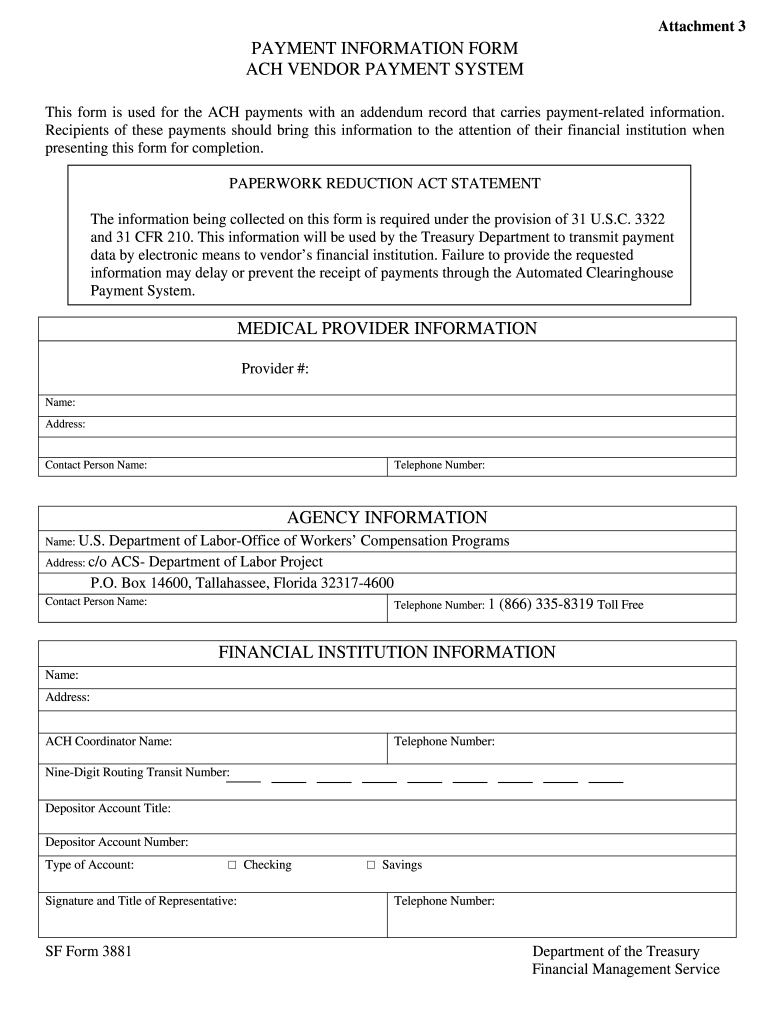
- Begin with the medical provider information section. Enter the provider number, name, and address as required fields. Additionally, specify the contact person's name and their telephone number.
- Move on to the agency information part. Input 'U.S. Department of Labor-Office of Workers’ Compensation Programs' as the agency name, followed by the address: c/o ACS- Department of Labor Project, P.O. Box 14600, Tallahassee, Florida 32317-4600. Include the contact person's name and telephone number (1 (866) 335-8319 Toll Free) in the designated fields.
- Next, fill in the financial institution information. Provide the name and address of the financial institution, along with the ACH coordinator’s name and telephone number.
- Enter the nine-digit routing transit number, depositor account title, and account number in the appropriate sections. Choose the type of account by marking either 'Checking' or 'Savings' in the tick box.
- Finally, ensure the representative of the financial institution signs the form and includes their title. Double-check all entered information for accuracy.
- Once completed, you can save any changes made to the form, download it, print it for your records, or share it as needed.
Complete your ACH Vendor Payment Form online to ensure timely processing of your payments.
Experience a faster way to fill out and sign forms on the web. Access the most extensive library of templates available.
Related content
This form is used for Automated Clearing House (ACH) payments with an addendum record that...
This form is used for Automated Clearing House (ACH) payments. The information being...
A: To change your banking information, please complete the ACH Direct · Deposit Form and...
Get answers to your most pressing questions about US Legal Forms API.
Who fills out an ACH form?
Typically, the business or vendor receiving payments fills out the ACH form. This ensures that the correct banking information is provided to facilitate accurate electronic transactions. Making use of the ACH vendor payment form helps streamline the process and establishes confidence in your financial dealings.
How can I get an ACH form?
You can easily obtain an ACH form through various financial institutions and online platforms. For optimal convenience, consider using US Legal Forms, where you can access ready-to-use templates tailored to meet your business needs. By selecting the ACH vendor payment form, you can quickly simplify your payment setup.
Is PayPal a form of ACH?
While PayPal offers convenient online payment options, it does not operate strictly as an ACH. Instead, PayPal can use various funding sources, such as credit cards and bank transfers, to process payments. For businesses looking for a direct bank payment solution, the ACH vendor payment form remains a more effective choice.
What is an ACH form used for?
An ACH form is primarily used for processing electronic payments and direct deposits. Businesses use it to authorize funds to be debited from one bank account and credited to another. This makes the ACH vendor payment form an essential tool for efficient accounting practices and managing vendor relationships.
What is a vendor ACH form?
A vendor ACH form is a document that allows businesses to collect payments from their vendors electronically. This streamlined payment method saves time and reduces the risk of errors compared to traditional checks. By utilizing the ACH vendor payment form, you can ensure timely payments and maintain a smooth financial relationship with your vendors.
How to set up ACH payments to vendors?
To set up ACH payments to vendors, begin by obtaining the ACH Vendor Payment Form and completing it with the required banking details. Next, submit the form to the appropriate department or bank representative within your organization. It’s essential to verify that the vendor's information is accurate to ensure proper setup. Utilizing resources like US Legal Forms can simplify this process and enhance efficiency.
How to fill out vendor ACH form?
Filling out a vendor ACH form involves providing specific details such as the vendor's name, banking information, and payment preferences. Start with the ACH Vendor Payment Form provided by your organization or a reliable source like US Legal Forms. Make sure to check each entry for accuracy to avoid payment delays. After filling it out completely, submit it per your company’s policies.
Who fills out the ACH form?
The ACH form is typically filled out by the accounts payable department or the employee responsible for vendor payments. In many cases, the vendor may also need to provide their banking information on the ACH Vendor Payment Form. Ensuring that both parties accurately complete their sections is crucial for timely and correct processing of payments. Platforms like US Legal Forms can offer guidance on this process.
What is an ACH vendor form?
An ACH vendor form is a document used to facilitate electronic payments to vendors through automated clearing house (ACH) transactions. This form typically requires detailed banking information from both the payer and the payee. By using the ACH Vendor Payment Form, businesses can streamline their payment processes, reduce the need for paper checks, and improve transaction speed.
How to fill ACH?
Filling out an ACH involves detailing the payment initiation process on the ACH Vendor Payment Form. Ensure you include essential information such as the payment amount, effective date, and accurate bank routing details. Always verify that the vendor's banking information matches their records to prevent errors. If you need assistance, consider using services from US Legal Forms for seamless processing.
Use professional pre-built templates to fill in and sign documents online faster. Get access to thousands of forms.
If you believe that this page should be taken down, please follow our DMCA take down process here.