How it works
  • Open form

    Open form follow the instructions

  • Easily sign form

    Easily sign the form with your finger

  • Share form

    Send filled & signed form or save

How to fill out the Public Partnerships Timesheet Pdf online

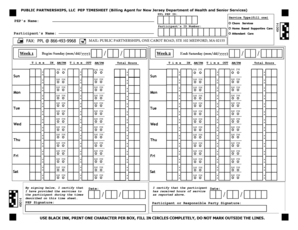
Filling out the Public Partnerships Timesheet is a crucial step in ensuring accurate billing for services provided. This guide will walk you through the process of completing the timesheet online, making it straightforward and efficient for you to document your hours worked.

Follow the steps to complete your Public Partnerships Timesheet online effectively.

  1. Click ‘Get Form’ button to access the timesheet and open it in your preferred online editor.
  2. Locate the ‘PPL PEP ID’ field at the top of the form and enter the appropriate identification number assigned to you.
  3. In the ‘Participant's ID Number’ section, input the ID number for the participant for whom services have been rendered.
  4. Fill in the ‘Participant's Name’ field with the full name of the individual receiving services.
  5. Using the provided tables, record the days of service: Starting with ‘Week 1,’ select the corresponding day for each week, starting with Sunday and ending on Saturday.
  6. Input the time in the ‘Time IN’ and ‘Time OUT’ fields for each day, making sure to use AM/PM format as required.
  7. Calculate the ‘Total Hours’ for each day and enter this figure in the designated space below the time entries.
  8. In the designated signature area, sign the form to certify that you have provided the services as indicated.
  9. Repeat steps for Week 2, filling out all necessary fields just as you did for Week 1.
  10. Once all information is complete, you can save the changes, download the filled timesheet, print it for your records, or share it as needed.

Complete your Public Partnerships Timesheet online today.

Get form

Experience a faster way to fill out and sign forms on the web. Access the most extensive library of templates available.

Related content

20 / / 20 C O N J P P O N J P

*SUBMIT YOUR TIMESHEET ONLINE! GO TO. HTTPS://FMS ... PUBLIC PARTNERSHIPS, LLC Employee...

Learn more
Public Partnerships Llc Timesheets Schdule A 2014

As technology continues to advance rapidly, having a clear and comprehensive guide like...

Learn more
All-Hazards Incident Management Manual

P.1. IMPLEMENTATION. This manual is intended to aid and assist. Department personnel...

Learn more
Questions & Answers

Get answers to your most pressing questions about US Legal Forms API.

Contact support

How to fill out a timesheet on Deltek?

Filling out a timesheet on Deltek starts with logging into your account and navigating to the timesheet section. Enter your hours, ensuring you allocate them correctly to the respective tasks or projects. For best practices, you might want to use the Public Partnerships Timesheet Pdf to guide you as you fill out Deltek, ensuring consistency and accuracy.

To write 7 hours and 45 minutes on a timesheet, convert the minutes into decimal form. This means you would write 7.75 hours. When you use the Public Partnerships Timesheet Pdf, this format ensures that your total hours are clear and precise.

Completing your timesheet involves inputting accurate hours worked, project names, and dates. It’s important to verify all details before submission to avoid errors. Using the Public Partnerships Timesheet Pdf can streamline the process, ensuring that you capture all necessary information effectively.

To fill out a timesheet in Xero, access the 'Time' or 'Timesheets' section. Enter your worked hours, add tasks, and categorize them correctly. If needed, refer to the Public Partnerships Timesheet Pdf for guidance on entries, ensuring that your records align with the format Xero accepts.

A timesheet should include essential details like your name, employee ID, contact information, project or task codes, dates, total hours worked, and any breaks taken. When using the Public Partnerships Timesheet Pdf, ensure all entries are accurate to facilitate smooth payroll processing and project tracking.

To write 30 minutes on a timesheet, convert it into decimal form. You can write 0.5 hours to represent 30 minutes. If you are using the Public Partnerships Timesheet Pdf, this format helps in ensuring accurate calculations and easy processing of your work hours.

Writing hours on a timesheet involves specifying the start and end times for each task. If you worked from 9 AM to 5 PM, write 8 hours for that entry. Make sure you convert any partial hours into decimal form for clarity on the Public Partnerships Timesheet Pdf, so everyone understands your recorded hours.

To properly fill out a timesheet, start by entering your name, the project or task title, and the date range. Next, accurately record the hours worked for each task, ensuring you follow the format required for the Public Partnerships Timesheet Pdf. Finally, submit your timesheet on time to avoid payroll delays.

If you already have a user account for the BetterOnline™ Web Portal, log in to the app with the same username and password. Your entry will be saved to the pay period's timesheet and will show on the Hours screen. Tap entry to edit or view. Go to the Pay Periods screen to view or submit your timesheet.

Consumer's ID. This is the Consumer's PPL Identification number that begins with a "C." The Medicaid number can also be used in place of the "C." It can be found on the consumer's Medicaid ID card.

Get This Form Now!

Use professional pre-built templates to fill in and sign documents online faster. Get access to thousands of forms.

If you believe that this page should be taken down, please follow our DMCA take down process here.

Get Public Partnerships Timesheet Pdf