
Open form follow the instructions

Easily sign the form with your finger

Send filled & signed form or save
How to fill out the Stock Power Form Computershare online
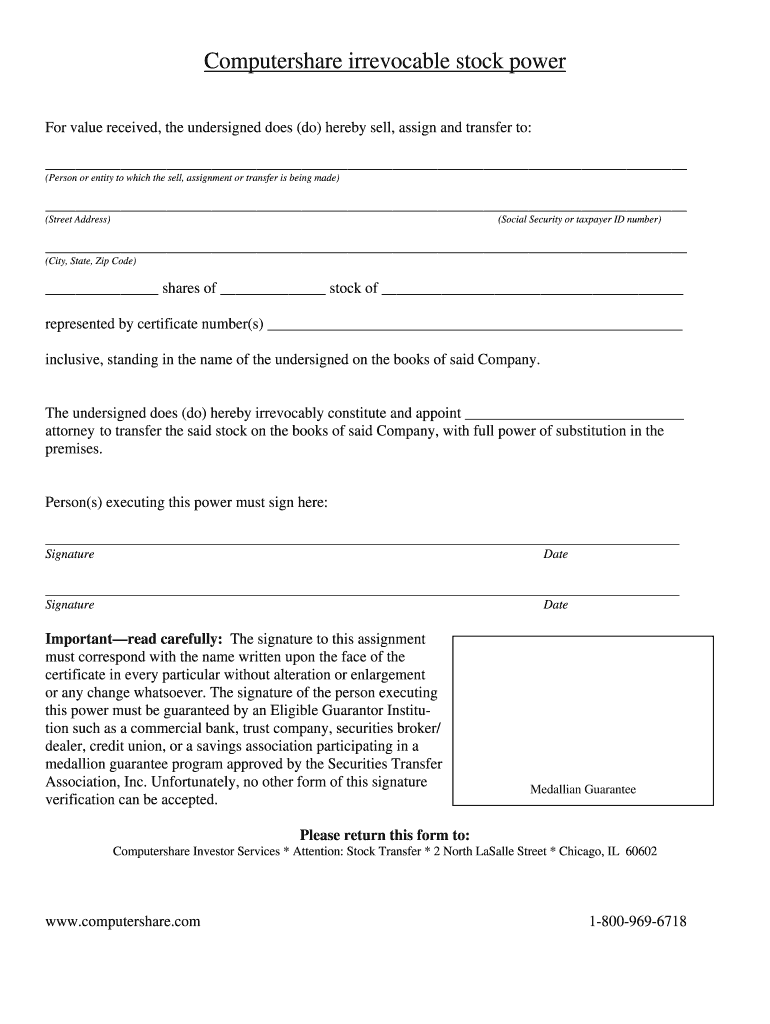
The Stock Power Form provided by Computershare is an important document used for the transfer of stock ownership. This guide will help users navigate the online completion of this form to ensure accuracy and compliance with the necessary requirements.
Follow the steps to complete the Stock Power Form accurately and efficiently.
- Press the ‘Get Form’ button to access the Stock Power Form and open it in your editor.
- In the first section, fill in the name of the person or entity to whom you are selling, assigning, or transferring the stock. Ensure you write their full legal name.
- Provide the street address of the recipient for this transfer. Include any applicable apartment or unit numbers.
- Enter the Social Security number or taxpayer identification number associated with the recipient. This information is critical for tax purposes.
- Complete the city, state, and zip code where the recipient resides.
- Specify the number of shares being transferred in the designated space, along with the name of the stock being transferred.
- In the section for certificate numbers, list all relevant certificate numbers associated with the shares being transferred.
- Designate an attorney who is authorized to transfer the stock on behalf of the undersigned. Write their name in the corresponding field.
- Both individuals executing this power must provide their signatures in the specified areas, followed by the date of signing.
- Ensure to read the important instructions indicating that the signature must match the name on the face of the certificate exactly. Remember that a signature guarantee is required from an Eligible Guarantor Institution.
- After completing the form, you will have the option to save changes, download, print, or share the document as needed.
Complete your Stock Power Form online today to ensure a smooth transfer process.
Experience a faster way to fill out and sign forms on the web. Access the most extensive library of templates available.
Related content
Executed “Stock” Power Form, with guaranteed signature. Letter from Seller. Letter...
Computershare Stock Transfer Forms - Web you should use the attached form if you wish to...
by O ANNU · Cited by 1 — This financial report covers the consolidated entity...
Get answers to your most pressing questions about US Legal Forms API.
How do I access my Computershare statement?
You can access your Computershare statement through their online portal. Simply log in with your credentials, and navigate to the 'Statements' section. If you need additional assistance, the Stock Power Form Computershare platform offers support to help you retrieve your information seamlessly.
How to complete a stock power form?
To complete a stock power form, provide the seller's name and the purchaser's name along with any relevant stock details. Clearly specify the number of shares and include your signature. The Stock Power Form Computershare can guide you in accurately fulfilling these requirements.
How to properly fill out a stock certificate?
To properly fill out a stock certificate, start by writing the name of the shareholder and their address on the certificate. After that, include the number of shares being transferred and the stock certificate number. By using the Stock Power Form Computershare, you can ensure that each detail is correctly documented.
How to fill out a stock transfer form?
To fill out a stock transfer form, begin by entering the names of the seller and buyer, along with their respective addresses. Next, specify the number of shares being transferred and include the stock certificate number. Make sure you use the Stock Power Form Computershare for a clear and organized process.
Do you have to complete a stock transfer form?
Yes, completing a stock transfer form is necessary when transferring ownership of stocks. This form allows for the accurate recording of the new owner's information and ensures a smooth transition. Utilizing the Stock Power Form Computershare can help you navigate this requirement easily.
How to obtain a stock transfer form?
To obtain a stock transfer form, you can visit the official website of Computershare or contact their customer service directly. Many companies also offer downloadable forms online. Using the Stock Power Form Computershare is an effective way to streamline your stock transfer.
What is a stock power document?
A stock power document is a legal form used to transfer ownership of shares from one individual to another. It includes essential information such as the names of the seller and buyer, the number of shares, and the stock certificate number. For those utilizing Computershare, the Stock Power Form Computershare simplifies this transfer process, ensuring everything is completed correctly.
How to fill stock power form?
Filling the stock power form involves writing your name and the recipient's name clearly, alongside any pertinent stock identification. You must also sign the form to authorize the transfer. For your convenience and peace of mind, consider using the Stock Power Form Computershare to streamline the process.
How to fill out a stock power form?
To properly fill out a stock power form, start by entering your information as the current owner, followed by the new owner's details. Make sure to specify the number of shares and the type of stock being transferred. Always attach the Stock Power Form Computershare, as this document ensures the transfer is executed accurately and legally.
How to fill out a back of stock certificate?
Filling out the back of a stock certificate requires you to write the name of the new owner, their address, and the date of transfer. Additionally, the current owner must sign the back of the certificate to authorize the transfer. Remember to include a Stock Power Form Computershare to make the process smoother and legally valid.
Use professional pre-built templates to fill in and sign documents online faster. Get access to thousands of forms.
If you believe that this page should be taken down, please follow our DMCA take down process here.