Loading
Form preview
  • US Legal Forms
  • Form Library
  • More Forms
  • More Uncategorized Forms
  • Panalpina Usppi

Get Panalpina Usppi

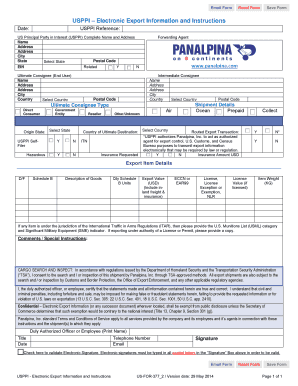
Email Form Reset Form Save Form USPPI Electronic Export Information and Instructions Date: USPPI Reference: US Principal Party in Interest (USPPI) Complete Name and Address Name Address Address City.

How it works

  1. Open form

    Open form follow the instructions

  2. Easily sign form

    Easily sign the form with your finger

  3. Share form

    Send filled & signed form or save

How to fill out the Panalpina Usppi online

This guide provides a clear and comprehensive approach to filling out the Panalpina Usppi online. Users of all levels will benefit from the step-by-step instructions designed to ensure accuracy in completing this essential export document.

Follow the steps to successfully complete the Panalpina Usppi form online:

  1. Press the ‘Get Form’ button to access the Panalpina Usppi form. This will allow you to begin the process of filing your export information electronically.
  2. Enter the date you completed the form in the designated field.
  3. Document your USPPI reference number to track your submission effectively.
  4. Fill in the complete name and address of the US Principal Party in Interest (USPPI). This includes providing their Employer Identification Number (EIN). Ensure no Post Office Box is used.
  5. Indicate if the USPPI is related to the Ultimate Consignee by selecting 'Yes' or 'No'.
  6. Provide the full name and address of the Ultimate Consignee (End User). Include the city and country information.<br>Ensure accuracy as this is the party receiving the shipment.
  7. If applicable, fill out the details for the Forwarding Agent, if different from the USPPI.
  8. Specify the Origin State where the cargo began its journey.
  9. Select the Country of Ultimate Destination where the goods will be delivered.
  10. Indicate whether the shipment is hazardous by selecting 'Yes' or 'No'.
  11. If requested, provide the insurance amount in USD by indicating 'Yes' or 'No'.
  12. List the Shipment Details, indicating the mode of transport (Air or Ocean) and whether charges are prepaid or collectible.
  13. Detail the Export Item Information, including the description of goods, quantity, export value, ECCN or EAR99 classification, and weight.
  14. If items fall under ITAR, provide the appropriate USML category and indicate significant military equipment status.
  15. Include any comments or special instructions related to the shipment.
  16. Print or electronically sign the form by typing your name in all capital letters in the Signature box. Ensure the validation box is checked.
  17. Finally, you can save your changes, download the form, or share it as necessary.

Start filling out your Panalpina Usppi form online now!

Get form

Experience a faster way to fill out and sign forms on the web. Access the most extensive library of templates available.
Get form

Related content

General Notices
by ROFONER LETTER · 2016 — PANALPINA, INC. ... AES is the electronic method for the...
Learn more
(PDF) International logistics the management of...
... USPPI—is now always the manufacturer of the goods, even on an EXW shipment...
Learn more

Related links form

LAZAROUS KANTUKOMWE V THE PEOPLE 1981 ZR 125 SC Replace Your Ride Automotive Dealership Operations Manual Abel Banda V The People Lombe Chibesakunda V Rajan Lekhraj Mahtani

Questions & Answers

Get answers to your most pressing questions about US Legal Forms API.

Contact support

The Foreign Principal Party in Interest (FPPI) form is typically filled out by the foreign buyer or seller involved in the transaction. It's crucial that this party provides accurate details to ensure smooth customs clearance. If you need assistance in understanding or completing this form under the Panalpina USPPi framework, resources from US Legal Forms can be valuable.

Yes, FedEx offers services that facilitate filing your EEI for you. When you use their international shipping options, they can assist in preparing and submitting the required information. This service is particularly beneficial for those looking to streamline their processes while meeting the Panalpina USPPi requirements.

Yes, you can file the AES yourself if you have the right information and access to the system. It’s important to ensure that all details, including shipper’s information and export details, are accurate. Consider using resources from US Legal Forms to get step-by-step instructions tailored for filing your AES under the Panalpina USPPi regulations.

Filing an EEI with UPS is straightforward if you follow the proper steps. First, prepare your shipment information, including the weight and value of your goods. Then, utilize the UPS Export Services or other tools provided by US Legal Forms to complete your filing. This method aligns well with the compliance requirements of Panalpina USPPi.

To file an Electronic Export Information (EEI), you must use the Automated Export System (AES). Start by gathering necessary details about your shipment, such as the destination and items being exported. After that, access platforms like US Legal Forms for guidance and submission assistance. This ensures compliance with the Panalpina USPPi standards.

The Shipper's Letter of Instruction (SLI) is typically completed by the shipper or the logistics provider acting on their behalf. This crucial document outlines shipment details and instructions. With Panalpina Usppi, you can get support in creating and managing your SLI to ensure accuracy and compliance.

The CID number, or Customer Identification number, is a unique identifier that aids in tracking and managing shipments on a bill of lading. It ensures that the shipment is properly logged and processed. Utilizing Panalpina Usppi can enhance your tracking capabilities and improve overall shipment transparency.

The point of origin indicates where the shipment starts, while the FTZ number refers to a Foreign Trade Zone that offers specific customs advantages. This information is crucial for international shipments. With Panalpina Usppi, understanding these terms can simplify your logistics planning and ensure compliance.

An expeditor's shipper's letter of instruction provides detailed directives on how to handle a shipment. This document guides the shipping company in correctly processing and routing the cargo. Using Panalpina Usppi, you can streamline your logistics process by effectively using such documents.

The consignee is the person or entity that receives the shipment, while the ultimate consignee is the final receiver of the goods. Often, the consignee may transfer the goods to another party, known as the ultimate consignee. In the context of Panalpina Usppi services, understanding these roles can enhance the shipping process and ensure proper delivery.

Get This Form Now!

Use professional pre-built templates to fill in and sign documents online faster. Get access to thousands of forms.
Get form
If you believe that this page should be taken down, please follow our DMCA take down processhere.

Industry-leading security and compliance

US Legal Forms protects your data by complying with industry-specific security standards.
  • In businnes since 1997
    25+ years providing professional legal documents.
  • Accredited business
    Guarantees that a business meets BBB accreditation standards in the US and Canada.
  • Secured by Braintree
    Validated Level 1 PCI DSS compliant payment gateway that accepts most major credit and debit card brands from across the globe.
Get Panalpina Usppi
Get form
  • Adoption
  • Bankruptcy
  • Contractors
  • Divorce
  • Home Sales
  • Employment
  • Identity Theft
  • Incorporation
  • Landlord Tenant
  • Living Trust
  • Name Change
  • Personal Planning
  • Small Business
  • Wills & Estates
  • Packages A-Z
  • Affidavits
  • Bankruptcy
  • Bill of Sale
  • Corporate - LLC
  • Divorce
  • Employment
  • Identity Theft
  • Internet Technology
  • Landlord Tenant
  • Living Wills
  • Name Change
  • Power of Attorney
  • Real Estate
  • Small Estates
  • Wills
  • All Forms
  • Forms A-Z
  • Form Library
  • Legal Hub
  • About Us
  • Help Portal
  • Legal Resources
  • Blog
  • Affiliates
  • Contact Us
  • Delete My Account
  • Site Map
  • Industries
  • Forms in Spanish
  • Localized Forms
  • State-specific Forms
  • Forms Kit
  • Real Estate Handbook
  • All Guides
  • Notarize
  • Incorporation services
  • For Consumers
  • For Small Business
  • For Attorneys
  • USLegal
  • FormsPass
  • pdfFiller
  • signNow
  • altaFlow
  • DocHub
  • Instapage
Form Packages
  • Adoption
  • Bankruptcy
  • Contractors
  • Divorce
  • Home Sales
  • Employment
  • Identity Theft
  • Incorporation
  • Landlord Tenant
  • Living Trust
  • Name Change
  • Personal Planning
  • Small Business
  • Wills & Estates
  • Packages A-Z
Form Categories
  • Affidavits
  • Bankruptcy
  • Bill of Sale
  • Corporate - LLC
  • Divorce
  • Employment
  • Identity Theft
  • Internet Technology
  • Landlord Tenant
  • Living Wills
  • Name Change
  • Power of Attorney
  • Real Estate
  • Small Estates
  • Wills
  • All Forms
  • Forms A-Z
  • Form Library
Customer Service
  • Legal Hub
  • About Us
  • Help Portal
  • Legal Resources
  • Blog
  • Affiliates
  • Contact Us
  • Delete My Account
  • Site Map
  • Industries
  • Forms in Spanish
  • Localized Forms
  • State-specific Forms
  • Forms Kit
Legal Guides
  • Real Estate Handbook
  • All Guides
Prepared for you
  • Notarize
  • Incorporation services
Our Customers
  • For Consumers
  • For Small Business
  • For Attorneys
Our Sites
  • USLegal
  • FormsPass
  • pdfFiller
  • signNow
  • altaFlow
  • DocHub
  • Instapage
Social Media
Call us now toll free:
+1 833 426 79 33
As seen in:
© Copyright 1999-2026 airSlate Legal Forms, Inc. 3720 Flowood Dr, Flowood, Mississippi 39232
  • Your Privacy Choices
  • Terms of Service
  • Privacy Notice
  • Content Takedown Policy
  • Bug Bounty Program