Loading
Get Ea 571-e 2002-2026
How it works
-

Open form follow the instructions
-

Easily sign the form with your finger
-

Send filled & signed form or save
How to fill out the EA 571-E online
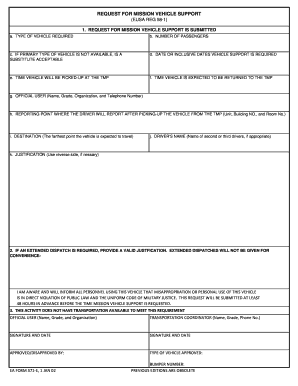
The EA 571-E form is essential for requesting mission vehicle support within military operations. This guide provides a step-by-step approach to filling out the form electronically, ensuring all necessary information is captured accurately.
Follow the steps to successfully complete the EA 571-E form online.
- Click ‘Get Form’ button to obtain the EA 571-E form and open it in your preferred PDF editor or online filling tool.
- In the first section, indicate the type of vehicle you require by selecting the appropriate option from the dropdown or input field provided.
- Input the number of passengers that will be using the vehicle. Ensure this aligns with the vehicle size selection.
- If the primary type of vehicle is unavailable, select 'Yes' or 'No' to indicate if a substitute vehicle is acceptable.
- Fill in the date or inclusive dates for when vehicle support is required, using the format specified.
- Provide the time you will pick up the vehicle from the Transportation Motor Pool (TMP).
- Specify the expected return time of the vehicle to the TMP after use.
- In the official user section, input your name, grade, organization, and your telephone number.
- State the reporting point where the driver will report after picking up the vehicle; include the unit, building number, and room number.
- Indicate the destination, which is the farthest point the vehicle is expected to travel.
- If applicable, provide the names of any additional drivers in the designated space.
- Complete the justification for the vehicle use in the space provided on the form. If more space is needed, utilize the reverse side of the form.
- If an extended dispatch is required, ensure you provide a valid justification, recognizing that convenience alone will not suffice.
- Acknowledge that all personnel using the vehicle will be informed of the restrictions regarding misappropriation or personal use.
- Make sure to submit the request at least 48 hours in advance of the vehicle support needed.
- Fill in the official user and transportation coordinator details, including name, grade, and phone number.
- Finally, sign and date the form, and if applicable, indicate approval or disapproval by the relevant authority.
- Once you have completed the form, you can save changes, download a copy, print it, or share it as needed.
Begin completing the EA 571-E form online to ensure your mission vehicle support request is submitted promptly.
Acquiring an EA redeem code involves visiting the EA 571-E platform where you can input promotional codes. Sometimes, you can find these codes through participating in promotions, special events, or seasonal offers. Additionally, always check your email for exclusive offers sent directly to your EA account. Once you have a code, redeem it directly in your account to unlock great content.