Loading
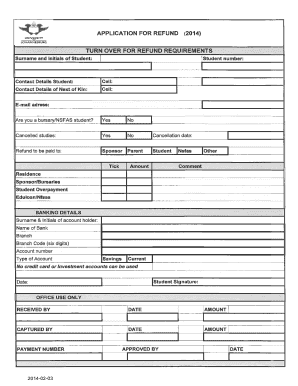
Get Nsfas Refund Claim Form
How it works
-

Open form follow the instructions
-

Easily sign the form with your finger
-

Send filled & signed form or save
How to fill out the Nsfas Refund Claim Form online
This guide provides a comprehensive overview of how to complete the Nsfas Refund Claim Form online. By following these steps, users will find the process clear and manageable, ensuring a smooth submission experience.
Follow the steps to successfully complete your refund claim form.
- Click ‘Get Form’ button to access the Nsfas Refund Claim Form and open it in the appropriate editor.
- Begin by entering your personal information, including your full name, identification number, and contact details. Ensure that all information is accurate and up to date.
- Next, provide details regarding your Nsfas application, such as your student number and the institution you attended. This information helps to verify your eligibility for a refund.
- In the following section, outline the reason for your refund claim. Be clear and concise in your explanation to help facilitate the review process.
- Attach any required supporting documents that may be necessary for your claim. This may include receipts, proof of payment, or any other relevant documentation.
- Review all entered information for accuracy. Make any necessary corrections to ensure everything is correct before submission.
- Finally, save your changes. You can download, print, or share the completed form, depending on your needs.
Complete your Nsfas Refund Claim Form online today to ensure prompt processing of your claim.
To get a refund from NSFAS, you must complete the Nsfas Refund Claim Form accurately and provide any required supporting documents. Submit the completed form through the MyNSFAS portal or via the designated email address. Following submission, keep an eye on your email for updates regarding the status of your refund.