Loading
Get Max Life Insurance Neft Form 2020-2026
How it works
-

Open form follow the instructions
-

Easily sign the form with your finger
-

Send filled & signed form or save
How to fill out the Max Life Insurance Neft Form online
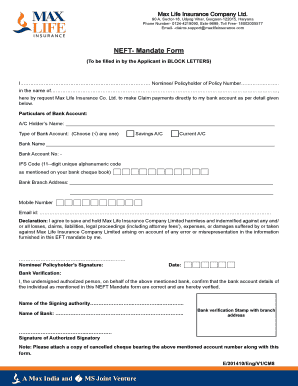
Filling out the Max Life Insurance NEFT Mandate Form is essential for ensuring that your claim payments are directed to your bank account. This guide provides clear and detailed instructions to help you complete the form accurately and efficiently.
Follow the steps to complete the NEFT mandate form
- Press the ‘Get Form’ button to access the NEFT Mandate Form and open it in your preferred editor.
- Begin by filling in your details as the nominee or policyholder. In the provided space, enter your full name followed by your policy number.
- In the next section, detail the particulars of your bank account. Start with the account holder’s name.
- Select the type of bank account you hold by checking the appropriate box for either 'Savings A/C' or 'Current A/C'.
- Next, provide the name of the bank where your account is held.
- Specify your bank account number in the designated field.
- Enter the IFS code, which is a unique 11-digit alphanumeric code found on your bank cheque book.
- Fill in the address of your bank branch accurately.
- Provide your mobile number and email ID in the respective fields to ensure effective communication.
- Review the declaration statement carefully. By signing, you agree to hold Max Life Insurance Company Limited harmless against any claims related to errors in the information you provided.
- Affix your signature on the designated line acknowledging your agreement with the declaration.
- Lastly, complete the bank verification section by having it signed by an authorized bank representative, who will also provide their name and the bank’s stamp. Remember to attach a copy of a cancelled cheque with the form.
Take the next step in safeguarding your financial future by filling out the Max Life Insurance NEFT Mandate Form online today.
To update your NEFT details in Max Life Insurance online, log in to your Max Life Insurance account. Then, navigate to the profile settings where you can find options to edit your payment information. Carefully input your new NEFT details and save the changes. This is crucial to ensure that future payments are directed correctly.