Loading
Get Physiotherapy Sooke 2020-2026
How it works
-

Open form follow the instructions
-

Easily sign the form with your finger
-

Send filled & signed form or save
How to fill out the Physiotherapy Sooke online
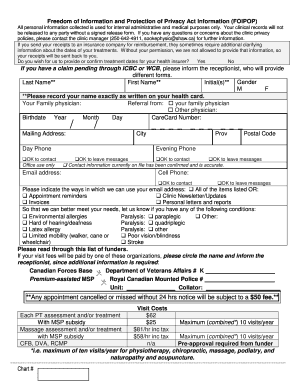
Filling out the Physiotherapy Sooke form online is a straightforward process designed to collect essential information for your treatment. This guide provides clear, step-by-step instructions to help you navigate each section of the form efficiently.
Follow the steps to complete the online form.
- Click the ‘Get Form’ button to obtain the form and open it in your preferred editor.
- Begin by entering your last name, first name, and any initials accurately as they appear on your health card. Ensure all required fields are marked with **.
- Specify your gender by selecting either 'M' for male or 'F' for female.
- Provide your birthdate by selecting the year, month, and day from the dropdown menus.
- Enter your CareCard number and complete your mailing address, including city, province, and postal code.
- Input your daytime and evening phone numbers, ensuring to specify if it is okay to contact you or leave messages.
- Include your email address and indicate how you wish the clinic to use your email (appointment reminders, newsletters, invoices, etc.).
- Indicate any relevant medical conditions or disabilities that apply to you. This may include allergies, mobility limitations, or other health concerns.
- If applicable, circle the funding organization that will cover your visit fees, such as Canadian Forces Base or Department of Veterans Affairs.
- Review the consent for treatment section and select the therapist(s) you consent to receive treatment from by checking the relevant boxes.
- Confirm the accuracy of all information provided, sign the document, and date it to indicate your agreement.
- If you are a parent or guardian signing for a minor, include your signature and print your name, providing any additional contact information if necessary.
- Once all sections are complete, save any changes, and you have the option to download, print, or share the form electronically.
Complete your Physiotherapy Sooke document online today for a seamless experience.
During your appointment at Physiotherapy Sooke, clearly describe your symptoms, how long you've experienced them, and any limitations you face in daily activities. Don’t hesitate to mention what has worked or not worked in your past treatments. This information helps your physio adjust their approach and provides the best chance for effective treatment.