Loading
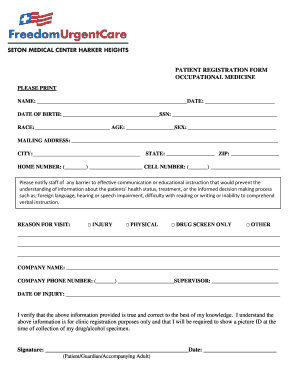
Get Patient Registration Form Occupational Medicine - Freedom Urgent ... 2020-2025
How it works
-

Open form follow the instructions
-

Easily sign the form with your finger
-

Send filled & signed form or save
How to fill out the Patient Registration Form Occupational Medicine - Freedom Urgent online
Filling out the Patient Registration Form for Occupational Medicine is an important step in ensuring that your medical needs are met effectively. This guide provides clear instructions to help you complete the form online with ease and confidence.
Follow the steps to complete the Patient Registration Form efficiently.
- Press the ‘Get Form’ button to access the patient registration form and open it in your preferred editing application.
- Begin by entering your full name in the designated field. Ensure that all details are accurate to avoid any issues with your registration.
- Fill in the date and your date of birth in the appropriate sections. Make sure to use the format requested in the form.
- Input your social security number (SSN) accurately. This information is often required for identity verification and insurance purposes.
- Indicate your race and age clearly in the respective fields. This information assists in statistical reporting and demographic tracking.
- Provide your current mailing address, including city, state, and zip code. This will be used for any correspondence regarding your medical care.
- Enter your home and cell phone numbers. Make sure the numbers are correct so the medical staff can reach you if necessary.
- Notify the staff of any barriers to communication that may affect your understanding of the health information. List these barriers in the designated space.
- Select the reason for your visit by checking the appropriate box: Injury, Physical, Drug screen only, or Other. If 'Other,' please specify your reason.
- Provide the name of your company and the company phone number if applicable. This helps in coordinating care and understanding your workplace safety needs.
- If applicable, enter the name of your supervisor and the date of injury, ensuring this information is accurate.
- Finally, verify the truthfulness of the information you provided. Sign and date the form in the specified area, confirming that you understand its purpose.
- Once completed, you can save your changes, download a copy for your records, print the form, or share it as required.
Complete your Patient Registration Form online today to ensure your visit goes smoothly.
Industry-leading security and compliance
US Legal Forms protects your data by complying with industry-specific security standards.
-
In businnes since 199725+ years providing professional legal documents.
-
Accredited businessGuarantees that a business meets BBB accreditation standards in the US and Canada.
-
Secured by BraintreeValidated Level 1 PCI DSS compliant payment gateway that accepts most major credit and debit card brands from across the globe.