Loading
Form preview
  • US Legal Forms
  • Other Templates
  • More Forms
  • More Multi-State Forms
  • Autosweep Rfid Authorization Letter 2020

Get Autosweep Rfid Authorization Letter 2020-2026

How it works

  1. Open form

    Open form follow the instructions

  2. Easily sign form

    Easily sign the form with your finger

  3. Share form

    Send filled & signed form or save

How to fill out the Autosweep RFID Authorization Letter online

Filling out the Autosweep RFID Authorization Letter online can streamline your process for obtaining an RFID account for your vehicle. This guide walks you through each section of the form, ensuring a complete and accurate submission.

Follow the steps to successfully complete the form

  1. Click ‘Get Form’ button to obtain the form and access it in the editing interface.
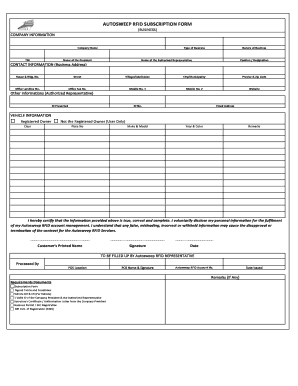
  2. Begin by filling out the company information section. Include the company name, Tax Identification Number (TIN), type of business, name of the president, nature of business, and the name and position of the authorized representative.
  3. Proceed to the contact information section. Enter the complete business address, including house and building number, street, village or subdivision, city or municipality, province, zip code, and relevant contact numbers such as the office landline, office fax, and two mobile numbers. Also, provide the company website.
  4. Next, address the section for authorized representatives. Indicate the ID presented, the identification number, and the email address of the authorized representative.
  5. Move on to the vehicle information section. If you are the registered owner, mark the appropriate option and fill in the vehicle's plate number, make and model, year, and color. If you are not the registered owner, make sure to select the user-only option and provide the plate number, make and model, year, and color of the vehicle.
  6. Certify the information provided in the form by reviewing the statement and inserting the printed name of the customer, signing in the designated area, and indicating the date.
  7. The section labeled 'To be filled up by Autosweep RFID representative' is not for the user to fill out; this will be completed by the representative upon processing.
  8. Ensure all required documents are prepared as detailed in the requirements section. These may include the subscription form, signed terms and conditions, vehicle official receipt and certification, valid identification of both the company president and authorized representative, a secretary's certificate or authorization letter, business permit or SEC registration, and BIR certification of registration.
  9. Finally, review the completed form for accuracy, save any changes, and choose to download, print, or share the form as needed.

Start completing the Autosweep RFID Authorization Letter online now for a seamless process.

Get form

Experience a faster way to fill out and sign forms on the web. Access the most extensive library of templates available.
Get form

Related content

(PDF) Authorization Letter Vehicle Owner RFID |...
Authorization Letter Vehicle Owner RFID. Asyraf Arrifaei. MOHD ABDULLAH BIN MOHAMED RAMLI...
Learn more
Operating Manual For The R&S FSL R&S/R&S ...
The product may be opened only by authorized, specially trained personnel. ... Service...
Learn more

Related links form

Application Fee Waiver Form - SIU Undergraduate Admissions - Admissions Siu Johnson C Smith University Physical Examination Amp History Lpendix 23a Exp 7192 XIC ANTHROPOMETRY FORM A-42 PNCF (Rev 913)

Questions & Answers

Get answers to your most pressing questions about US Legal Forms API.

Contact support

To transfer Easytrip ownership, visit the Easytrip website and locate the ownership transfer form. You will need to provide your Autosweep Rfid Authorization Letter as part of the documentation required. Proper verification will speed up the process and help ensure a successful transfer.

Currently, transferring your RFID balance to another account within the Philippines is not directly possible. You may want to contact customer support for possible solutions. Including your Autosweep Rfid Authorization Letter can help clarify your request and facilitate any potential adjustments.

To register a new number in your Autosweep RFID, visit the Autosweep website and access the registration page. Fill out the form and include the details from your Autosweep Rfid Authorization Letter. This process confirms that your new number aligns with your RFID account and maintains proper tracking.

Yes, you can secure an Autosweep RFID without an appointment at select service centers. However, having your Autosweep Rfid Authorization Letter and necessary documents ready will help expedite the process. Typically, walk-ins are accepted during business hours but call ahead to ensure availability.

RFID is transferable in the Philippines, but you must follow the proper process. You need to submit a request along with your Autosweep Rfid Authorization Letter and identification documents. This ensures that the transfer is legitimate and traceable within the system.

To transfer RFID ownership in the Philippines, you'll need to complete a transfer form available on the Autosweep website. Accompany this with your Autosweep Rfid Authorization Letter and valid identification. Once submitted, the process usually takes a few days to finalize, ensuring that both parties are informed throughout.

Yes, you can transfer your RFID to another person, but it requires specific procedures. You should fill out a form and include a copy of the Autosweep Rfid Authorization Letter signed by both parties. This ensures a smooth transfer and maintains a clear record of ownership.

To activate your RFID card in the Philippines, visit the official Autosweep website, where you can find the activation process. You will need to provide personal details and the required information from your Autosweep Rfid Authorization Letter. After filling out the forms, you will receive confirmation once the activation is successful.

Getting your SOA for Autosweep RFID is straightforward. You can either visit the official website or contact customer service to request your Statement of Account. Providing your account details will help expedite the process. If needed, your Autosweep RFID Authorization Letter can be helpful when communicating your request.

To download your RFID SOA, access your account on the Autosweep website. Look for the section dedicated to account statements or transaction history. Once you locate your SOA, you can download it directly to your device as a PDF. Keep your Autosweep RFID Authorization Letter handy if you need further assistance with the download.

Get This Form Now!

Use professional pre-built templates to fill in and sign documents online faster. Get access to thousands of forms.
Get form
If you believe that this page should be taken down, please follow our DMCA take down processhere.
Get Autosweep Rfid Authorization Letter
Get form
  • Adoption
  • Bankruptcy
  • Contractors
  • Divorce
  • Home Sales
  • Employment
  • Identity Theft
  • Incorporation
  • Landlord Tenant
  • Living Trust
  • Name Change
  • Personal Planning
  • Small Business
  • Wills & Estates
  • Packages A-Z
  • Affidavits
  • Bankruptcy
  • Bill of Sale
  • Corporate - LLC
  • Divorce
  • Employment
  • Identity Theft
  • Internet Technology
  • Landlord Tenant
  • Living Wills
  • Name Change
  • Power of Attorney
  • Real Estate
  • Small Estates
  • Wills
  • All Forms
  • Forms A-Z
  • Other Templates
  • Legal Hub
  • About Us
  • Help Portal
  • Legal Resources
  • Blog
  • Affiliates
  • Contact Us
  • Delete My Account
  • Site Map
  • Industries
  • Forms in Spanish
  • Localized Forms
  • State-specific Forms
  • Forms Kit
  • Real Estate Handbook
  • All Guides
  • Notarize
  • Incorporation services
  • For Consumers
  • For Small Business
  • For Attorneys
  • USLegal
  • FormsPass
  • pdfFiller
  • signNow
  • altaFlow
  • DocHub
  • Instapage
Form Packages
  • Adoption
  • Bankruptcy
  • Contractors
  • Divorce
  • Home Sales
  • Employment
  • Identity Theft
  • Incorporation
  • Landlord Tenant
  • Living Trust
  • Name Change
  • Personal Planning
  • Small Business
  • Wills & Estates
  • Packages A-Z
Form Categories
  • Affidavits
  • Bankruptcy
  • Bill of Sale
  • Corporate - LLC
  • Divorce
  • Employment
  • Identity Theft
  • Internet Technology
  • Landlord Tenant
  • Living Wills
  • Name Change
  • Power of Attorney
  • Real Estate
  • Small Estates
  • Wills
  • All Forms
  • Forms A-Z
  • Other Templates
Customer Service
  • Legal Hub
  • About Us
  • Help Portal
  • Legal Resources
  • Blog
  • Affiliates
  • Contact Us
  • Delete My Account
  • Site Map
  • Industries
  • Forms in Spanish
  • Localized Forms
  • State-specific Forms
  • Forms Kit
Legal Guides
  • Real Estate Handbook
  • All Guides
Prepared for you
  • Notarize
  • Incorporation services
Our Customers
  • For Consumers
  • For Small Business
  • For Attorneys
Our Sites
  • USLegal
  • FormsPass
  • pdfFiller
  • signNow
  • altaFlow
  • DocHub
  • Instapage
Social Media
Call us now toll free:
+1 833 426 79 33
As seen in:
© Copyright 1999-2026 airSlate Legal Forms, Inc. 17 Station Street, Suite 303, Brookline, MA 02445
  • Your Privacy Choices
  • Terms of Service
  • Privacy Notice
  • Content Takedown Policy
  • Bug Bounty Program