Loading

Open form follow the instructions

Easily sign the form with your finger

Send filled & signed form or save
How to fill out the Teamcare Application For Extension Of Coverage online
Filling out the Teamcare Application For Extension Of Coverage online is a straightforward process that requires attention to detail. This guide will assist you in completing the application accurately to ensure that your request for an extension of coverage is processed smoothly.
Follow the steps to complete the application effectively.
- Press the ‘Get Form’ button to access the Teamcare Application For Extension Of Coverage and open it in your preferred online editor.
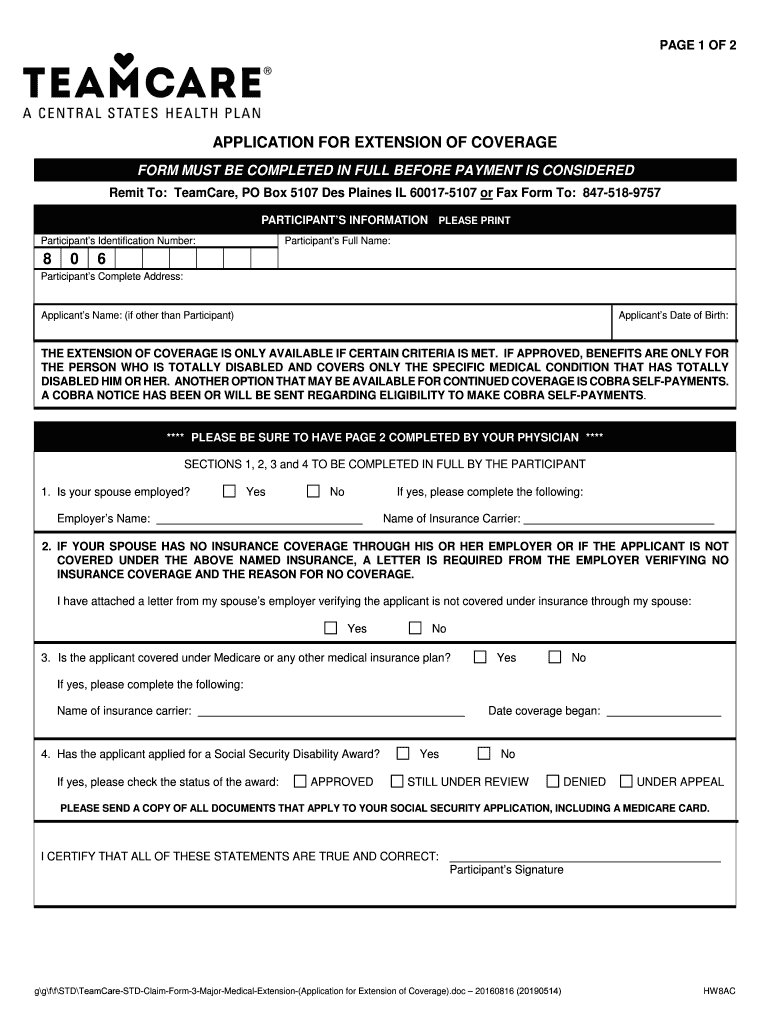
- Begin with the participant’s information. Enter the participant’s identification number, full name, and complete address in the designated fields.
- If the applicant is different from the participant, provide the applicant’s name and date of birth.
- Answer the question regarding whether the participant’s spouse is employed by selecting ‘Yes’ or ‘No’. If ‘Yes’, please enter the employer’s name and the name of the insurance carrier.
- If the spouse has no insurance through their employer, ensure to attach a letter from the employer confirming no insurance coverage, and indicate if the letter is attached by selecting ‘Yes’ or ‘No’.
- Indicate if the applicant is covered under Medicare or any other medical insurance plan. If ‘Yes’, provide the name of the insurance carrier and the date coverage started.
- Respond to whether the applicant has applied for a Social Security Disability Award and select the appropriate status: Approved, Still Under Review, Denied, or Under Appeal.
- Certify that all the statements made are true and correct by having the participant provide their signature.
- For page two, ensure that the physician completes the required sections related to the disabling diagnosis, the extent of the disability, and the anticipated duration of the disability along with the treatment plan.
- Once all fields are completed, review the application for accuracy. Then, you can save changes, download, print, or share the completed form.
Complete your Teamcare Application For Extension Of Coverage online today to ensure your coverage needs are met.
Experience a faster way to fill out and sign forms on the web. Access the most extensive library of templates available.
Related content
After the occurrence of a Qualifying Event and upon timely election pursuant to Section...
This Benefit Booklet provides a complete explanation of your Benefits, limitations and...
An elite combat medic and former Talon agent, Baptiste now uses his abilities to help save...
Get answers to your most pressing questions about US Legal Forms API.
What is UPS TeamCare?
TeamCare offers flexible plans and a full range of affordable medical benefits to our members and their families. Our extensive network of partners and providers make your medical and preventative care – including routine checkups and important screenings – a top priority. Explore Medical Benefits.
Is dental treatment covered in mediclaim in India?
No, all health insurance policies do not cover dental insurance as standard coverage. However, it is possible to include it as an additional coverage as per the availability of such a cover. Note that dental injury due to an accident is covered under health insurance as per applicable terms and conditions.
What is the TeamCare explanation of benefits?
After your claim is processed, you'll receive an Explanation of Benefits (EOB) that details what was paid and, if a claim was denied, the reason why. An EOB is not a bill! It's a good idea to review your EOB carefully and compare it to the billing statement from your provider.
What is TeamCare Gold plan?
TeamCare Gold is a supplemental medical and prescription benefits plan that offers more medical and prescription benefit than offered by Medicare alone. Gold plans are priced below or at the market value compared to similar Humana plans in your area.
Does Teamcare cover root canal?
Dentures: full or partial, if the impression was taken while you were covered. Fixed bridgework, gold restorations and crowns: if the tooth or teeth were prepared while you were covered. Root canal therapy: if the tooth or teeth were opened for treatment while you were covered.
How do I find my Teamcare member ID?
What is my member ID number? Your member ID number or UMI (Unique Identification Number) is the number listed on your medical ID card, and typically begins with 806.
Use professional pre-built templates to fill in and sign documents online faster. Get access to thousands of forms.
If you believe that this page should be taken down, please follow our DMCA take down process here.