Loading
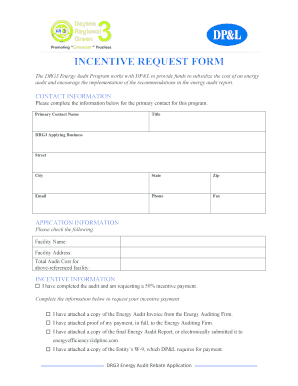
Get Incentive Request Form - Drg3 2020-2026
How it works
-

Open form follow the instructions
-

Easily sign the form with your finger
-

Send filled & signed form or save
How to fill out the INCENTIVE REQUEST FORM - Drg3 online
The INCENTIVE REQUEST FORM - Drg3 is essential for users seeking financial assistance for energy audits. This guide will provide a step-by-step approach to completing the form accurately and efficiently.
Follow the steps to successfully complete the form.
- Click the 'Get Form' button to access the INCENTIVE REQUEST FORM - Drg3 online.
- In the contact information section, enter the primary contact name, title, DRG3 applying business, street address, city, state, zip code, email, phone, and fax number. Ensure that all details are accurate and complete.
- Proceed to the application information section. Fill in the facility name and address where the energy audit was conducted. Additionally, provide the total audit cost corresponding to the facility.
- In the incentive information section, indicate that you have completed the audit and are requesting a 50% incentive payment by checking the appropriate box. Attach the necessary documents as specified: the energy audit invoice, proof of payment to the energy auditing firm, final energy audit report, and W-9 form.
- Complete the payment information section by specifying who the incentive checks should be made payable to and providing the mailing address for the incentive checks.
- In the applicant authorization section, the business decision-maker must read the program guidelines, sign, print their name, and date the application to confirm their understanding and agreement.
- Finally, save your changes, download the completed form, print it if necessary, or share it as required. Make sure to mail, fax, or email the completed application to the designated contact at Dayton Power & Light.
Complete your INCENTIVE REQUEST FORM - Drg3 online to take the next steps toward your energy audit funding.
To write an incentive email, craft a concise subject line that highlights your request. Begin with a polite greeting, then succinctly explain your request while linking it to prior contributions. Incorporate the INCENTIVE REQUEST FORM - Drg3 within your email to provide a structured format that facilitates understanding and response from the recipient.
Industry-leading security and compliance
US Legal Forms protects your data by complying with industry-specific security standards.
-
In businnes since 199725+ years providing professional legal documents.
-
Accredited businessGuarantees that a business meets BBB accreditation standards in the US and Canada.
-
Secured by BraintreeValidated Level 1 PCI DSS compliant payment gateway that accepts most major credit and debit card brands from across the globe.