Loading
Form preview
  • US Legal Forms
  • Other Templates
  • More Forms
  • More Multi-State Forms
  • Venta De Divisas Bancolombia 2020

Get Venta De Divisas Bancolombia 2020-2026

How it works

  1. Open form

    Open form follow the instructions

  2. Easily sign form

    Easily sign the form with your finger

  3. Share form

    Send filled & signed form or save

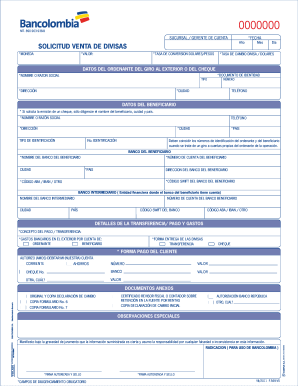
How to fill out the Venta De Divisas Bancolombia online

This guide provides clear instructions for completing the Venta De Divisas Bancolombia form online. Whether you are familiar with document requests or not, this expert guide will support you through each section of the form.

Follow the steps to successfully complete the form.

  1. Press the ‘Get Form’ button to access the Venta De Divisas Bancolombia form and open it in your preferred editor.
  2. Enter the date of your application in the fields for year, month, and day, ensuring you accurately reflect the current date.
  3. Specify the *value* of the currency you wish to purchase, selecting the appropriate *currency* from the dropdown menu.
  4. Input the *conversion rate* from dollars to pesos. If your operation is greater than USD 5,000, include the negotiated rate or leave it blank for the bank's standard rate.
  5. Fill in the *exchange rate* for the currency against dollars if you are acquiring a currency other than USD and your transaction exceeds USD 5,000.
  6. Provide complete details under the *data of the sender* section, which includes the sender's identification document type and number, full name, city, address, and phone number.
  7. In the *beneficiary's data* section, include the beneficiary's full name, address, phone number, city, identification type and number, and country. Ensure identification numbers are consistent if transferring to the sender's account.
  8. Fill in the *bank details of the beneficiary*, including the bank's name, city, account number, country, and relevant banking codes (such as SWIFT and ABA/IBAN).
  9. If applicable, complete the *intermediary bank* information, providing the bank's name, city, account number, country, and necessary banking codes.
  10. Describe the *payment details and expenses*, detailing the purpose of the transfer, and specifying who will bear the banking costs.
  11. Select how the currency will be delivered, whether via wire transfer or check, and indicate the payment method for the associated charges.
  12. Attach relevant documents as required, marking any necessary forms like copies of forms No. 6 or No. 7 depending on the nature of the exchange.
  13. Provide the *authorized signature and seal* in the designated area to confirm the information provided is accurate.
  14. Review all entered information for accuracy, then save your changes, download a copy, print it for your records, or share it as necessary.

Begin your process by completing your documents online today!

Get form

Experience a faster way to fill out and sign forms on the web. Access the most extensive library of templates available.
Get form

Related content

Qué hacer si lo estafaron | Consumer Advice
¿Un estafador hizo una transferencia no autorizada desde su cuenta bancaria? Comuníquese...
Learn more
el impacto financiero de la moneda virtual en...
by JD Arango Feo · 2022 · Cited by 1 — mismos, además el banco de la república no...
Learn more

Related links form

Com 112 Pdf BRIEFINGREBRIEFINGDEBRIEFING CERTIFICATE DIVORCEWITHOUT MINOR CHILDREN The Court Order Part 4 DIVORCE - Superiorcourt Maricopa PETITION TO MODIFY Change CHILD SUPPORT SIMPLIFIED PROCESS DRMSS11f PETITION TO MODIFY Change CHILD

Questions & Answers

Get answers to your most pressing questions about US Legal Forms API.

Contact support

Bancolombia cobra una tarifa por cambio de dólares, que se basa en la tasa de cambio vigente y en las políticas del banco. Es importante informarte sobre las tarifas actuales para evitar sorpresas. La Venta De Divisas Bancolombia puede ofrecerte una forma más ventajosa de gestionar estos cambios al proporcionarte información clara sobre las tasas aplicables.

El monto que puedes retirar por ventanilla en Bancolombia depende del tipo de cuenta que tengas y de las políticas del banco. Es recomendable contactar directamente al banco para obtener información precisa sobre tus límites de retiro. También, considera utilizar los servicios de Venta De Divisas Bancolombia para facilitar tus transacciones en grandes montos.

TRM significa Tasa Representativa del Mercado, y es el valor que se utiliza para el cambio de divisas. En la plataforma de Bancolombia, la TRM se actualiza diariamente, reflejando el precio de referencia para la compra y venta de dólares. Estar al tanto de la TRM es fundamental para quienes manejan la Venta De Divisas Bancolombia, ya que influye en las decisiones de cambio.

Bancolombia cobra una comisión por retirar dólares, la cual varía dependiendo del tipo de cuenta que poseas. Asegúrate de consultar directamente con Bancolombia o a través de su portal en línea para verificar las tasas actualizadas. La opción de Venta De Divisas Bancolombia puede ser una alternativa valiosa para ahorrar en este tipo de transacciones.

Para retirar dinero en un cajero automático de Bancolombia, inserta tu tarjeta y selecciona la opción de retiro. Ingresa tu clave y elige el monto que deseas retirar. Es recomendable verificar los límites y las tarifas asociadas, especialmente si planeas realizar una transacción grande como en la Venta De Divisas Bancolombia.

Para sacar dólares de Bancolombia, dirígete a una oficina que ofrezca este servicio. Puedes solicitar el monto de dólares que necesitas, pero asegúrate de conocer las tasas y comisiones aplicables. Además, muchas personas optan por la Venta De Divisas Bancolombia para asegurar tasas competitivas y mayores comodidades.

Retirar plata de Bancolombia es un proceso sencillo. Primero, visita cualquier sucursal de Bancolombia o utiliza un cajero automático. Asegúrate de tener tu tarjeta y tu documento de identidad a mano. Si necesitas asistencia adicional, la opción de Venta De Divisas Bancolombia puede ofrecer soluciones adaptadas a tus necesidades.

Los costos de las transacciones en Bancolombia pueden variar según el tipo de operación que realices. Generalmente, hay comisiones por giros, cambios de divisas, y transferencias, integrados en el servicio de Venta De Divisas Bancolombia. Además, es importante estar consciente de cualquier tarifa adicional que pueda aplicarse a tus transacciones. Te recomendamos consultar la tabla de tarifas en el sitio web de Bancolombia para tener una visión clara de todos los costos.

Realizar un giro internacional por Bancolombia es un proceso sencillo. Debes ingresar a la plataforma digital de Bancolombia, seleccionar la opción de giros internacionales, y seguir los pasos indicados. Durante este proceso, es importante tener a la mano la información del destinatario y conocer los costos asociados, incluidos los de la Venta De Divisas Bancolombia. Si necesitas ayuda, el equipo de servicio al cliente está disponible para asistirte en cada paso.

Al retirar dinero en el extranjero con Bancolombia, se incurre en un costo por el uso de cajeros automáticos internacionales. Estos cargos pueden variar, y suelen tener un cargo fijo más un porcentaje adicional sobre la cantidad retirada. Este costo puede afectar tu presupuesto, así que es recomendable tener en cuenta estos gastos en tu planificación. Asegúrate de conocer la política de tarifas antes de viajar para evitar sorpresas.

Get This Form Now!

Use professional pre-built templates to fill in and sign documents online faster. Get access to thousands of forms.
Get form
If you believe that this page should be taken down, please follow our DMCA take down processhere.
Get Venta De Divisas Bancolombia
Get form
  • Adoption
  • Bankruptcy
  • Contractors
  • Divorce
  • Home Sales
  • Employment
  • Identity Theft
  • Incorporation
  • Landlord Tenant
  • Living Trust
  • Name Change
  • Personal Planning
  • Small Business
  • Wills & Estates
  • Packages A-Z
  • Affidavits
  • Bankruptcy
  • Bill of Sale
  • Corporate - LLC
  • Divorce
  • Employment
  • Identity Theft
  • Internet Technology
  • Landlord Tenant
  • Living Wills
  • Name Change
  • Power of Attorney
  • Real Estate
  • Small Estates
  • Wills
  • All Forms
  • Forms A-Z
  • Other Templates
  • Legal Hub
  • About Us
  • Help Portal
  • Legal Resources
  • Blog
  • Affiliates
  • Contact Us
  • Delete My Account
  • Site Map
  • Industries
  • Forms in Spanish
  • Localized Forms
  • State-specific Forms
  • Forms Kit
  • Real Estate Handbook
  • All Guides
  • Notarize
  • Incorporation services
  • For Consumers
  • For Small Business
  • For Attorneys
  • USLegal
  • FormsPass
  • pdfFiller
  • signNow
  • altaFlow
  • DocHub
  • Instapage
Form Packages
  • Adoption
  • Bankruptcy
  • Contractors
  • Divorce
  • Home Sales
  • Employment
  • Identity Theft
  • Incorporation
  • Landlord Tenant
  • Living Trust
  • Name Change
  • Personal Planning
  • Small Business
  • Wills & Estates
  • Packages A-Z
Form Categories
  • Affidavits
  • Bankruptcy
  • Bill of Sale
  • Corporate - LLC
  • Divorce
  • Employment
  • Identity Theft
  • Internet Technology
  • Landlord Tenant
  • Living Wills
  • Name Change
  • Power of Attorney
  • Real Estate
  • Small Estates
  • Wills
  • All Forms
  • Forms A-Z
  • Other Templates
Customer Service
  • Legal Hub
  • About Us
  • Help Portal
  • Legal Resources
  • Blog
  • Affiliates
  • Contact Us
  • Delete My Account
  • Site Map
  • Industries
  • Forms in Spanish
  • Localized Forms
  • State-specific Forms
  • Forms Kit
Legal Guides
  • Real Estate Handbook
  • All Guides
Prepared for you
  • Notarize
  • Incorporation services
Our Customers
  • For Consumers
  • For Small Business
  • For Attorneys
Our Sites
  • USLegal
  • FormsPass
  • pdfFiller
  • signNow
  • altaFlow
  • DocHub
  • Instapage
Social Media
Call us now toll free:
+1 833 426 79 33
As seen in:
© Copyright 1999-2026 airSlate Legal Forms, Inc. 17 Station Street, Ste. 203, Brookline, MA 02445
  • Your Privacy Choices
  • Terms of Service
  • Privacy Notice
  • Content Takedown Policy
  • Bug Bounty Program