
Open form follow the instructions

Easily sign the form with your finger

Send filled & signed form or save
How to fill out the Circle K W2 online
Filling out your Circle K W2 online is an essential step for accurately reporting your income and taxes. This guide provides clear and detailed instructions to assist you in completing the form efficiently and correctly.
Follow the steps to fill out your Circle K W2 accurately.
- Press the ‘Get Form’ button to access the W2 form and open it in your preferred editing tool.
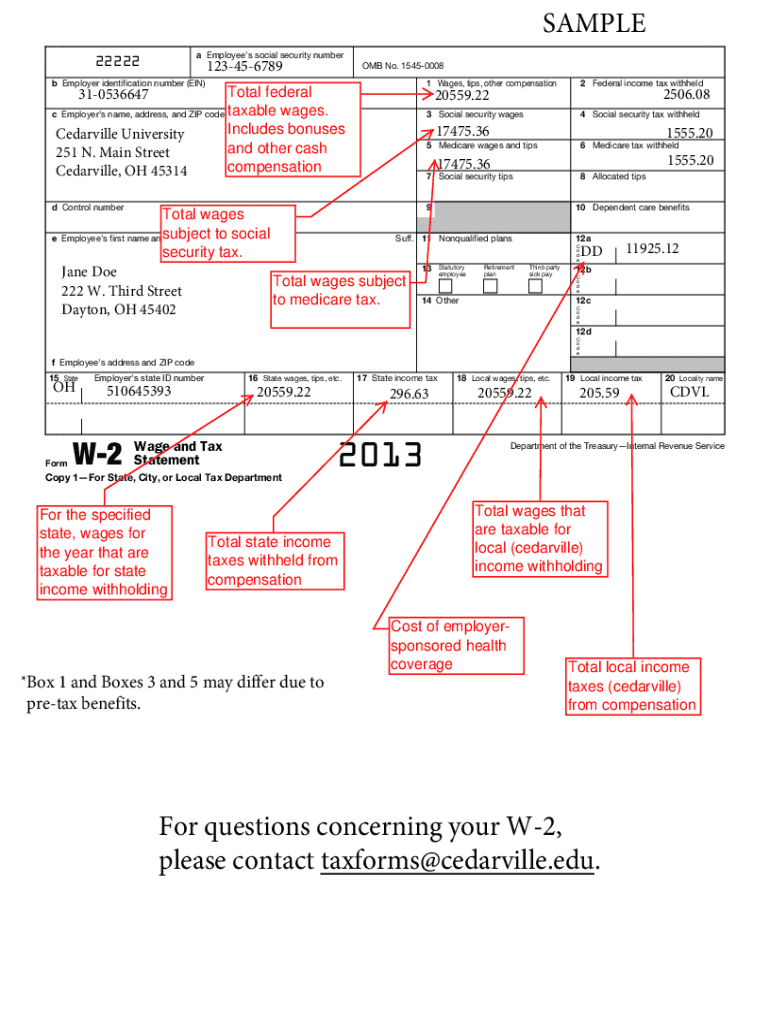
- In the top section, enter your employee information: provide your social security number, your employer's identification number (EIN), and the employer's name, address, and ZIP code.
- Fill in the control number if applicable, then complete your personal details by entering your first name, middle initial, last name, and your address along with your ZIP code.
- Proceed to report your earnings in the relevant boxes: Box 1 for wages, tips, and other compensation; Box 2 for federal income tax withheld; Box 3 for social security wages; Box 4 for social security tax withheld; Box 5 for Medicare wages and tips; and Box 6 for Medicare tax withheld.
- Complete Box 7 if you received tips, and fill in Box 8 for allocated tips if applicable. Further, address any dependent care benefits in Box 10, nonqualified plans in Box 11, and any required codes in Boxes 12a to 12d.
- Indicate if you are a statutory employee in Box 13, and note if you have a retirement plan or received third-party sick pay.
- Complete the state-related sections: enter your employer's state ID number in Box 15, fill in Box 16 for state wages, Box 17 for state income tax, Box 18 for local wages, and Box 19 for local income tax. Finish with the locality name in Box 20.
- Review all entries for accuracy, ensuring consistency in the information provided. Depending on your needs, you can then save any changes made, download, print, or share the completed form.
Ensure your tax filings are accurate by completing your Circle K W2 online today.
Experience a faster way to fill out and sign forms on the web. Access the most extensive library of templates available.
Related content
For electronic filing of Forms W-2, Wage and Tax ... W-2 in calendar year 2020, you must...
Jan 13, 2017 — For employees who have not opted out of receiving paper copies, W-2 forms...
Scale Algorithm ?*t#K ns ns ns ns ns ns ns ns ns ns ns. Start Raster Graphics ... Circle...
Get answers to your most pressing questions about US Legal Forms API.
How do I get my W-2 from a job I no longer work for?
To get your W-2 from a job you no longer work for, first, contact the former employer's HR or payroll department. They typically have a protocol for issuing W-2s to former employees. If you need additional resources, platforms like uslegalforms can offer guidance on your rights and steps to take.
What does Circle K use for payroll?
Circle K uses a comprehensive payroll system to manage employee compensation and tax documents like the W-2. This system ensures timely and accurate payment processing. Understanding how this process works can help you navigate your payroll inquiries more effectively.
How do you get your W-2 from Circle K?
To get your W-2 from Circle K, access the employee portal and log in using your credentials. In the tax forms section, you should be able to view and download your Circle K W-2. If you encounter any issues, contacting HR can help resolve them efficiently.
How can I get my W-2 from a job I no longer work at?
If you need your W-2 from a job you no longer work at, start by reaching out to the previous employer's HR department. They should have a process in place for former employees to request tax forms. Alternatively, platforms like uslegalforms can provide you with essential information to facilitate this process.
How do I get my Circle K W-2?
To get your Circle K W-2, you can access the Circle K employee portal and log in with your details. If you prefer, you can also contact HR for assistance in obtaining your W-2. They can guide you through the process and ensure you receive your tax documents.
What to do when you didn't get a W-2 and the job no longer exists?
If you did not receive your Circle K W-2 and the job no longer exists, start by contacting the HR department at Circle K. They can provide guidance on how to retrieve your W-2. Additionally, consider using platforms like uslegalforms to understand your rights and find resources on tax filing without a W-2.
Does Circle K mail W-2?
Yes, Circle K does mail W-2 forms to employees at their registered addresses. If you are an employee and have not received your Circle K W-2, it could be helpful to check your mailing information in the employee portal. You may also reach out to HR for assistance.
How can I obtain my W-2 online?
To obtain your Circle K W-2 online, visit the Circle K employee portal. Log in with your credentials, and navigate to the tax forms section. You can download or print your W-2 directly from there, making it easy to access your tax information anytime.
How to look for old W-2 from previous employer?
To look for an old Circle K W2 from a previous employer, check your personal records first, as you may have a copy stored away. If you cannot find it, you can contact your former employer directly or request a transcript from the IRS that includes your wage information. The US Legal Forms platform can also provide guidance on how to track down old tax documents.
How do I get my W-2 from a company I no longer work for?
To obtain your Circle K W2 from a company you no longer work for, first reach out to their HR or payroll department. They should be able to send you a copy of your W-2 via mail or electronically. If you experience challenges, consider exploring solutions on the US Legal Forms website to assist you in obtaining your tax documents.
Use professional pre-built templates to fill in and sign documents online faster. Get access to thousands of forms.
If you believe that this page should be taken down, please follow our DMCA take down process here.