Loading
Get Mndriveinfo
How it works
-

Open form follow the instructions
-

Easily sign the form with your finger
-

Send filled & signed form or save
How to fill out the Mndriveinfo online
Filling out the Mndriveinfo form is a straightforward process designed to help individuals with disabilities obtain a disability parking certificate. This guide will walk you through each section of the form, ensuring that you can submit your application accurately and efficiently.
Follow the steps to complete your Mndriveinfo application successfully.
- Click 'Get Form' button to access the Mndriveinfo form and open it in the editor.
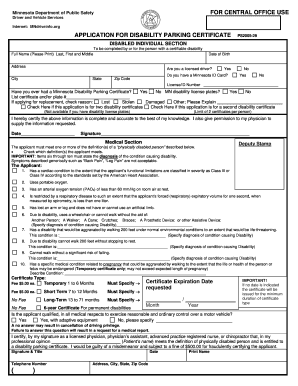
- Begin by filling out the disabled individual section with the full name (last, first, and middle), date of birth, address, city, state, and zip code of the person with a certifiable disability.
- Indicate whether the individual is a licensed driver by selecting 'Yes' or 'No.' If applicable, provide the license or ID number.
- Answer whether the individual has ever had a Minnesota Disability Parking Certificate or Minnesota disability license plates.
- If applying for a replacement certificate, check the reason for the request and specify if this application is for two disability certificates or a second one.
- The individual must certify the accuracy of information provided by signing and dating the form.
- In the medical section, check the definitions of a 'physically disabled person' that apply to the individual. Ensure to specify the diagnosis causing the disability where required.
- Choose the type of certificate desired and indicate the expiration date requested. Be sure to specify the duration accurately.
- Confirm whether the applicant is qualified to exercise reasonable control over a motor vehicle and provide a physician's verification by having a licensed professional sign and date the form.
- Review all sections for completeness. Save your changes, download, print, or share the form as needed.
Complete your documents online today to obtain your disability parking certificate.
To schedule a MN driver's test, head to the Minnesota Department of Public Safety's website. There, you will find a section dedicated to driver services, including appointment scheduling. Follow the prompts to provide your information and select a convenient time for your test. Don't forget to check Mndriveinfo for any changes or updates to scheduling procedures.