Loading
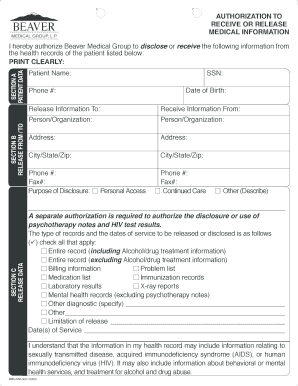
Get Beaver Medical Group Medical Records
How it works
-

Open form follow the instructions
-

Easily sign the form with your finger
-

Send filled & signed form or save
How to fill out the Beaver Medical Group Medical Records online
This guide provides a step-by-step approach to filling out the Beaver Medical Group Medical Records form online. By following the instructions outlined here, users can efficiently complete the authorization process for disclosing or receiving medical information.
Follow the steps to fill out the form accurately and efficiently.
- Click ‘Get Form’ button to obtain the form and open it in the editor.
- In Section A, Patient Data, clearly print the patient's name, phone number, social security number (SSN), and date of birth in the designated fields.
- Move to Section B, Release From/To, where you will indicate the person or organization from whom you are releasing information, as well as the person or organization to which it will be sent. Fill in all address details, including city, state, and ZIP code.
- In Section C, Release Data, check the purpose of disclosure. Options include 'personal access,' 'continued care,' or 'other.' If selecting 'other,' be sure to describe the reason in the field provided.
- Next, indicate the type of records you wish to release by checking the applicable options. Also, provide dates of service for the records being requested.
- Proceed to Section D, Duration, and specify when this authorization will expire. If left blank, the authorization will automatically expire six months from the date of signing.
- In Section E, Authorization, sign the form where indicated, ensuring to print your name and specify your relationship to the patient if applicable.
- If applicable, have a witness sign in the indicated area before proceeding.
- Once the form is completely filled out, you can save your changes, download or print the document, or share it as needed.
Complete your medical records request online today.
The easiest way to collect all of your medical records is to use a centralized request system. By contacting each provider and stating you need your Beaver Medical Group Medical Records, you can simplify the process. In addition, uslegalforms offers tools that assist in compiling and managing multiple requests, making it straightforward and less stressful.