Loading
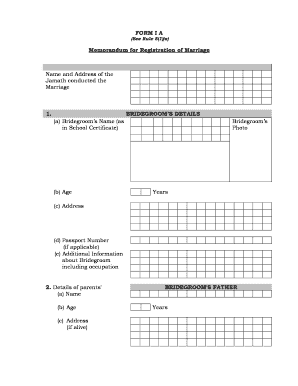
Get Memorandum For Registration Of Marriage Online
How it works
-

Open form follow the instructions
-

Easily sign the form with your finger
-

Send filled & signed form or save
How to fill out the Memorandum For Registration Of Marriage Online
Filing the Memorandum For Registration Of Marriage Online is a vital step in officially recognizing your marriage. This guide provides clear instructions on how to complete the necessary components of the form with ease.
Follow the steps to effectively fill out the form online.
- Press the ‘Get Form’ button to obtain the form and access it in your editing environment.
- Begin with the section that requests the name and address of the Jamath that conducted the marriage. Ensure accurate details are provided to avoid any issues.
- Fill out the bridegroom's details, which includes uploading a photo and entering the bridegroom’s name as it appears on their school certificate, age, address, and passport number if applicable. Provide any additional information about the bridegroom, including their occupation.
- Complete the details of the bridegroom's parents. Enter the father's name, age, and address if alive. Repeat this process for the bridegroom's mother.
- Move on to the bride’s details. Similar to the previous section, upload a photo and enter the bride’s name as it appears on their school certificate, age, address, and passport number if applicable. Include additional information about the bride, including occupation.
- Provide the details of the bride’s parents, including the father's name, age, and address if alive. Repeat this for the bride's mother.
- Enter details about the wedding Mahar, if applicable.
- Provide the name and address of the Khazi or Imam who conducted the marriage, along with the date and time of the marriage. Also, include the full address of the venue where the marriage took place.
- Require signatures from the Khazi/Imam, bridegroom, and bride in the appropriate sections.
- Fill in the details about the Vali (guardian of the bride), including their name, father’s name, relationship to the bride, address, and signature.
- Complete the section for the Vakil (representative of Vali) with their name, father’s name, address, and signature.
- Finally, fill out the details about the witnesses, including their names, father’s names, addresses, and signatures.
- Once all sections are completed, be sure to save any changes. You may then download, print, or share the completed form.
Begin completing your Memorandum For Registration Of Marriage Online today!
You will no longer receive a marriage certificate at the ceremony. All certificates will be produced electronically and are no longer handwritten. If your ceremony is taking place with Registrars in attendance, then they will return the marriage schedule to the office.
Industry-leading security and compliance
US Legal Forms protects your data by complying with industry-specific security standards.
-
In businnes since 199725+ years providing professional legal documents.
-
Accredited businessGuarantees that a business meets BBB accreditation standards in the US and Canada.
-
Secured by BraintreeValidated Level 1 PCI DSS compliant payment gateway that accepts most major credit and debit card brands from across the globe.