Loading
Get Marketing Campaign - Consent Form 2020-2026
How it works
-

Open form follow the instructions
-

Easily sign the form with your finger
-

Send filled & signed form or save
How to fill out the MARKETING CAMPAIGN - CONSENT FORM online
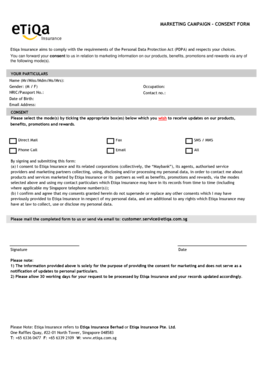
Filling out the MARKETING CAMPAIGN - CONSENT FORM is essential for consenting to receive marketing information from Etiqa Insurance. This guide provides clear instructions on how to complete the form online, ensuring that your preferences are accurately recorded.
Follow the steps to fill out the form effectively.
- Click ‘Get Form’ button to obtain the form and open it in the editor.
- Begin by filling out your particulars. Provide your full name and select your gender. Enter your NRIC or passport number, your occupation, and your contact number. Additionally, include your date of birth and email address.
- In the consent section, select the mode(s) through which you would like to receive updates. Be sure to tick all that apply: Direct Mail, Fax, SMS/MMS, Phone Call, Email, or select 'All' if you wish to receive updates through all modes.
- Read the consent statement carefully. By signing the form, you consent to Etiqa Insurance collecting and processing your personal data as described. Ensure you understand that this consent does not replace any prior consents you may have provided.
- Sign the form to indicate your agreement and provide the date of your signature.
- Once the form is completed, you can save your changes. Look for options to download, print, or share the completed form as needed.
Complete your MARKETING CAMPAIGN - CONSENT FORM online today to ensure you receive the latest information from Etiqa Insurance.
To fill out a consent form correctly, begin by reading it thoroughly to understand its intention. Provide your personal information accurately in the designated fields. Once completed, sign and date the form to confirm your consent and ensure all required steps are taken for the 'MARKETING CAMPAIGN - CONSENT FORM.'