Get Elite Paycheck Plus
How it works
-

Open form follow the instructions
-

Easily sign the form with your finger
-

Send filled & signed form or save
How to fill out the Elite Paycheck Plus online
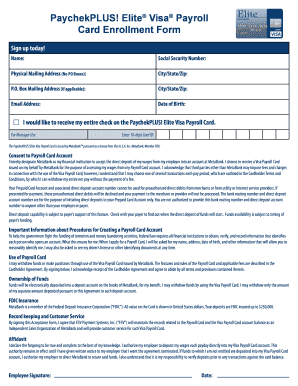
Completing the Elite Paycheck Plus form online is a crucial step for individuals looking to receive their wages via the PaychekPLUS! Elite Visa Payroll Card. This guide provides clear, step-by-step instructions to help you navigate the enrollment process smoothly and efficiently.
Follow the steps to complete the Elite Paycheck Plus form online.
- Press the ‘Get Form’ button to obtain the Elite Paycheck Plus form and open it in the online editor.
- Input your name in the designated field to ensure the card is registered under your legal name.
- Enter your Social Security number securely in the provided space; this is necessary for identity verification and account setup.
- Fill in your physical mailing address accurately. Note that PO Boxes are not accepted.
- If you have a P.O. Box mailing address, provide that information along with the corresponding city, state, and ZIP code.
- Input your email address to receive important updates related to your payroll card.
- Specify your date of birth to verify your identity as part of the enrollment process.
- Indicate your preference to receive your entire paycheck on the PaychekPLUS! Elite Visa Payroll Card by selecting the corresponding option.
- For manager use, if applicable, ensure the 10-digit card ID is entered in the specified field.
- Review the consent section and acknowledge that you are designating MetaBank as your financial institution for direct deposits.
- Read through the important information regarding the procedures for creating a payroll card account and ensure you understand the requirements.
- Once all fields are completed, save your changes, and choose to download, print, or share the completed form as desired.
Complete your Elite Paycheck Plus enrollment today for efficient payroll management.
The routing number for PayChekPLUS is essential for directing your transactions accurately. This number helps ensure that your funds are processed smoothly and without delay. To find the specific routing number tied to your Elite Paycheck Plus account, refer to your account details or consider reaching out to customer support for assistance. It's crucial to have this information handy for any transactions involving PayChekPLUS.