Loading
Form preview
  • US Legal Forms
  • Form Library
  • More Forms
  • More Uncategorized Forms
  • Psa Pass

Get Psa Pass

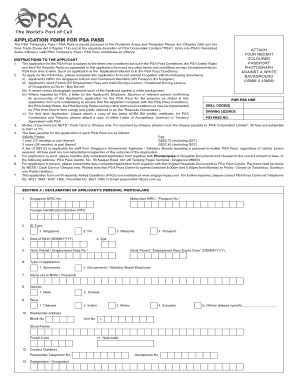
E absolute discretion of PSA Corporation Limited ( PSA ). Entry into PSA s Restricted Areas without a valid PSA Temporary Pass / PSA Pass constitutes an offence. ATTACH YOUR RECENT COLOURED PASSPORT PHOTOGRAPH AGAINST A WHITE BACKGROUND (35MM X 45MM) INSTRUCTIONS TO THE APPLICANT 1. The application for the PSA Pass is subject to the terms and conditions set out in the PSA Pass Conditions, the PSA Safety Rules and the PSA Security Rules as appended to this application form and any othe.

How it works

  1. Open form

    Open form follow the instructions

  2. Easily sign form

    Easily sign the form with your finger

  3. Share form

    Send filled & signed form or save

How to fill out the Psa Pass online

The Psa Pass application process is essential for gaining access to restricted areas managed by PSA Corporation Limited. This guide will walk you through the process of completing the Psa Pass application form online in a straightforward manner.

Follow the steps to successfully complete your Psa Pass application.

  1. Click 'Get Form' button to retrieve the application form and open it in the editor.
  2. Provide your personal particulars in Section A, including your NRIC or passport number, date of birth, and contact information. Ensure accuracy to avoid delays.
  3. Upload a recent coloured passport photograph against a white background, ensuring it meets the specified dimensions (35mm x 45mm).
  4. Indicate your application type, which could be sponsored or for government/statutory board employees. Fill in your work permit or employment pass number if applicable.
  5. Detail the purpose for seeking entry into PSA’s restricted areas in the designated field. This should be clear and concise.
  6. Complete Section B if applicable, where your employer or sponsor must endorse your application, providing their company details and confirming your employment status.
  7. Review all information thoroughly for accuracy. Once confirmed, sign the declaration in Section A to affirm the truthfulness of the provided information.
  8. Choose the mode of payment for the application fee, which includes NETS, Cash Card, or Cheque. Ensure to complete payment as stipulated.
  9. Finalize your application by either printing the form for in-person submission or saving it for electronic submission if applicable. Remember to keep a copy for your records.

Get started and fill out your Psa Pass application online today!

Get form

Experience a faster way to fill out and sign forms on the web. Access the most extensive library of templates available.
Get form

Related content

Assessment of the Patient Acceptable Symptom State...
by E Lubrano · 2020 · Cited by 47 — This study showed that PASS might be used as an...
Learn more
Academic Mission Investment | UCSF School of...
SOM departments are assessed both AMI and UME AMI rates on: Funds flow payments received...
Learn more
Agilent PSA Series Spectrum Analyzers W-CDMA and...
The Agilent PSA Series offers high- performance spectrum analysis up to 50 GHz with...
Learn more

Related links form

Natural Selection Worksheet Nationalism At Center Stage Chapter 7 Section 2 County Of Riverside Employment Services School Attendance - Mvc Hair Analysis Webquest

Questions & Answers

Get answers to your most pressing questions about US Legal Forms API.

Contact support

To fill up a PSA birth certificate, start with accurate information in the designated fields. Ensure your full name, date of birth, and parents' information are entered correctly. Mistakes can lead to complications later on, especially if you're looking to utilize your PSA Pass for other services.

Filling up a PSA appointment is easy. Access the online appointment system and input your personal information as required. Ensure that your details match those on your identification to prevent any issues when you arrive for your appointment.

You can annotate a PSA birth certificate at the local civil registry where the document was originally registered. Bring all required documentation, including your PSA Pass, to avoid any delays. The registry staff will assist you in processing the necessary annotations, ensuring your birth certificate is up to date.

To fill out a PSA online appointment, navigate to the official PSA appointment portal. Enter your details accurately, including the reason for your appointment. After confirming your information, you will receive a confirmation email, which you should keep handy when visiting the PSA office.

Filling up the PSA form is straightforward. Begin by entering correct personal information, including full name, date of birth, and other identification details. Ensure that all entries are accurate, as mistakes can delay processing, particularly if you are using your PSA Pass for additional services.

To correct a PSA birth certificate, you must file a petition for correction with the local civil registry where the document was issued. Gather required documents, such as your PSA Pass, and submit these alongside the petition. The civil registry will guide you through the correction process, ensuring the changes are legitimate and properly documented.

To obtain your Philippine birth certificate from abroad, you can request it through the PSA's online service or by emailing the Philippine embassy in your current location. Make sure to provide all necessary identification details, including your PSA Pass information, to expedite the process. Additionally, consider checking the relevant fees and processing times on the official website.

To obtain the PSA Pass in person, locate the nearest authorized office or center that processes these applications. Bring your identification and any other required documents to submit on site. If you need detailed support, the US Legal Forms platform is a great resource to ensure you have everything in order for your in-person visit.

To apply for a temporary PSA Pass, visit the official site or authorized agents that provide this option. A temporary pass can usually be issued for short-term needs, and you'll need to provide identification and other relevant documents. For more assistance, US Legal Forms can offer specific templates and guidance tailored for temporary applications.

Applying for the PSA Pass involves filling out an application form and providing the necessary documentation. You can easily navigate this process through the US Legal Forms platform, which offers step-by-step instructions to guide you. Ensure you gather all required documents beforehand to expedite your submission.

Get This Form Now!

Use professional pre-built templates to fill in and sign documents online faster. Get access to thousands of forms.
Get form
If you believe that this page should be taken down, please follow our DMCA take down processhere.

Industry-leading security and compliance

US Legal Forms protects your data by complying with industry-specific security standards.
  • In businnes since 1997
    25+ years providing professional legal documents.
  • Accredited business
    Guarantees that a business meets BBB accreditation standards in the US and Canada.
  • Secured by Braintree
    Validated Level 1 PCI DSS compliant payment gateway that accepts most major credit and debit card brands from across the globe.
Get Psa Pass
Get form
Form Packages
Adoption
Bankruptcy
Contractors
Divorce
Home Sales
Employment
Identity Theft
Incorporation
Landlord Tenant
Living Trust
Name Change
Personal Planning
Small Business
Wills & Estates
Packages A-Z
Form Categories
Affidavits
Bankruptcy
Bill of Sale
Corporate - LLC
Divorce
Employment
Identity Theft
Internet Technology
Landlord Tenant
Living Wills
Name Change
Power of Attorney
Real Estate
Small Estates
Wills
All Forms
Forms A-Z
Form Library
Customer Service
Your Privacy Choices
Terms of Service
Privacy Notice
Legal Hub
Content Takedown Policy
Bug Bounty Program
About Us
Help Portal
Legal Resources
Blog
Affiliates
Contact Us
Delete My Account
Site Map
Industries
Forms in Spanish
Localized Forms
State-specific Forms
Forms Kit
Legal Guides
Real Estate Handbook
All Guides
Prepared for You
Notarize
Incorporation services
Our Customers
For Consumers
For Small Business
For Attorneys
Our Sites
US Legal Forms
USLegal
FormsPass
pdfFiller
signNow
altaFlow
DocHub
Instapage
Social Media
Call us now toll free:
+1 833 426 79 33
As seen in:
  • USA Today logo picture
  • CBC News logo picture
  • LA Times logo picture
  • The Washington Post logo picture
  • AP logo picture
  • Forbes logo picture
© Copyright 1997-2025
airSlate Legal Forms, Inc.
3720 Flowood Dr, Flowood, Mississippi 39232
Form Packages
Adoption
Bankruptcy
Contractors
Divorce
Home Sales
Employment
Identity Theft
Incorporation
Landlord Tenant
Living Trust
Name Change
Personal Planning
Small Business
Wills & Estates
Packages A-Z
Form Categories
Affidavits
Bankruptcy
Bill of Sale
Corporate - LLC
Divorce
Employment
Identity Theft
Internet Technology
Landlord Tenant
Living Wills
Name Change
Power of Attorney
Real Estate
Small Estates
Wills
All Forms
Forms A-Z
Form Library
Customer Service
Your Privacy Choices
Terms of Service
Privacy Notice
Legal Hub
Content Takedown Policy
Bug Bounty Program
About Us
Help Portal
Legal Resources
Blog
Affiliates
Contact Us
Delete My Account
Site Map
Industries
Forms in Spanish
Localized Forms
State-specific Forms
Forms Kit
Legal Guides
Real Estate Handbook
All Guides
Prepared for You
Notarize
Incorporation services
Our Customers
For Consumers
For Small Business
For Attorneys
Our Sites
US Legal Forms
USLegal
FormsPass
pdfFiller
signNow
altaFlow
DocHub
Instapage
Social Media
Call us now toll free:
+1 833 426 79 33
As seen in:
  • USA Today logo picture
  • CBC News logo picture
  • LA Times logo picture
  • The Washington Post logo picture
  • AP logo picture
  • Forbes logo picture
© Copyright 1997-2025
airSlate Legal Forms, Inc.
3720 Flowood Dr, Flowood, Mississippi 39232