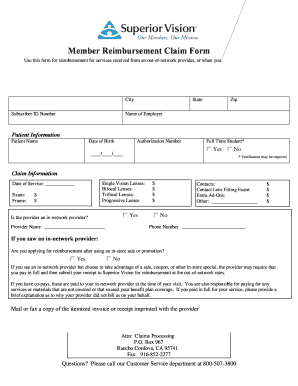
Member Reimbursement Claim Form Use this form for reimbursement for services received from an out-of-network provider or when you ve utilized an in-store sale or promotion from an in-network provider. Subscriber Information Please print clearly Subscriber Name Daytime Phone Evening Phone Mailing Address City State Name of Employer Zip Patient Information Patient Name Date of Birth Authorization Number Full Time Student Yes // No Verification may be required Claim Information Single Vision Lenses Bifocal Lenses Progressive Lenses Date of Service Exam Frame Is the provider an in-network provider Provider Name Contacts Contact Lens Fitting Exam Extra Ad-Ons Other Phone Number If you saw an in-network provider Are you applying for reimbursement after using an in-store sale or promotion you pay in full and then submit your receipt to Superior Vision for reimbursement at the out-of-network rates. Subscriber Information Please print clearly Subscriber Name Daytime Phone Evening Phone Mailing ....
Open form follow the instructions
Easily sign the form with your finger
Send filled & signed form or save
How to fill out the Superior Vision Reimbursement Form Online
Completing the Superior Vision Reimbursement Form online is a straightforward process that ensures you receive the reimbursement you are entitled to for services received. This guide will provide you with clear, step-by-step instructions for filling out each section of the form accurately.
Follow the steps to fill out the form online with ease.
- Click ‘Get Form’ button to obtain the form and open it in the editor.
- Begin by entering your Subscriber Information. This includes your name, contact phone numbers, mailing address, Subscriber ID Number, and employer name. Ensure that all details are clearly printed.
- Next, provide Patient Information by entering the patient’s name, date of birth, and authorization number. Indicate if the patient is a full-time student by selecting 'Yes' or 'No'.
- In the Claim Information section, fill out details regarding the services received. This includes any lenses (single vision, bifocal, trifocal, or progressive) and their respective costs. Also, include any exam and frame costs.
- Indicate whether the provider is an in-network provider by checking 'Yes' or 'No'. If they are in-network, provide the provider's name and contact number.
- If you utilized an in-store sale with an in-network provider, specify whether you are applying for reimbursement after using the sale. Check 'Yes' or 'No'.
- If applicable, provide a brief explanation for why your provider did not bill Superior Vision on your behalf if you paid in full.
- Finally, gather all necessary documentation, including the itemized invoice or receipt, and fax or mail it along with the completed form to the provided contact information.
- Save your changes, download, print, or share the form as needed.
Complete your Superior Vision Reimbursement Form online today to ensure timely reimbursement for your eligible expenses.
Experience a faster way to fill out and sign forms on the web. Access the most extensive library of templates available.
Related content
To file online, log in at superiorvision.com, click 'Submit a claim', and fill out the...
Mail a copy of the itemized invoice or receipt imprinted with the provider's name and...
Dec 9, 2024 — • Optimize vision – glasses if needed. • Optimize hearing ... the...
Get answers to your most pressing questions about US Legal Forms API.
How to fill up a claim form?
To fill up a claim form, start by providing your contact information and the details of the services rendered. Include dates and any other relevant information to support your claim. Submitting your Superior Vision Reimbursement Form Online can streamline this process and save you time.
How do I write a reimbursement claim?
Writing a reimbursement claim requires clear and detailed information. Begin with a brief description of the services received, include costs, and any relevant claim identifiers. Use our uslegalforms platform to help you structure your claim properly and ensure all necessary information is included.
How to fill a reimbursement claim form online?
To fill out a reimbursement claim form online, start by logging into the Superior Vision portal. Navigate to the claims section where you can access the form. After entering the required information, review it for accuracy before submitting your Superior Vision Reimbursement Form Online.
How to fill out a reimbursement form?
Filling out a reimbursement form is straightforward. Begin by entering your personal details, such as your name and membership number. Make sure to specify the services you received and attach any necessary documentation. For a seamless experience, consider using our uslegalforms platform for guided assistance.
Can I use Superior Vision online?
Yes, you can easily access Superior Vision services online. The online platform allows you to manage your vision benefits efficiently. With our user-friendly interface, you can submit your Superior Vision Reimbursement Form Online without any hassle.
How do I get reimbursed from VSP?
To get reimbursed from VSP, gather your receipts for eligible eyewear or services and fill out the Superior Vision Reimbursement Form Online. Submit both the form and the receipts to VSP for processing. Keep a record of your submission to track the status of your reimbursement claim.
How to get out of VSP?
If you wish to get out of VSP, review your plan's terms and conditions, as this varies by employer or provider. Contact your HR department or VSP customer service for guidance on cancellation procedures. Note that you may need to formally notify your employer and may have to return any VSP materials.
How do you use VSP benefits?
To use VSP benefits, locate a provider within the VSP network and schedule an appointment for an eye exam or eyewear. After receiving services, fill out the Superior Vision Reimbursement Form Online if payment is made upfront. Submitting the form will help you claim your benefits effectively.
How long does it take to get VSP reimbursement?
Typically, it takes about two to four weeks to receive VSP reimbursement after submitting the Superior Vision Reimbursement Form Online. Processing times can vary based on the volume of claims and completeness of your submission. Checking your claim status online can provide additional insights into the process.
How to get a reimbursement from VSP?
To receive reimbursement from VSP, complete the Superior Vision Reimbursement Form Online. This form allows you to submit your expenses for eyewear or services covered by your plan. Once filled out, submit it along with your receipts. Make sure to keep copies for your records.
Use professional pre-built templates to fill in and sign documents online faster. Get access to thousands of forms.
If you believe that this page should be taken down, please follow our DMCA take down process here.
This form is available in several versions. Select the version you need from the drop-down list below.