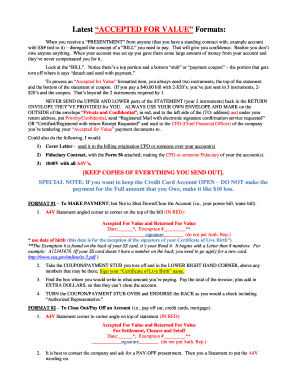
A BILL you need to pay. That will give you confidence. Realize you don t owe anyone anything. When your account was set up you gave them some large amount of money from your account and they ve never compensated you for it. Look at the BILL . Notice there s a top portion and a bottom stub or payment coupon the portion that gets torn off where it says detach and send with payment. To process an Accepted for Value formatted item, you always need two in.
Open form follow the instructions
Easily sign the form with your finger
Send filled & signed form or save
How to use or fill out the A4v online
Filling out the A4v form can appear complicated, but with a clear understanding of each section, you can complete it confidently. This guide will walk you through the necessary steps and components involved in submitting the A4v online.
Follow the steps to successfully complete the A4v form.
- Click ‘Get Form’ button to obtain the form and open it in the editor.
- Begin by identifying the top portion of the statement where you will mark the 'Accepted For Value and Returned For Value' section in red. Fill in the appropriate date and exemption number, followed by your signature.
- Take the payment stub or coupon from the bottom of the statement. In the lower right corner, sign your name as per your Certificate of Live Birth.
- Complete the section specifying the amount you're paying, ensuring to add extra dollars to prevent account closure.
- Turn the payment stub over and endorse the back as you would a check, including the term 'Authorized Representative.'
- Ensure that you do not send both the upper and lower portions of the statement back in the provided return envelope. Use your own envelope, marking it as 'Private and Confidential' in red on the outside.
- Choose a method of mailing such as 'Registered Mail with electronic signature confirmation service requested' or 'Certified/Registered with return Receipt Requested,' and direct it to the CFO of the company.
- Review your completed form and maintain copies of all documentation sent for your records. Save changes, download, print, or share as needed.
Begin the process of completing your A4v documents online today.
Experience a faster way to fill out and sign forms on the web. Access the most extensive library of templates available.
Related content
whose compensation is for services performed outside of Arizona,. (EMPLOYEE'S NAME) has...
Mar 19, 2004 — 1UXM is an A4V mutant of human SOD1, an OXIDOREDUCTASE, with a mutation...
* 2022: The next -generation A series (A4V, A7V, A8H, etc.) will be released to replace...
Get answers to your most pressing questions about US Legal Forms API.
What is the frequency response of Adam T series?
Adam Professional Audio T7V Overview The unit is bi-amped with 50W allocated to the woofer, while 20W powers the tweeter, which combine to provide a frequency response of 39 Hz to 25 kHz and a maximum SPL of 110 dB.
What is the frequency response of the Adam a7v?
Frequency Response @ -6 dB: 40 Hz - 45 kHz. Peak SPL per speaker at 1 m: 105 dB SPL.
What is the frequency response of the Adam A4V?
With a frequency range of 52 Hz to 45 kHz, the A4V can accommodate a broad spectrum of audio applications—from producing podcasts to mixing string quartets—and will fit well within immersive and 3D setups.
What is the frequency response of Adam speaker?
In the case of the ADAM Audio T Series and AX Series, the frequency response limits are defined at -10 dB; a choice reflecting that a 10 dB decrease in volume level subjectively sounds around half as loud.
How much does Adam A4V weigh?
Tech Specs Weight: 12.81 lbs.
What is the frequency response of Adam a7x monitors?
Linear frequency response of 42Hz–50kHz. Maximum peak sound pressure per pair at 1m ≥ 114dB.
Use professional pre-built templates to fill in and sign documents online faster. Get access to thousands of forms.
If you believe that this page should be taken down, please follow our DMCA take down process here.