Loading
Get Prospercare
How it works
-

Open form follow the instructions
-

Easily sign the form with your finger
-

Send filled & signed form or save
How to fill out the Prospercare form online
Filling out the Prospercare form online can be a straightforward process when you have clear guidance. This guide will walk you through each section of the form to ensure you submit your application accurately and efficiently.
Follow the steps to complete your Prospercare application.
- Press the ‘Get Form’ button to retrieve the Prospercare form and open it in your editor of choice.
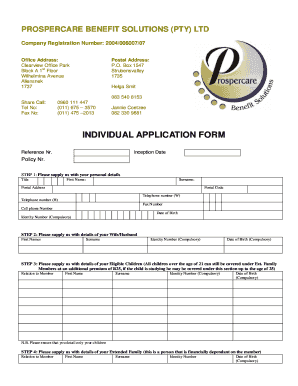
- Provide your personal information in the designated fields. This includes your title, first name, surname, postal address, postal code, telephone number (work and home), fax number, cell phone number, date of birth, and identity number, which is mandatory.
- Fill out the details of your partner. This includes their first names, surname, identity number (compulsory), and date of birth (compulsory).
- Enter the details of your eligible children. Record their relation to you, first names, surnames, identity numbers (compulsory), and dates of birth (compulsory). Remember, only include your children, and note that children over 21 can be covered at an additional premium if studying.
- Supply information about your extended family members. Include their relation to you, first names, surnames, identity numbers, and date of birth (compulsory).
- Provide your nominated beneficiary's details. Fill in their first names, surname, date of birth, and identity number.
- Complete the benefits section, where you will list the benefits for various family members, as well as the premium rates applicable.
- Review all information entered to ensure accuracy. Sign and date the form where indicated, confirming your understanding of the policy terms.
- Once you have filled out the form, save any changes made. You can then download, print, or share the completed form as necessary.
Complete your Prospercare application online today to ensure your coverage needs are met.
You can contact Prospercare through several convenient methods. For immediate assistance, visit the customer support section on the Prospercare website, where you will find options for live chat and email support. Alternatively, you can reach out via phone; the number is listed prominently on our contact page. We are dedicated to helping you with any questions about Prospercare, ensuring you receive the support you need.