Loading
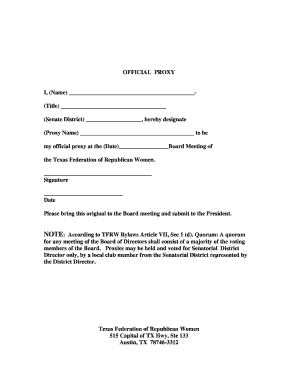
Get Official Proxy - Tfrw 2020-2026
How it works
-

Open form follow the instructions
-

Easily sign the form with your finger
-

Send filled & signed form or save
How to fill out the OFFICIAL PROXY - Tfrw online
This guide provides clear and concise instructions for completing the OFFICIAL PROXY - Tfrw form online. By following these steps, users can easily designate their proxy for the Texas Federation of Republican Women Board Meeting.
Follow the steps to complete the OFFICIAL PROXY - Tfrw form online
- Click ‘Get Form’ button to obtain the form and open it in the editor.
- In the first blank field, enter your name. Be sure to provide your full name as it appears on official documents.
- In the next field labeled 'Title', include your official title or position that you hold within the organization.
- Fill in your Senate District information in the corresponding field, ensuring accuracy in your designation.
- Next, designate your chosen proxy by entering their name in the 'Proxy Name' field.
- Specify the date of the Board Meeting in the provided space, ensuring the format is clear and correct.
- Sign the document in the designated signature area to indicate your approval and authorization.
- Finally, enter the date on which you are signing the proxy form.
- After completing all fields, be sure to save your changes. You can then download, print, or share the completed form as necessary.
Complete your OFFICIAL PROXY - Tfrw form online today!