Loading
Get Independent Provider Weekly Timesheet
How it works
-

Open form follow the instructions
-

Easily sign the form with your finger
-

Send filled & signed form or save
How to fill out the independent provider weekly timesheet online
The independent provider weekly timesheet is a crucial document used to record the hours and types of assistance provided to individuals receiving care. This guide offers clear, step-by-step instructions to ensure users can fill out the form accurately and efficiently online.
Follow the steps to complete the independent provider weekly timesheet online
- Click ‘Get Form’ button to obtain the form and open it in the editor.
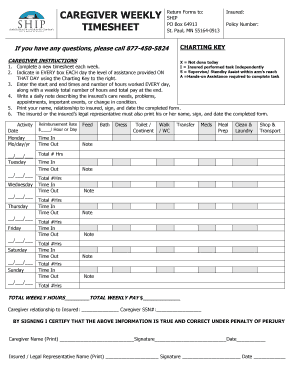
- Begin by filling in the insured's information, including their name and policy number at the top of the form.
- For each day of the week, indicate the level of assistance provided using the Charting Key. This should be noted in every box for each day.
- Document the start and end times for each day, and calculate the total number of hours worked. Ensure you also include a weekly total number of hours and pay at the end of the form.
- Write a daily note that summarizes the insured’s care needs, any problems encountered, scheduled appointments, significant events, or changes in their condition.
- Print your name clearly, indicate your relationship to the insured, sign, and date the completed form.
- Have the insured or their legal representative print their name, sign, and date the form.
- Once all fields are completed, you may save your changes, download, print, or share the form as needed.
Complete your independent provider weekly timesheet online today.
Filling out a weekly time sheet involves logging your hours in an organized manner. Start with your basic information, then enter the hours worked each day, ensuring you account for breaks or any time off. Use your independent provider weekly timesheet to make this task straightforward. Consistent records also aid in accurate payroll and project management.