Loading
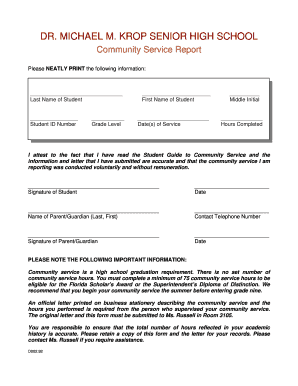
Get Community Service Report - Dr Michael M Krop Senior High School
How it works
-

Open form follow the instructions
-

Easily sign the form with your finger
-

Send filled & signed form or save
How to fill out the Community Service Report - Dr Michael M Krop Senior High School online
The Community Service Report is an essential document to meet graduation requirements at Dr Michael M Krop Senior High School. This guide will help users navigate through the online filling process of the report, ensuring all necessary information is accurately provided.
Follow the steps to successfully complete the Community Service Report online.
- Press the ‘Get Form’ button to access the Community Service Report and open it in your chosen online editor.
- Begin filling in the student's last name in the designated field. Ensure that the entry is clear and legible.
- Next, input the student ID number in the appropriate section, ensuring accuracy to maintain identification.
- Indicate the student's grade level by selecting the correct option from the dropdown or entering it as directed.
- Fill in the first name of the student in the provided field, making sure to match the name on official documents.
- Record the dates of service in the specified area, providing exact dates for clarity.
- Enter the middle initial of the student, if applicable, in the designated space to complete their name correctly.
- Document the total hours of community service completed in the corresponding field to reflect the effort accurately.
- Review the attestation statement verifying that the information provided is accurate. Make sure to understand its significance before proceeding.
- Sign the report in the designated section to confirm the information is correct and that the community service was conducted voluntarily.
- Input the date of signing in the provided field to document when the report was completed.
- Next, enter the name of the parent or guardian in the specified area, using the format of last name followed by first name.
- Provide a contact telephone number for the parent or guardian in the designated field to ensure they can be reached.
- Have the parent or guardian sign the report in the appropriate space to affirm their agreement with the report's content.
- Finally, enter the date when the parent or guardian signed the report in the corresponding field.
- Once all sections are completed, save your changes, and consider downloading or printing the form for your records.
Start completing your Community Service Report online to ensure your graduation requirements are met.