Loading
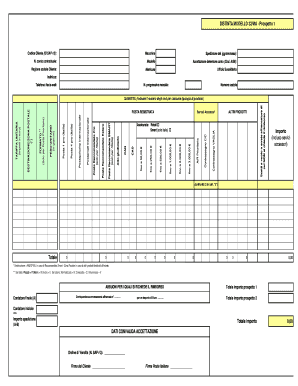
Get 0,00 Distinta Modello 32/ma - Prospetto 1 Importo (incluso ... 2020-2025
How it works
-

Open form follow the instructions
-

Easily sign the form with your finger
-

Send filled & signed form or save
How to use or fill out the 0,00 DISTINTA MODELLO 32/MA - Prospetto 1 Importo (incluso ...) online
This guide provides a comprehensive walkthrough for successfully filling out the 0,00 DISTINTA MODELLO 32/MA - Prospetto 1 Importo form online. Follow the instructions carefully to ensure accurate completion of the required fields.
Follow the steps to fill out the form accurately.
- Click ‘Get Form’ button to obtain the form and open it for editing.
- Fill in the 'Codice Cliente (ID SAP r3)' section with the relevant customer identification code.
- Specify the 'Macchina' or machine being referenced in the document.
- Enter the date for 'Spedizione del (gg/mm/aaaa)', making sure to use the correct day, month, and year format.
- Provide the 'N. conto contrattuale' or contract account number as applicable.
- Indicate the 'Modello' which relates to the specific model of the service used.
- Complete the 'Accettazione detentore conto (Cod. AGE)' section, entering the acceptance code.
- Input the 'Ragione sociale Cliente', which is the official name of the client or company.
- Fill out the 'Matricola' or registration number as required.
- Provide the 'Ufficio Sussidiario', or subsidiary office information.
- Enter the 'Indirizzo', or address of the client properly.
- Detail the 'N. progressivo mensile' which represents the monthly progressive number.
- List the 'Telefono /fax/e-mail' details for contact purposes.
- Report the 'Numero scatole' or number of boxes being referenced.
- Specify any 'Scatti a vuoto o errate affrancature di cui NON si chiede il rimborso', marking them appropriately.
- Indicate the chosen options for 'Contrassegno C/C', 'A/R Prioritaria', etc., as per your needs.
- Fill in 'PESO UNITARIO' with the weight in grams for the shipping.
- Complete the 'DESTINAZIONE/ZONA POSTALE' fields with postal destination details.
- Calculate and enter the 'TARIFFA UNITARIA' indicating unit prices.
- Input the 'QUANTITA' by specifying the number of shipments for each product type.
- Review and fill in the 'Importo (incluso servizi accessori)' accurately for total service costs.
- Complete the section for 'ABBUONI PER I QUALI SI RICHIEDE IL RIMBORSO' if applicable.
- After reviewing all fields for accuracy, users can save changes, download, print, or share the completed form.
Complete your documents online today for efficient processing.
La distinta postale è un documento che riporta i dettagli delle spedizioni effettuate, come data, destinatario e tipo di servizio utilizzato. Essa crea una registrazione chiara delle transazioni postali effettuate. Con USLegalForms, hai accesso a strumenti che semplificano l'elaborazione delle distinte postali. Utilizzare il 0,00 DISTINTA MODELLO 32/MA - Prospetto 1 Importo (incluso può facilitare il monitoraggio delle tue spedizioni.
Industry-leading security and compliance
US Legal Forms protects your data by complying with industry-specific security standards.
-
In businnes since 199725+ years providing professional legal documents.
-
Accredited businessGuarantees that a business meets BBB accreditation standards in the US and Canada.
-
Secured by BraintreeValidated Level 1 PCI DSS compliant payment gateway that accepts most major credit and debit card brands from across the globe.