Loading
Form preview
  • US Legal Forms
  • Form Library
  • More Forms
  • More Multi-State Forms
  • Erupay 2020

Get Erupay 2020-2026

How it works

  1. Open form

    Open form follow the instructions

  2. Easily sign form

    Easily sign the form with your finger

  3. Share form

    Send filled & signed form or save

How to fill out the Erupay online

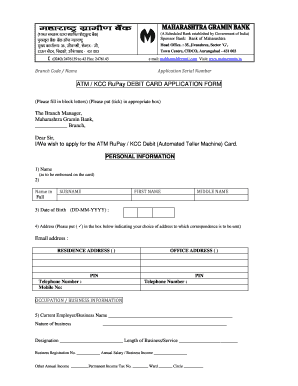
Filling out the Erupay online can be a straightforward process if you follow each step carefully. This guide will provide you with detailed instructions for each section of the form, ensuring that you can complete your application efficiently and accurately.

Follow the steps to successfully complete your Erupay application

  1. Press the ‘Get Form’ button to access the Erupay application form. This action will open the form in your online editor so you can begin filling it out.
  2. In the personal information section, fill in your name as you would like it to appear embossed on the card. Provide your full name, including your surname, first name, and middle name.
  3. Enter your date of birth in the format DD-MM-YYYY.
  4. Provide your address details. Indicate whether you would like correspondence sent to your residence or office address by checking the appropriate box.
  5. Include your email address and contact numbers. Ensure you provide both your mobile number and any other telephone number you may have.
  6. In the occupation/business information section, fill in details about your current employer or business name, nature of business, designation, length of service, business registration number, annual salary or business income, and any other annual income.
  7. For financial information, include your primary account details such as the type of account, account number, balance, and any joint holders' names if applicable.
  8. If you hold any other credit or ATM cards, please provide the necessary details including their names, issuing institutions, validity periods, and limits.
  9. State your nationality and resident status, specifying if you are an Indian resident or non-resident.
  10. Provide documentation for positive identification, indicating which document you are using and including relevant details like the issuing authority and date of issue.
  11. Read the declaration statement carefully. Confirm that all information is correct by providing your authorized signature(s) as required.
  12. After completing all sections, you can save your changes, download the completed form, print it, or share it as needed.

Complete your Erupay application online today for a hassle-free banking experience.

Get form

Experience a faster way to fill out and sign forms on the web. Access the most extensive library of templates available.
Get form

Related content

Policy 20054 Equivalent Residential Unit Transfer...
One ERU represents 262.5 gallons of daily wastewater flow. The allocation of sewer...
Learn more
Árbók hins Íslenzka fornleifafélags (1907)
Columbia University Libraries Digital Collections. Árbók hins Íslenzka fornleifafélags...
Learn more

Related links form

Fisher College Of Business Minor Planning Form - Fisher Osu Hortonville Area School District ACKNOWLEGEMENT AND - Hasd Skills Worksheet Reinforcement Cambridge By Law 187 06

Questions & Answers

Get answers to your most pressing questions about US Legal Forms API.

Contact support

To fill out a remittance application form using Erupay, first gather all necessary details about the sender and receiver, including addresses and contact information. Next, accurately fill in the form with the amount to be sent and any additional notes or references. If you encounter challenges, uslegalforms can provide helpful resources to guide you through the process seamlessly.

Using the digital rupee app powered by Erupay is simple and intuitive. Begin by downloading the app and creating an account. After that, you can link your bank account or add funds directly, allowing you to send and receive e-rupees easily. The app also features transaction tracking and budgeting tools, making your financial management more effective.

Filling out a financial statement is straightforward with Erupay. Start by gathering your income sources, expenses, assets, and liabilities. Then, use the user-friendly interface provided by Erupay to input your data, ensuring accuracy for your financial overview. If you need assistance, platforms like uslegalforms offer templates and guidance tailored specifically for your needs.

You can convert your digital e-rupee balance to your bank account, thanks to the flexibility offered by Erupay. This conversion process helps you manage your funds better by ensuring they are accessible in your traditional bank account whenever needed. Just follow the outlined procedures in your preferred digital wallet or banking app to initiate the conversion seamlessly.

To send an e-rupee, start by accessing a platform that allows for such transactions, like Erupay. Enter the recipient's details and the amount you wish to send. After reviewing the information for accuracy, confirm the transaction. This straightforward method ensures that transferring digital currency is as easy as sending a text message.

Sending digital e-rupee through Erupay is simple and efficient. First, you need to ensure that you have a compatible digital wallet or app that supports e-rupee transactions. Once you've set that up, you can easily select the recipient, enter the amount, and complete the transfer with just a few taps. This seamless process is designed to save you time and effort.

Several major banks support e-rupee transactions, including State Bank of India, HDFC Bank, and ICICI Bank, among others. This support makes using Erupay more convenient, as you can link your existing bank accounts for smooth digital payments. As the adoption of e-rupee grows, more banks are likely to join the network, enhancing accessibility for all users. Check with your bank to explore the specific services they offer.

Yes, you can transfer an e-rupee to a bank account, making it a flexible option for digital transactions. With Erupay, the process is designed to be simple and user-friendly. By integrating these two systems, you effectively bridge digital currency and conventional banking, ensuring that your funds remain accessible. Leverage this feature for enhanced financial management.

Erupay and UPI serve distinct purposes in the digital payment landscape. UPI, or Unified Payments Interface, is a real-time payment system allowing instant fund transfers between bank accounts. In contrast, e-rupee refers to the digital version of the Indian currency, which enhances transaction methods while maintaining the traditional currency's characteristics. Understanding this distinction helps you choose the right method for your digital transactions.

The limit for using e-Rupi varies depending on the specific terms set by your bank participating in the Erupay system. Most banks provide information regarding transaction limits through their official communications. Understanding these limits can help you plan your digital transactions effectively.

Get This Form Now!

Use professional pre-built templates to fill in and sign documents online faster. Get access to thousands of forms.
Get form
If you believe that this page should be taken down, please follow our DMCA take down processhere.

Industry-leading security and compliance

US Legal Forms protects your data by complying with industry-specific security standards.
  • In businnes since 1997
    25+ years providing professional legal documents.
  • Accredited business
    Guarantees that a business meets BBB accreditation standards in the US and Canada.
  • Secured by Braintree
    Validated Level 1 PCI DSS compliant payment gateway that accepts most major credit and debit card brands from across the globe.
Get Erupay
Get form
Form Packages
Adoption
Bankruptcy
Contractors
Divorce
Home Sales
Employment
Identity Theft
Incorporation
Landlord Tenant
Living Trust
Name Change
Personal Planning
Small Business
Wills & Estates
Packages A-Z
Form Categories
Affidavits
Bankruptcy
Bill of Sale
Corporate - LLC
Divorce
Employment
Identity Theft
Internet Technology
Landlord Tenant
Living Wills
Name Change
Power of Attorney
Real Estate
Small Estates
Wills
All Forms
Forms A-Z
Form Library
Customer Service
Your Privacy Choices
Terms of Service
Privacy Notice
Legal Hub
Content Takedown Policy
Bug Bounty Program
About Us
Help Portal
Legal Resources
Blog
Affiliates
Contact Us
Delete My Account
Site Map
Industries
Forms in Spanish
Localized Forms
State-specific Forms
Forms Kit
Legal Guides
Real Estate Handbook
All Guides
Prepared for You
Notarize
Incorporation services
Our Customers
For Consumers
For Small Business
For Attorneys
Our Sites
US Legal Forms
USLegal
FormsPass
pdfFiller
signNow
altaFlow
DocHub
Instapage
Social Media
Call us now toll free:
+1 833 426 79 33
As seen in:
  • USA Today logo picture
  • CBC News logo picture
  • LA Times logo picture
  • The Washington Post logo picture
  • AP logo picture
  • Forbes logo picture
© Copyright 1997-2026
airSlate Legal Forms, Inc.
3720 Flowood Dr, Flowood, Mississippi 39232
Form Packages
Adoption
Bankruptcy
Contractors
Divorce
Home Sales
Employment
Identity Theft
Incorporation
Landlord Tenant
Living Trust
Name Change
Personal Planning
Small Business
Wills & Estates
Packages A-Z
Form Categories
Affidavits
Bankruptcy
Bill of Sale
Corporate - LLC
Divorce
Employment
Identity Theft
Internet Technology
Landlord Tenant
Living Wills
Name Change
Power of Attorney
Real Estate
Small Estates
Wills
All Forms
Forms A-Z
Form Library
Customer Service
Your Privacy Choices
Terms of Service
Privacy Notice
Legal Hub
Content Takedown Policy
Bug Bounty Program
About Us
Help Portal
Legal Resources
Blog
Affiliates
Contact Us
Delete My Account
Site Map
Industries
Forms in Spanish
Localized Forms
State-specific Forms
Forms Kit
Legal Guides
Real Estate Handbook
All Guides
Prepared for You
Notarize
Incorporation services
Our Customers
For Consumers
For Small Business
For Attorneys
Our Sites
US Legal Forms
USLegal
FormsPass
pdfFiller
signNow
altaFlow
DocHub
Instapage
Social Media
Call us now toll free:
+1 833 426 79 33
As seen in:
  • USA Today logo picture
  • CBC News logo picture
  • LA Times logo picture
  • The Washington Post logo picture
  • AP logo picture
  • Forbes logo picture
© Copyright 1997-2026
airSlate Legal Forms, Inc.
3720 Flowood Dr, Flowood, Mississippi 39232