Loading
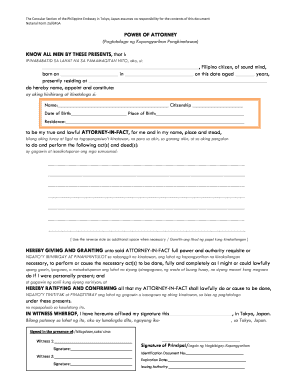
Get Draft.power.of.attorney.form.2a.gpoa - Tokyope Dfa Gov
How it works
-

Open form follow the instructions
-

Easily sign the form with your finger
-

Send filled & signed form or save
How to use or fill out the Draft.Power.of.Attorney.form.2a.GPoA - Tokyope Dfa Gov online
This guide provides users with step-by-step instructions to effectively fill out the Draft Power of Attorney Form 2a GPoA for the Tokyo Philippine Embassy. Whether you are familiar with legal documents or this is your first experience, this guide ensures you have the necessary information to complete the form accurately.
Follow the steps to successfully fill out the form online.
- Click the ‘Get Form’ button to obtain the Draft Power of Attorney form and open it in the editor.
- Begin by entering your full name in the designated space as the person granting power of attorney.
- Fill in your citizenship status, ensuring it reflects your legal nationality.
- Provide your date of birth and place of birth in the specified fields to establish your identity.
- Indicate your current residence, including your complete address, to confirm your living status.
- Next, identify the person you are appointing as your attorney-in-fact by entering their full name, citizenship, date of birth, place of birth, and residence.
- In the section for the powers granted, clearly state the acts or deeds you are authorizing your attorney-in-fact to perform on your behalf. Be as specific as possible.
- If additional space is needed for further instructions, use the reverse side of the form as indicated.
- Sign and date the document in the presence of at least two witnesses, who must also provide their signatures in the designated areas.
- Finally, ensure that you fill in your identification document number, expiration date, and issuing authority to complete the form.
- Once the form is filled out completely, you can save the changes, download the document, print it, or share it as necessary.
Complete your documents online with confidence and efficiency.