Loading
Form preview
  • US Legal Forms
  • Form Library
  • More Forms
  • More Uncategorized Forms
  • Apostille

Get Apostille

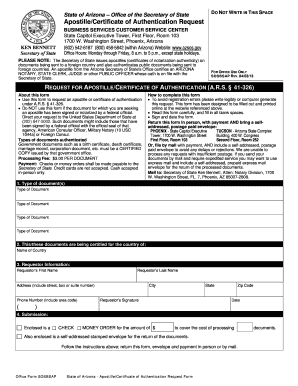
E CENTER State Capitol Executive Tower, First Floor, Room 103 1700 W. Washington Street, Phoenix, Arizona (602) 542-6187 (800) 458-5842 (within Arizona) Website: www.azsos.gov Office Hours: Monday through Friday, 8 a.m. to 5 p.m., except state holidays. PLEASE NOTE: The Secretary of State issues apostilles (certificates of notarization authenticity) on documents being sent to a foreign country and also authenticates public documents being sent to foreign countries. An apostille from the Arizona.

How it works

  1. Open form

    Open form follow the instructions

  2. Easily sign form

    Easily sign the form with your finger

  3. Share form

    Send filled & signed form or save

How to fill out the Apostille online

Obtaining an apostille is essential for validating documents intended for use in foreign countries. This guide provides clear, step-by-step instructions to ensure you complete the Apostille request form correctly and efficiently online.

Follow the steps to successfully complete your Apostille request online.

  1. Press the ‘Get Form’ button to access the Apostille form and open it in your online editor.
  2. In the first section, select the type of document(s) you need to have apostilled. You may include multiple documents by specifying each one.
  3. In the next field, indicate the country for which the documents are being certified. Ensure the country name is accurate to avoid processing issues.
  4. Fill out the requestor information section completely. This includes entering your first name, last name, and full address. Make sure to include the area code with your phone number.
  5. Sign and date the form in the designated area to verify that the information provided is accurate.
  6. In the submission section, indicate the method of payment by checking either the box for a check or a money order. Provide the amount enclosed to cover the processing fee.
  7. If you are submitting the form by mail, be sure to enclose a self-addressed, postage-paid envelope to facilitate the return of your documents.
  8. Once all fields have been filled out accurately, save your changes, and you can then download, print, or share the completed form as necessary.

Complete your Apostille request online today for a seamless experience.

Get form

Experience a faster way to fill out and sign forms on the web. Access the most extensive library of templates available.
Get form

Related content

Preparing a Document for an Apostille Certificate
Dec 13, 2024 — An apostille certificate is for documents you use in countries that are...
Learn more
Apostille - Cornell Registrar
Governments and agencies may require that diplomas and transcripts be certified with an...
Learn more
apostille - NamuWiki
It is a legalization procedure or an international agreement on one country to be legally...
Learn more

Related links form

GROUNDWATER RECHARGE ESTIMATION USING CHLORIDE MASS Request Police Report - Policefullertonedu - Police Fullerton Fall 2016 Bachelor Of Science In Criminal Justice - Bgsu Sample Letter To Congressman

Questions & Answers

Get answers to your most pressing questions about US Legal Forms API.

Contact support

In the US, the process of apostille is regulated by state authorities, primarily the Secretary of State in each state. Additionally, notaries and specialized document service companies can assist with obtaining an apostille. It is important to select a reliable entity familiar with the apostille protocol to ensure your documents are properly authenticated.

Getting a document apostilled in the United States involves contacting your state’s Secretary of State office. After verifying your document's eligibility, submit it along with any required forms and payment. Depending on the state's procedures, the office will issue an apostille certificate, allowing your document to be recognized abroad.

In the United States, the authority that issues an apostille is typically the Secretary of State for your state. You can also seek assistance from accredited notaries or specialized companies that offer document authentication services. These experts ensure your documents are properly apostilled for overseas use.

To send a document to be apostilled, ensure your document is signed by the necessary authority. Mail the document, along with any required forms and payment, to the appropriate government office that processes apostille requests. Additionally, consider using a service like US Legal Forms to streamline your submission and track your document status.

An example of apostille authentication is when a marriage certificate issued in one country is verified for use in another country under the Hague Convention. The local authority attaches an apostille to the document, affirming its authenticity. This certification allows the marriage certificate to be accepted without additional verification from foreign authorities.

A Brazilian apostille typically appears as a single-page certificate attached to the original document. It contains specific information such as the name of the certifying officer, their title, and the seal of the issuing authority. This format ensures that the document is easily recognizable in international contexts.

In Brazil, documents can be certified by a variety of officials, including notaries and certain governmental authorities. A notary must review and sign the document to certify it. Once certified, the document can then be submitted for an apostille.

Yes, Brazil is part of the Apostille Convention, which simplifies the process of international document verification. This agreement allows Brazilian documents bearing an apostille to be recognized in other convention countries without further authentication. Hence, obtaining an apostille in Brazil facilitates the use of your documents abroad.

In Brazil, you can apostille a document by visiting a state notary office. Present the original document along with a valid identification. The notary will review the document, and if everything is in order, issue an apostille, which is officially recognized in other countries participating in the Hague Convention.

To make a document apostille, you must first prepare the document by ensuring it is signed by an authorized official. Next, submit the document to the appropriate government office that provides apostille services. They will verify the signature and attach an apostille certificate, affirming the document's authenticity for international use.

Get This Form Now!

Use professional pre-built templates to fill in and sign documents online faster. Get access to thousands of forms.
Get form
If you believe that this page should be taken down, please follow our DMCA take down processhere.

Industry-leading security and compliance

US Legal Forms protects your data by complying with industry-specific security standards.
  • In businnes since 1997
    25+ years providing professional legal documents.
  • Accredited business
    Guarantees that a business meets BBB accreditation standards in the US and Canada.
  • Secured by Braintree
    Validated Level 1 PCI DSS compliant payment gateway that accepts most major credit and debit card brands from across the globe.
Get Apostille
Get form
  • Adoption
  • Bankruptcy
  • Contractors
  • Divorce
  • Home Sales
  • Employment
  • Identity Theft
  • Incorporation
  • Landlord Tenant
  • Living Trust
  • Name Change
  • Personal Planning
  • Small Business
  • Wills & Estates
  • Packages A-Z
  • Affidavits
  • Bankruptcy
  • Bill of Sale
  • Corporate - LLC
  • Divorce
  • Employment
  • Identity Theft
  • Internet Technology
  • Landlord Tenant
  • Living Wills
  • Name Change
  • Power of Attorney
  • Real Estate
  • Small Estates
  • Wills
  • All Forms
  • Forms A-Z
  • Form Library
  • Legal Hub
  • About Us
  • Help Portal
  • Legal Resources
  • Blog
  • Affiliates
  • Contact Us
  • Delete My Account
  • Site Map
  • Industries
  • Forms in Spanish
  • Localized Forms
  • State-specific Forms
  • Forms Kit
  • Real Estate Handbook
  • All Guides
  • Notarize
  • Incorporation services
  • For Consumers
  • For Small Business
  • For Attorneys
  • USLegal
  • FormsPass
  • pdfFiller
  • signNow
  • altaFlow
  • DocHub
  • Instapage
Form Packages
  • Adoption
  • Bankruptcy
  • Contractors
  • Divorce
  • Home Sales
  • Employment
  • Identity Theft
  • Incorporation
  • Landlord Tenant
  • Living Trust
  • Name Change
  • Personal Planning
  • Small Business
  • Wills & Estates
  • Packages A-Z
Form Categories
  • Affidavits
  • Bankruptcy
  • Bill of Sale
  • Corporate - LLC
  • Divorce
  • Employment
  • Identity Theft
  • Internet Technology
  • Landlord Tenant
  • Living Wills
  • Name Change
  • Power of Attorney
  • Real Estate
  • Small Estates
  • Wills
  • All Forms
  • Forms A-Z
  • Form Library
Customer Service
  • Legal Hub
  • About Us
  • Help Portal
  • Legal Resources
  • Blog
  • Affiliates
  • Contact Us
  • Delete My Account
  • Site Map
  • Industries
  • Forms in Spanish
  • Localized Forms
  • State-specific Forms
  • Forms Kit
Legal Guides
  • Real Estate Handbook
  • All Guides
Prepared for you
  • Notarize
  • Incorporation services
Our Customers
  • For Consumers
  • For Small Business
  • For Attorneys
Our Sites
  • USLegal
  • FormsPass
  • pdfFiller
  • signNow
  • altaFlow
  • DocHub
  • Instapage
Social Media
Call us now toll free:
+1 833 426 79 33
As seen in:
© Copyright 1999-2026 airSlate Legal Forms, Inc. 3720 Flowood Dr, Flowood, Mississippi 39232
  • Your Privacy Choices
  • Terms of Service
  • Privacy Notice
  • Content Takedown Policy
  • Bug Bounty Program