Open form follow the instructions
Easily sign the form with your finger
Send filled & signed form or save
How to fill out the IPO application Docx online
In this guide, we provide clear instructions on how to complete the IPO Application Docx online. By following these steps, you can ensure that your application is accurately filled out and submitted.
Follow the steps to complete your IPO application online
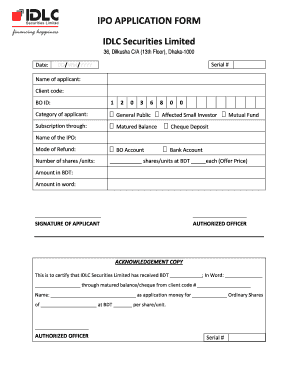
- Click ‘Get Form’ button to obtain the IPO Application Docx and open it in your preferred online editor.
- Fill in the date of application in the format DD/MM/YYYY. This is essential for tracking your application.
- Enter your name in the 'Name of applicant' field to identify yourself on the application.
- Input your client code, which is your unique identifier for this application.
- Provide your BO ID in the designated field; this is necessary for the application process.
- Select the category of applicant you belong to from the options provided, such as 'General Public' or 'Affected Small Investor'.
- Choose your subscription method, which can include options like 'Matured Balance', 'Cheque Deposit', or 'Bank Account'.
- Fill in the 'Name of the IPO' you are applying for to clearly indicate the specific IPO you want to invest in.
- Specify the mode of refund that you prefer, ensuring that you will receive any money owed to you correctly.
- Indicate the number of shares or units you wish to subscribe to, along with the offer price in BDT.
- Calculate and enter the total amount in BDT and also write it out in words for verification.
- Sign the document in the 'Signature of applicant' section to confirm that all information provided is accurate.
- Have an authorized officer sign the application to endorse and process it.
- Review the acknowledgment copy with the total amount received for the application to ensure accuracy before submission.
- Once the form is fully completed, you can save changes, download, print, or share the form as necessary.
Complete your IPO Application Docx online today to ensure a smooth submission process.
Experience a faster way to fill out and sign forms on the web. Access the most extensive library of templates available.
Related content
Sep 13, 2018 — For example, rather than applying a surcharge to those who do not file...
The President may return the signed forms to the IPO, request the IPO obtain additional...
I am affixing Rs.10/- Court Fee Stamp on this application towards RTI application fee OR I...
Get answers to your most pressing questions about US Legal Forms API.
Can I fill an IPO form after?
No, you cannot fill an IPO Application Docx after the designated closing time. All forms must be submitted within the established timeframe to be considered valid. It's advisable to be proactive and prepare your application ahead of time to avoid last-minute stress.
What is the 30 day rule for IPO?
The 30-day rule for IPOs refers to the practice whereby investors typically monitor a company's performance for 30 days post-listing before making additional purchases. This approach allows for better analysis of market reactions. Using tools like the IPO Application Docx, investors can efficiently track their investment strategies during this period.
What are the hours for IPO listing?
IPO listings usually occur during standard market hours, which typically run from AM to 4 PM EST. The actual listing time may vary, but it's essential to stay updated on announcements from the issuing company. Understanding these details can help you plan your involvement better when considering an IPO Application Docx.
How to fill pre-IPO?
Filling out pre-IPO documentation is essential for those looking to invest before shares are available to the public. Start with the IPO Application Docx, entering necessary details about your investment intentions. Remember to consult your financial advisor to ensure compliance and make informed decisions. This preparation can enhance your investment potential.
What is the cut-off time for IPO application?
The cut-off time for IPO applications typically falls on the last day of the subscription period, often around 4 PM on that day. It’s crucial to be aware of these timings while preparing your IPO Application Docx. This ensures your application is submitted in a timely manner to secure your shares.
How to fill an IPO application form?
Filling an IPO application form involves entering your personal information, investment details, and payment instructions correctly in the IPO Application Docx. Ensure you double-check all entries for accuracy. If you need guidance, consider using platforms like US Legal Forms, which can help simplify the process with step-by-step instructions.
How to file for an IPO?
To file for an IPO, start by preparing the necessary documents, including your IPO Application Docx. You’ll need to work with financial advisors and legal teams to ensure compliance with regulations. Once your documentation is ready, submit it through your broker or investment bank. This method helps facilitate your entry into the public market.
Can we fill an IPO after market hours?
You cannot fill an IPO Application Docx after market hours. The process requires adherence to the specified hours established by the exchanges. However, you can prepare your application in advance and submit it during market hours. This way, you ensure your application is submitted on time.
How to file for IPO?
To file for an IPO, you must prepare comprehensive documentation, including your IPO Application Docx. Submit this documentation to the SEC, adhering to their submission guidelines. Make sure to keep open lines of communication with your team or legal advisors to handle any arising questions efficiently.
How to file documents with the IPO?
Filing documents with the IPO requires you to have your IPO Application Docx ready. You can submit your documents electronically through the SEC's EDGAR system, ensuring all information is accurate and complete. After submission, monitor for any correspondence from the SEC for additional requirements or changes needed.
Use professional pre-built templates to fill in and sign documents online faster. Get access to thousands of forms.
If you believe that this page should be taken down, please follow our DMCA take down process here.