Loading
Form preview
  • US Legal Forms
  • Form Library
  • More Forms
  • More Uncategorized Forms
  • Zipcar Accident Report

Get Zipcar Accident Report

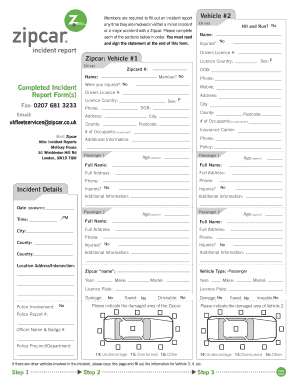
Co. uk Mail Zipcar Attn Incident Reports Melbury House 51 Wimbledon Hill Rd London SW19 7QW Name No Injuries Y / N M Sex F / F Licence Country Zipcard DOB Completed Incident Report Form s Hit and Run No/ N Y Drivers Licence Zipcar Vehicle 1 Driver Vehicle 2 Member No/ N Were you injured No/ N Phone Mobile Address County City Postcode of Occupants include driver Insurance Carrier Additional Information Policy Passenger 1 Age approx Full Name Full .

How it works

  1. Open form

    Open form follow the instructions

  2. Easily sign form

    Easily sign the form with your finger

  3. Share form

    Send filled & signed form or save

How to fill out the Zipcar Accident Report online

Completing the Zipcar Accident Report is an essential step following any incident involving a Zipcar. This guide offers step-by-step instructions to help you accurately fill out the form online, ensuring that all necessary details are provided.

Follow the steps to accurately complete the Zipcar Accident Report.

  1. Click the ‘Get Form’ button to obtain the Zipcar Accident Report form and open it for editing.
  2. Begin by entering the incident details, including the date, time, city, county, and country of the incident. Additionally, indicate whether there were any injuries and provide the relevant Zipcard number.
  3. Fill in your personal information, including your driver's license number, address, and contact information. Ensure that all details are accurate to avoid any processing delays.
  4. Document the number of occupants in the vehicle and provide their details, including names and ages. Repeat this for any additional passengers who were present.
  5. Provide information regarding the vehicles involved, including make, model, and license plate numbers, as well as any damages noted. Also indicate if police were involved and whether there were any injuries.
  6. Describe the incident using the provided diagram section. Be sure to include the actions of all involved parties and any pertinent traffic signals or signage.
  7. In the conditions section, detail weather and road surface conditions at the time of the incident. This helps create a comprehensive report.
  8. Once all sections are completed, review the report for accuracy. When satisfied, sign and date the report where indicated.
  9. Finally, save your changes or download the form. You may choose to print and share it as needed.

Complete and submit your Zipcar Accident Report online to ensure prompt processing of your incident.

Get form

Experience a faster way to fill out and sign forms on the web. Access the most extensive library of templates available.
Get form

Related content

Zipcar NYC Partner Training
Once it is safe to do so, immediately report any accidents that may occur to Zipcar via...
Learn more
Zipcar.doc
Apr 19, 2014 — Zipcar has 6 simple rules for usage: 1. Report damage. 2. Keep the car...
Learn more
Avis Budget Group, Inc. 2016 Annual Report
Mar 21, 2017 — Now with over one million members,. Zipcar is developing a new platform...
Learn more

Related links form

East Point Residential Construction Submittal Guide Georgia Application For Rezoning - Cartersville - Cityofcartersville PZ BUILDING DEPARTMENT FEBRUARY 2015 MONTHLY REPORT 8220 (Fax)

Questions & Answers

Get answers to your most pressing questions about US Legal Forms API.

Contact support

If you crash a rental car in the UK, you should immediately contact the rental company to report the accident. They will guide you through the necessary steps to provide a complete Zipcar Accident Report or equivalent documentation. Remember to collect information from other drivers involved and take photos of the scene for your records.

To qualify for Zipcar Canada, you must meet certain criteria, which includes being at least 21 years old and possessing a valid driver's license. You will also need to provide a clear driving record and proof of identity. Once you complete your application, your qualifications will be reviewed, allowing you to enjoy the benefits of Zipcar in Canada.

Yes, Zipcar provides insurance coverage for its members during their rentals. This coverage includes collision and liability protection, but it is important to understand the specific terms associated with the policy. Always review your Zipcar membership plan to confirm your coverage details before using the vehicle.

If you crash a Zipcar in the UK, the first step is to check for injuries and call emergency services if needed. Next, complete a Zipcar Accident Report to document the details of the crash. This report assists in the claims process, ensuring you have documented proof for your insurance and Zipcar's records.

To lock a Zipcar, simply press the lock button on the Zipcar key fob when you step out of the vehicle. This action ensures that your car remains secure. If you encounter any issues, you can reach out to Zipcar support for assistance with your vehicle's locking mechanism.

To write a description of an accident, begin with the context in which the accident occurred. Describe the actions leading to the incident, the event itself, and any resulting actions taken. Use straightforward language to convey facts, and ensure this description aligns with the details in your Zipcar accident report to maintain consistency.

Accident reporting consists of several key steps, including notifying the relevant authorities, documenting the event, and collecting witness statements. After gathering this information, complete the Zipcar accident report, providing a thorough account of what occurred. This structured approach not only aids in proper reporting but also assists in possible insurance claims.

The seven steps of accident investigation typically include: scene preservation, gathering initial data, interviewing witnesses, collecting evidence, analyzing information, developing findings, and preparing a report. Each of these steps is crucial for creating an effective Zipcar accident report. Following a systematic approach ensures that you capture all necessary details.

Filling out an accident form requires attention to detail. Start by entering your contact information, vehicle details, and the specifics of the accident. Use clear and concise language to explain what transpired. Ensure you refer to guidelines provided by Zipcar for accurate submission of the accident report.

To fill up a Zipcar, you should first locate a nearby gas station. Ensure that you observe the fuel policy set by Zipcar. After refueling the vehicle, keep the receipt, as it may be needed when you submit the Zipcar accident report or when returning the car. This helps maintain compliance with Zipcar’s terms.

Get This Form Now!

Use professional pre-built templates to fill in and sign documents online faster. Get access to thousands of forms.
Get form
If you believe that this page should be taken down, please follow our DMCA take down processhere.

Industry-leading security and compliance

US Legal Forms protects your data by complying with industry-specific security standards.
  • In businnes since 1997
    25+ years providing professional legal documents.
  • Accredited business
    Guarantees that a business meets BBB accreditation standards in the US and Canada.
  • Secured by Braintree
    Validated Level 1 PCI DSS compliant payment gateway that accepts most major credit and debit card brands from across the globe.
Get Zipcar Accident Report
Get form
  • Adoption
  • Bankruptcy
  • Contractors
  • Divorce
  • Home Sales
  • Employment
  • Identity Theft
  • Incorporation
  • Landlord Tenant
  • Living Trust
  • Name Change
  • Personal Planning
  • Small Business
  • Wills & Estates
  • Packages A-Z
  • Affidavits
  • Bankruptcy
  • Bill of Sale
  • Corporate - LLC
  • Divorce
  • Employment
  • Identity Theft
  • Internet Technology
  • Landlord Tenant
  • Living Wills
  • Name Change
  • Power of Attorney
  • Real Estate
  • Small Estates
  • Wills
  • All Forms
  • Forms A-Z
  • Form Library
  • Legal Hub
  • About Us
  • Help Portal
  • Legal Resources
  • Blog
  • Affiliates
  • Contact Us
  • Delete My Account
  • Site Map
  • Industries
  • Forms in Spanish
  • Localized Forms
  • State-specific Forms
  • Forms Kit
  • Real Estate Handbook
  • All Guides
  • Notarize
  • Incorporation services
  • For Consumers
  • For Small Business
  • For Attorneys
  • USLegal
  • FormsPass
  • pdfFiller
  • signNow
  • altaFlow
  • DocHub
  • Instapage
Form Packages
  • Adoption
  • Bankruptcy
  • Contractors
  • Divorce
  • Home Sales
  • Employment
  • Identity Theft
  • Incorporation
  • Landlord Tenant
  • Living Trust
  • Name Change
  • Personal Planning
  • Small Business
  • Wills & Estates
  • Packages A-Z
Form Categories
  • Affidavits
  • Bankruptcy
  • Bill of Sale
  • Corporate - LLC
  • Divorce
  • Employment
  • Identity Theft
  • Internet Technology
  • Landlord Tenant
  • Living Wills
  • Name Change
  • Power of Attorney
  • Real Estate
  • Small Estates
  • Wills
  • All Forms
  • Forms A-Z
  • Form Library
Customer Service
  • Legal Hub
  • About Us
  • Help Portal
  • Legal Resources
  • Blog
  • Affiliates
  • Contact Us
  • Delete My Account
  • Site Map
  • Industries
  • Forms in Spanish
  • Localized Forms
  • State-specific Forms
  • Forms Kit
Legal Guides
  • Real Estate Handbook
  • All Guides
Prepared for you
  • Notarize
  • Incorporation services
Our Customers
  • For Consumers
  • For Small Business
  • For Attorneys
Our Sites
  • USLegal
  • FormsPass
  • pdfFiller
  • signNow
  • altaFlow
  • DocHub
  • Instapage
Social Media
Call us now toll free:
+1 833 426 79 33
As seen in:
© Copyright 1999-2026 airSlate Legal Forms, Inc. 3720 Flowood Dr, Flowood, Mississippi 39232
  • Your Privacy Choices
  • Terms of Service
  • Privacy Notice
  • Content Takedown Policy
  • Bug Bounty Program