We use cookies to improve security, personalize the user experience, enhance our marketing activities (including cooperating with our marketing partners) and for other business use.
Click "here" to read our Cookie Policy. By clicking "Accept" you agree to the use of cookies. Read less
Read more
Accept
Loading
Form preview
  • US Legal Forms
  • Form Library
  • More Forms
  • More Multi-State Forms
  • Aided Report 2020

Get Aided Report 2020-2025

How it works

  1. Open form

    Open form follow the instructions

  2. Easily sign form

    Easily sign the form with your finger

  3. Share form

    Send filled & signed form or save

How to fill out the Aided Report online

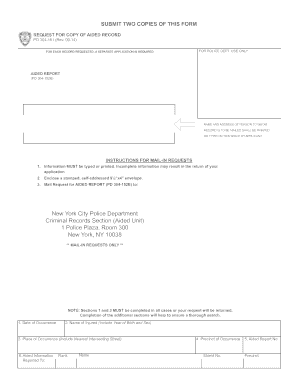
The Aided Report is a crucial form for requesting a copy of an aided record. This guide provides clear instructions on how to complete the form online, ensuring that users with varying levels of experience can successfully navigate the process.

Follow the steps to complete the Aided Report online

  1. Click ‘Get Form’ button to obtain the Aided Report form and open it in the designated online editor.
  2. Begin by entering the name and address of the person to whom the record should be mailed. This information must be clearly printed or typed in the provided space.
  3. Fill in Section 1 by providing the date of occurrence. Ensure to be accurate and specific with this information.
  4. In Section 2, include the name of the injured person, including their year of birth and sex. This is important for verification purposes.
  5. Complete Section 3 by detailing the place of occurrence. Include the nearest intersecting street to help locate the incident.
  6. In Section 4, input the precinct where the occurrence took place, along with the shield number of the responding officer, if available.
  7. In Section 5, provide the Aided Report number to assist with tracking and referencing the record.
  8. Lastly, review all filled sections for accuracy. Once confirmed, you can save your changes, download a copy of the form, print it for your records, or share it as needed.

Complete your Aided Report online today for a seamless documentation process.

Get form

Experience a faster way to fill out and sign forms on the web. Access the most extensive library of templates available.
Get form

Related content

PD 304-161 REQUEST FOR COPY OF AIDED RECORD. ...
INSTRUCTIONS FOR MAIL-IN REQUESTS—NO FEE REQUIRED. 1. Information MUST be typed or...
Learn more
California partnership aided COVID-19 response and...
Oct 3, 2025 — STOP COVID-19 CA showed how researchers and communities can work together...
Learn more
den180005 summary - accessdata.fda.gov
Secondary objective: The secondary objective is to report the population-average...
Learn more

Related links form

Patient Portal Authorization Form For East Alabama Medical - Eamc Work Search Verification - Printable Form - Wyomingworkforce BUSINESS ENTITY RESIDENT STOCKHOLDER AFFIDAVIT - Wyomingworkforce Ophthalmology Super Specialty - Medical Education - Government Bb - Medicaleducation Rajasthan Gov

Questions & Answers

Get answers to your most pressing questions about US Legal Forms API.

Contact support

To report someone in New York, you can file an aided report with the local authorities or relevant agency. Start by gathering all necessary details, including the person's name, address, and any incidents that prompted the report. It's important to provide a clear and concise account of the situation. For additional guidance and to ensure compliance with local laws, consider using the US Legal Forms platform, which offers resources to assist you in preparing your aided report.

RMS stands for Records Management System, which works in conjunction with computer-aided dispatch systems. An RMS stores and manages various incident records, transforming them into comprehensive Aided Reports. This integration allows for seamless data sharing and analysis between dispatch and record-keeping systems. By understanding RMS, users can appreciate how their data is managed efficiently and accurately.

A computer-aided dispatch report integrates information gathered during emergency calls into a clear document. This report, often referred to as an Aided Report, highlights the response actions taken and includes pertinent data like time stamps and unit assignments. The systematic approach of CAD reports ensures proper documentation, which is vital for investigations and training. It also enhances transparency in emergency response processes.

A CAD system serves as the backbone for emergency response operations. It helps in tracking incidents, managing resources, and generating Aided Reports with vital information at the click of a button. The integration of mapping technology allows dispatchers to visualize call locations, enhancing situational awareness. Consequently, CAD systems significantly elevate the efficiency and effectiveness of emergency service delivery.

A CAD report captures essential details related to an incident managed through a computer-aided dispatch system. It includes information such as the location, nature of the incident, and responding unit data, forming a critical Aided Report. This documentation is pivotal for analysis, accountability, and record-keeping. Users can rely on CAD reports for insights into incident response patterns and organizational performance.

Computer-aided dispatch (CAD) assists emergency service organizations in managing and deploying resources effectively. When an emergency call comes in, the CAD system quickly collects information and generates an Aided Report to ensure prompt response. This real-time data streamlines communication between dispatchers and responders, leading to more efficient operations. Overall, CAD systems enhance public safety and improve response times.

To obtain 911 call records in New York City, you need to submit a request to the Mayor's Office of Technology and Innovation. The process usually requires filling out a form and may take some time. You'll find that the Aided Report component of these records can provide vital information regarding the response to emergencies. Make sure to check the official website for specific instructions and requirements.

Copy of a Police Report To obtain a copy of the complaint report, please visit FOIL request and submit an online Freedom of Information Law (FOIL) request at least 24 hours after you submitted the complaint report.

You can request a copy of a Verification of Incident by submitting your request online or by mail. The form is available for download, or can be picked up at any police precinct, Housing Bureau public service area, or Transit Bureau district.

The form required (MV-198C) to request a copy of the report is available online at: .dmv.ny.gov.

Get This Form Now!

Use professional pre-built templates to fill in and sign documents online faster. Get access to thousands of forms.
Get form
If you believe that this page should be taken down, please follow our DMCA take down processhere.

Industry-leading security and compliance

US Legal Forms protects your data by complying with industry-specific security standards.
  • In businnes since 1997
    25+ years providing professional legal documents.
  • Accredited business
    Guarantees that a business meets BBB accreditation standards in the US and Canada.
  • Secured by Braintree
    Validated Level 1 PCI DSS compliant payment gateway that accepts most major credit and debit card brands from across the globe.
Get Aided Report
Get form
Form Packages
Adoption
Bankruptcy
Contractors
Divorce
Home Sales
Employment
Identity Theft
Incorporation
Landlord Tenant
Living Trust
Name Change
Personal Planning
Small Business
Wills & Estates
Packages A-Z
Form Categories
Affidavits
Bankruptcy
Bill of Sale
Corporate - LLC
Divorce
Employment
Identity Theft
Internet Technology
Landlord Tenant
Living Wills
Name Change
Power of Attorney
Real Estate
Small Estates
Wills
All Forms
Forms A-Z
Form Library
Customer Service
Terms of Service
Privacy Notice
Legal Hub
Content Takedown Policy
Bug Bounty Program
About Us
Help Portal
Legal Resources
Blog
Affiliates
Contact Us
Delete My Account
Site Map
Industries
Forms in Spanish
Localized Forms
State-specific Forms
Forms Kit
Legal Guides
Real Estate Handbook
All Guides
Prepared for You
Notarize
Incorporation services
Our Customers
For Consumers
For Small Business
For Attorneys
Our Sites
US Legal Forms
USLegal
FormsPass
pdfFiller
signNow
airSlate WorkFlow
DocHub
Instapage
Social Media
Call us now toll free:
+1 833 426 79 33
As seen in:
  • USA Today logo picture
  • CBC News logo picture
  • LA Times logo picture
  • The Washington Post logo picture
  • AP logo picture
  • Forbes logo picture
© Copyright 1997-2025
airSlate Legal Forms, Inc.
3720 Flowood Dr, Flowood, Mississippi 39232
Form Packages
Adoption
Bankruptcy
Contractors
Divorce
Home Sales
Employment
Identity Theft
Incorporation
Landlord Tenant
Living Trust
Name Change
Personal Planning
Small Business
Wills & Estates
Packages A-Z
Form Categories
Affidavits
Bankruptcy
Bill of Sale
Corporate - LLC
Divorce
Employment
Identity Theft
Internet Technology
Landlord Tenant
Living Wills
Name Change
Power of Attorney
Real Estate
Small Estates
Wills
All Forms
Forms A-Z
Form Library
Customer Service
Terms of Service
Privacy Notice
Legal Hub
Content Takedown Policy
Bug Bounty Program
About Us
Help Portal
Legal Resources
Blog
Affiliates
Contact Us
Delete My Account
Site Map
Industries
Forms in Spanish
Localized Forms
State-specific Forms
Forms Kit
Legal Guides
Real Estate Handbook
All Guides
Prepared for You
Notarize
Incorporation services
Our Customers
For Consumers
For Small Business
For Attorneys
Our Sites
US Legal Forms
USLegal
FormsPass
pdfFiller
signNow
airSlate WorkFlow
DocHub
Instapage
Social Media
Call us now toll free:
+1 833 426 79 33
As seen in:
  • USA Today logo picture
  • CBC News logo picture
  • LA Times logo picture
  • The Washington Post logo picture
  • AP logo picture
  • Forbes logo picture
© Copyright 1997-2025
airSlate Legal Forms, Inc.
3720 Flowood Dr, Flowood, Mississippi 39232