Loading
Form preview
  • US Legal Forms
  • Other Templates
  • More Forms
  • More Multi-State Forms
  • Fau Plus Loan Revision Form 2020

Get Fau Plus Loan Revision Form 2020-2026

How it works

  1. Open form

    Open form follow the instructions

  2. Easily sign form

    Easily sign the form with your finger

  3. Share form

    Send filled & signed form or save

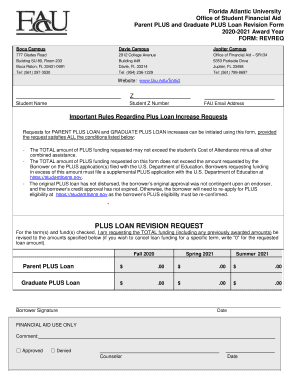
How to fill out the FAU PLUS Loan Revision Form online

Completing the FAU PLUS Loan Revision Form online can be a straightforward process with the right guidance. This guide offers a detailed overview of each section of the form to help you submit your request quickly and accurately.

Follow the steps to complete your FAU PLUS Loan Revision Form online.

  1. Press the ‘Get Form’ button to access the FAU PLUS Loan Revision Form and open it in your preferred editing interface.
  2. Begin by entering the required student information, including your name, student Z number, and FAU email address. Ensure all details are accurate to prevent any processing delays.
  3. Review the important rules concerning PLUS Loan increase requests. Make sure your request meets all specified conditions before proceeding.
  4. In the PLUS Loan Revision Request section, indicate the term(s) you wish to revise funding for by checking the appropriate box for Fall 2020, Spring 2021, and/or Summer 2021.
  5. For each selected term, fill in the total funding amounts you are requesting, ensuring that the total does not exceed your Cost of Attendance minus other financial assistance.
  6. Sign and date the form in the designated Borrower Signature and Date fields to authenticate your request.
  7. Once you have completed all sections, review the form for accuracy. Save your changes to ensure all information is captured.
  8. Finally, download and print the completed form, or share it as needed, following any required submission guidelines from the financial aid office.

Complete your FAU PLUS Loan Revision Form online today for a seamless financial aid experience.

Get form

Experience a faster way to fill out and sign forms on the web. Access the most extensive library of templates available.
Get form

Related content

Florida Atlantic University
Nov 12, 2019 — please provide one copy on an electronic format, preferably as a PDF...
Learn more
Parent PLUS and Graduate PLUS Loan Revision Office...
Requests for PARENT PLUS LOAN and GRADUATE PLUS LOAN increases can be initiated using this...
Learn more
Digital Technical Journal
The Digital Technical journal is a refereed journal published quarterly by Digital...
Learn more

Related links form

Fresh Start Policy - Ccsuedu Gibbs Essay--Chimurenga--revised--formatted Chemical Request Form Sick Student Meal Replacement Form - Champlain College - Champlain

Questions & Answers

Get answers to your most pressing questions about US Legal Forms API.

Contact support

To secure a full ride to FAU, begin by applying for scholarships, grants, and financial aid that cover tuition and fees. Additionally, maintaining a strong academic record can make you eligible for merit-based scholarships. Be sure to complete all necessary forms, including the FAU PLUS Loan Revision Form if you need additional funding. Stay proactive in seeking resources and guidance to maximize your financial opportunities.

Yes, there are limited options for Parent PLUS loan forgiveness. Students may qualify for forgiveness through programs such as Public Service Loan Forgiveness if certain criteria are met. Moreover, submitting the FAU PLUS Loan Revision Form can help you explore repayment plans that might lead to forgiveness. Always consult with your loan servicer to understand the available options.

A revised loan means that modifications have been made to the original terms of a loan agreement. This could involve changes in interest rates, loan amounts, or repayment schedules as indicated on the FAU PLUS Loan Revision Form. Revised loans can offer borrowers flexibility, allowing them to manage their repayments more effectively. It’s important to understand how these changes impact your overall financial goals.

A loan revision request is a formal appeal to change specific aspects of your loan agreement. This request can be initiated using the FAU PLUS Loan Revision Form, ensuring all necessary details are included. By submitting this form, you can ask for adjustments to repayment schedules or amounts. Clear communication with your loan servicer is crucial during this process.

Request loan revision refers to the process of seeking changes to the terms of an existing loan. Students can submit the FAU PLUS Loan Revision Form to adjust details like loan amounts or repayment plans. Making revisions can help better align your loan with your financial situation. It’s essential to follow the correct procedures to ensure your request is reviewed promptly.

The loan process typically includes application, processing, underwriting, and closing. During the application stage, you submit required documents, such as the FAU PLUS Loan Revision Form. Next, the processing stage involves verifying information and checking your eligibility. After processing, underwriting reviews the entire loan package before closing finalizes the agreement.

The school code for Florida Atlantic University (FAU) is 001481. If you are applying for federal student aid, including Parent PLUS loans, this code is essential for the FAFSA process. Ensure you include this code when filling out your application to facilitate your financial aid eligibility. For additional support regarding the FAU PLUS Loan Revision Form, you may visit uslegalforms for easy guidance.

Yes, Parent PLUS loans can be cancelled under certain circumstances. If you qualify for a loan discharge, such as total and permanent disability or death, you can apply to cancel the loan. Additionally, if you are enrolled in specific repayment plans or if your child no longer qualifies for benefits, you may want to explore the FAU PLUS Loan Revision Form for adjustments. Always consult with your loan provider to understand your options.

To find a financial advisor in FAU, you can start by visiting the university's financial aid office, where they can provide resources and guidance. Additionally, consider looking for local financial planning services that specialize in student financial aid. These advisors can help you navigate the complex options available to maximize your funding, including the FAU PLUS Loan Revision Form. Engaging a knowledgeable advisor may lead to better financial decisions.

Yes, it is possible to redo a parent PLUS loan, typically through a refinance or a revision process. If your financial situation changes, you may qualify for better rates or terms by submitting a FAFSA or using the FAU PLUS Loan Revision Form. This form lets you request adjustments or consolidate loans, ensuring you secure the most favorable conditions available. Always consider your options thoroughly when contemplating a redo.

Get This Form Now!

Use professional pre-built templates to fill in and sign documents online faster. Get access to thousands of forms.
Get form
If you believe that this page should be taken down, please follow our DMCA take down processhere.
Get FAU PLUS Loan Revision Form
Get form
  • Adoption
  • Bankruptcy
  • Contractors
  • Divorce
  • Home Sales
  • Employment
  • Identity Theft
  • Incorporation
  • Landlord Tenant
  • Living Trust
  • Name Change
  • Personal Planning
  • Small Business
  • Wills & Estates
  • Packages A-Z
  • Affidavits
  • Bankruptcy
  • Bill of Sale
  • Corporate - LLC
  • Divorce
  • Employment
  • Identity Theft
  • Internet Technology
  • Landlord Tenant
  • Living Wills
  • Name Change
  • Power of Attorney
  • Real Estate
  • Small Estates
  • Wills
  • All Forms
  • Forms A-Z
  • Other Templates
  • Legal Hub
  • About Us
  • Help Portal
  • Legal Resources
  • Blog
  • Affiliates
  • Contact Us
  • Delete My Account
  • Site Map
  • Industries
  • Forms in Spanish
  • Localized Forms
  • State-specific Forms
  • Forms Kit
  • Real Estate Handbook
  • All Guides
  • Notarize
  • Incorporation services
  • For Consumers
  • For Small Business
  • For Attorneys
  • USLegal
  • FormsPass
  • pdfFiller
  • signNow
  • altaFlow
  • DocHub
  • Instapage
Form Packages
  • Adoption
  • Bankruptcy
  • Contractors
  • Divorce
  • Home Sales
  • Employment
  • Identity Theft
  • Incorporation
  • Landlord Tenant
  • Living Trust
  • Name Change
  • Personal Planning
  • Small Business
  • Wills & Estates
  • Packages A-Z
Form Categories
  • Affidavits
  • Bankruptcy
  • Bill of Sale
  • Corporate - LLC
  • Divorce
  • Employment
  • Identity Theft
  • Internet Technology
  • Landlord Tenant
  • Living Wills
  • Name Change
  • Power of Attorney
  • Real Estate
  • Small Estates
  • Wills
  • All Forms
  • Forms A-Z
  • Other Templates
Customer Service
  • Legal Hub
  • About Us
  • Help Portal
  • Legal Resources
  • Blog
  • Affiliates
  • Contact Us
  • Delete My Account
  • Site Map
  • Industries
  • Forms in Spanish
  • Localized Forms
  • State-specific Forms
  • Forms Kit
Legal Guides
  • Real Estate Handbook
  • All Guides
Prepared for you
  • Notarize
  • Incorporation services
Our Customers
  • For Consumers
  • For Small Business
  • For Attorneys
Our Sites
  • USLegal
  • FormsPass
  • pdfFiller
  • signNow
  • altaFlow
  • DocHub
  • Instapage
Social Media
Call us now toll free:
+1 833 426 79 33
As seen in:
© Copyright 1999-2026 airSlate Legal Forms, Inc. 17 Station Street, Ste. 203, Brookline, MA 02445
  • Your Privacy Choices
  • Terms of Service
  • Privacy Notice
  • Content Takedown Policy
  • Bug Bounty Program