Get Wv License Clerk - Ct Application 2014-2026
How it works
-

Open form follow the instructions
-

Easily sign the form with your finger
-

Send filled & signed form or save
How to fill out the WV License Clerk - CT Application online
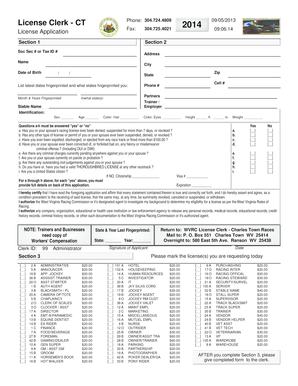
Filling out the WV License Clerk - CT Application online can streamline the process of applying for your racing license. This guide will provide you with detailed instructions to ensure that each section of the form is completed accurately and efficiently.
Follow the steps to accurately complete the online application.
- Click the ‘Get Form’ button to access the application form and open it in the appropriate editor.
- Enter your personal information in Section 1, including your name, address, date of birth, and social security number or tax ID number. Ensure the information provided is accurate and current.
- In Section 2, provide detail such as your height, weight, eye color, and hair color. This information is used for identification purposes.
- Answer the questions labeled a-h in Section 2, indicating 'yes' or 'no'. Each 'yes' answer may require further explanation on the back of the application form.
- If you are not a U.S. citizen, indicate your citizenship status in the appropriate field. Provide your visa number and expiration date, if applicable.
- Review Section 3 to indicate which license(s) you are requesting. Check the corresponding boxes to ensure all requested licenses are marked.
- Sign and date the application to certify that all information is true and correct. This is a crucial step in the application process.
- After completing all sections, you can save any changes made, download a copy of the form, print it for your records, or share it as needed.
Complete your application online today to ensure a smooth processing experience.
If you are an out-of-state resident, you can obtain a CT driver's license by providing proof of your identity, residency, and allowing for verification of your current license. Our WV License Clerk can support your CT Application and clarify any specific out-of-state requirements. You will likely need to surrender your previous license and may have to take a vision and knowledge test. Just ensure you gather all needed documents in advance for a smoother process.