Loading
Open form follow the instructions
Easily sign the form with your finger
Send filled & signed form or save
How to fill out the Lloyds Bank 13250 online
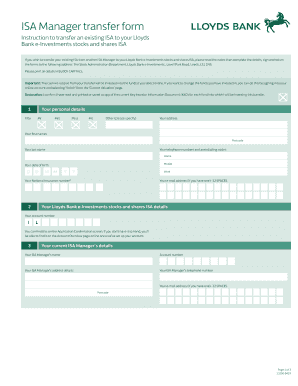
The Lloyds Bank 13250 form is designed for transferring an existing Individual Savings Account (ISA) to your Lloyds Bank e-Investments stocks and shares ISA. This guide provides clear, step-by-step instructions to help you complete the form accurately and efficiently.
Follow the steps to successfully transfer your ISA online.
- Press the ‘Get Form’ button to obtain the form and open it for completion.
- Enter your personal details in BLOCK CAPITALS. This includes your title, first names, last name, address, telephone numbers, date of birth, and National Insurance number.
- Provide your email address and your Lloyds Bank e-Investments stocks and shares ISA details, including your account number.
- Fill in the details of your current ISA manager, which includes their name, account number, address, and telephone number, as well as your manager's email address if available.
- Indicate the type of ISA you are transferring from by completing the relevant section (A, B, C, or D) based on whether it is a Stocks and Shares ISA, Cash ISA, Innovative Finance ISA, or Lifetime ISA. Provide information about the amount you wish to transfer.
- Sign and date the authorization section to allow your current ISA manager to sell investments and transfer cash to the Lloyds Bank e-Investments.
- Review all details for accuracy. Once complete, save your changes, and use the options to download, print, or share the form as required.
Complete your Lloyds Bank 13250 form online today for a seamless ISA transfer.
Experience a faster way to fill out and sign forms on the web. Access the most extensive library of templates available.
Related content
Lloyds Banking Group plc (the "Company") announces today that it has purchased the...
Jul 28, 2025 — The following page presents the Education & General (EDGEN) revenue for...
Oct 11, 2014 — Ninemeister, Units 21 - 26, Bank Quay Trading Estate ... call for full...
Get answers to your most pressing questions about US Legal Forms API.
What is the Lloyds Bank code?
The Lloyds Bank code, commonly referred to as the sort code, helps identify their branches for transactions. The standard format is 30-00-00, but it is always wise to double-check for accuracy. To perform transactions seamlessly, especially internationally, consider using the whole details associated with Lloyds Bank 13250.
What is the official address of Lloyds Bank?
The official address of Lloyds Bank is 25 Gresham Street, London, EC2V 7HN, United Kingdom. This location serves as the bank's headquarters. For any specific inquiries or to visit, you may want to contact Lloyds Bank 13250 for guidance on their local branches or services.
What is Lloyds Bank's routing number?
Lloyds Bank does not have a typical American routing number since it operates primarily in the UK. However, customers can use the International Bank Account Number (IBAN) for cross-border transactions. The relevant IBAN or your account details are essential when interacting with Lloyds Bank 13250 for international transfers.
How do I call Lloyds from abroad?
To call Lloyds Bank 13250 from abroad, first dial your country's exit code. Next, enter the UK country code, which is 44. Finally, omit the leading zero from the local number provided by Lloyds to reach their specific department or service.
What is the name and full postal address of Lloyds Bank?
The full name of the bank is Lloyds Bank plc. The primary postal address is 25 Gresham Street, London, EC2P 2BN, United Kingdom. If you're seeking services related to your Lloyds Bank 13250 account, you can contact local branches or visit their official website for further information. It is vital to have accurate contact details to manage your banking needs effectively.
How to fill out a cheque with Lloyds?
When you fill out a cheque with Lloyds Bank, begin by writing the date in the upper right corner. Next, write the name of the payee on the line followed by the amount written in both numbers and words. Don't forget to include your Lloyds Bank 13250 account number on the cheque, ensuring that it’s clear and legible. Finally, sign the cheque at the bottom, as this validates the transaction.
What is the format of Lloyds account number?
The format of a Lloyds Bank account number consists of eight digits. This unique number identifies your personal or business account within the Lloyds Bank 13250 network. It's essential to have this account number accurate when performing transactions, as it ensures that funds are directed correctly. Additionally, you may need your sort code to fully process any banking requests.
How to find swift and IBAN Lloyds?
To find the SWIFT and IBAN codes for Lloyds Bank 13250, you can visit the bank's official website or contact customer service for assistance. The SWIFT code is often necessary for international transfers, and the IBAN helps standardize bank account numbers in international transactions. Having this information readily available ensures that your transfers go through without issues.
What details are needed for a bank transfer with Lloyds?
To make a bank transfer with Lloyds Bank 13250, you will typically need the recipient's account number, sort code, and any reference details applicable to the transaction. Additionally, make sure you have your own Lloyds Bank account information ready, as this helps facilitate the transfer smoothly.
What is the phone bank number for Lloyds?
You can reach Lloyds Bank customer service at their phone banking number, which is 0345 300 0000. This number is available for personal banking inquiries, providing you with the support you need, whether it relates to your account or services associated with Lloyds Bank 13250.
Use professional pre-built templates to fill in and sign documents online faster. Get access to thousands of forms.
If you believe that this page should be taken down, please follow our DMCA take down process here.
This form is available in several versions. Select the version you need from the drop-down list below.