Loading
Get Cpp Application Form Isp1811
How it works
-

Open form follow the instructions
-

Easily sign the form with your finger
-

Send filled & signed form or save
How to fill out the Cpp Application Form Isp1811 online
Filling out the Cpp Application Form Isp1811 online can be a straightforward process if you understand each component of the form. This guide will provide you with step-by-step instructions to ensure accurate completion.
Follow the steps to successfully complete the form.
- Click the ‘Get Form’ button to obtain the form and open it in your chosen editor.
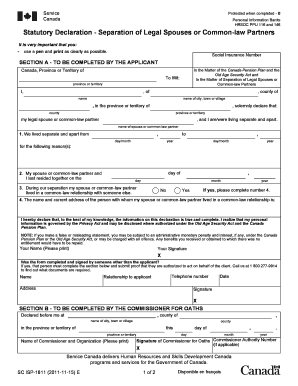
- Begin with Section A, where you will enter your personal information. Clearly print your name, province or territory, and county as requested.
- In the following section, declare your separation status. Indicate the dates you and your legal spouse or common-law partner lived apart.
- In the next part, state whether your spouse or common-law partner lived in a common-law relationship during your separation. If yes, provide the details of that individual.
- Finalize Section A by signing your name. Ensure that it is completed in full and legibly.
- If someone else completed the form on your behalf, ensure they fill out the additional section with their information and authorization.
- Proceed to Section B, which requires a Commissioner for Oaths' declaration. This must be completed in-person, so make arrangements as necessary.
- Once all sections are completed, you can save your changes, download, print, or share the form as needed.
Take the first step towards completing your application by starting the form online today.
A Separation Declaration is a declaration that the parties to a marriage or de facto relationship have separated.