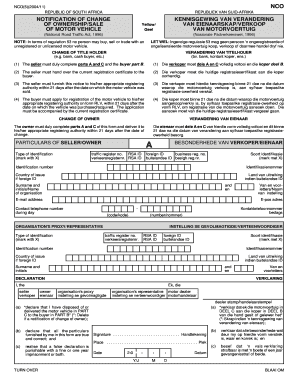
NCO NCO(5)(2004/11) REPUBLIC OF SOUTH AFRICA REPUBLIEK VAN SUIDAFRIKA NOTIFICATION OF CHANGE OF OWNERSHIP/SALE OF MOTOR VEHICLE KENNISGEWING VAN VERANDERING VAN EIENAARSKAP/VERKOOP VAN MOTORVOERTUIG.
Open form follow the instructions
Easily sign the form with your finger
Send filled & signed form or save
How to fill out the Nco Form Download online
The Nco Form Download is essential for notifying the change of ownership or sale of a motor vehicle in South Africa. This guide provides clear, step-by-step instructions to help users complete the form accurately and efficiently.
Follow the steps to complete the Nco Form Download online.
- Click ‘Get Form’ button to access the form and open it in your preferred editor.
- In Part A, the seller must provide their identification type by marking the appropriate box, enter their identification number, and include their surname and initials or organization name.
- Complete the seller's contact details, including their email address and daytime telephone number.
- Part C requires the seller to fill in the vehicle identification details, including the license number, chassis number, and the reason for the change of ownership.
- The buyer must complete Part B by marking their identification type, entering their identification number, and providing their surname and initials or organization name.
- In Part B, the buyer also needs to fill out their contact information similarly to the seller.
- Both the seller and buyer must sign the declaration sections in Parts A and B to confirm the accuracy of the information provided.
- After completing all required fields, save your changes, download the form, and print or share it as necessary.
Complete your Nco Form Download online today to ensure a smooth transfer of vehicle ownership.
Experience a faster way to fill out and sign forms on the web. Access the most extensive library of templates available.
Related content
Dec 11, 2015 — The 2166-9 series consists of three revised NCO rating forms based on...
The download process on Nco Support Form Bullets is a concert of efficiency. The user is...
For UL installations, Upload&. Download must be enabled. All othecs must be disabled. U...
Get answers to your most pressing questions about US Legal Forms API.
How to change ownership of a car if the owner is deceased in South Africa?
Changing ownership of a car when the owner is deceased involves submitting the death certificate, the vehicle's registration details, and proof of inheritance. It's important to follow the legal procedures to ensure a smooth transition of ownership. The Nco Form Download may provide guidance and form templates to facilitate this process seamlessly.
What is NCO in South Africa?
NCO in South Africa stands for National Certificate of Ownership. It serves as a formal acknowledgment of ownership, ensuring that all vehicle transfers or disputes can be resolved with legal clarity. You can easily access the Nco Form Download on platforms like uslegalforms, making it simple to manage your vehicle ownership records.
How to deregister a car in South Africa?
To deregister a car in South Africa, you need to submit a request with the relevant vehicle registration authority. This process usually requires specific documents, including your ID and proof of ownership. Utilizing the Nco Form Download can aid in making sure all necessary paperwork is completed correctly.
What is RC1 for?
RC1 is primarily for registering a vehicle and asserting ownership in South Africa. It contains key details necessary for the continued roadworthiness and legal standing of the vehicle. If you require assistance with obtaining this form, the Nco Form Download available through USLegalForms can facilitate your needs effectively.
What is a traveller declaration form in South Africa?
A traveller declaration form is a document required for individuals traveling across borders in South Africa. It generally includes details about personal belongings and declaration of valuables. For expedited processes, consider leveraging the Nco Form Download to assist with any related documentation and requirements.
Can I do change of vehicle ownership online in South Africa?
Yes, you can change vehicle ownership online in South Africa through the eNatis system. This online platform streamlines the process, making it convenient and quick. If you're looking for documentation or guidance, the Nco Form Download from USLegalForms can complement your online procedure.
What is a RC1 form in South Africa?
The RC1 form is essential for vehicle registration in South Africa. It captures vital information about the vehicle and its owner. Accessing the Nco Form Download via USLegalForms can help you fill out this form efficiently, ensuring you meet all requirements.
What is the RC1 document in South Africa?
The RC1 document is a form used in South Africa for vehicle registration. It serves to register a vehicle and confirm its ownership with the relevant authorities. For those needing to complete this process, the Nco Form Download can provide a structured approach to obtaining necessary documents, including the RC1.
What is the new Ncoer form?
The new NCOER is designed to eliminate inconsistent ratings between raters and senior raters. This is why the rater will only assess performance and the senior rater will only assess potential.
What form is the NCO support form?
DA FORM Pub/Form NumberDA FORM 2166-9-1APub/Form TitleNCO EVALUATION REPORT SUPPORT FORMUnit Of Issue(s)PDF (This form may require download to view. For more details visit FAQs.)Pub/Form ProponentG-1Pub/Form StatusACTIVE3 more rows
Use professional pre-built templates to fill in and sign documents online faster. Get access to thousands of forms.
If you believe that this page should be taken down, please follow our DMCA take down process here.