Loading
Form preview
  • US Legal Forms
  • Other Templates
  • More Forms
  • More Multi-State Forms
  • Signature Over Printed Name 2020

Get Signature Over Printed Name 2020-2026

How it works

  1. Open form

    Open form follow the instructions

  2. Easily sign form

    Easily sign the form with your finger

  3. Share form

    Send filled & signed form or save

How to fill out the Signature Over Printed Name online

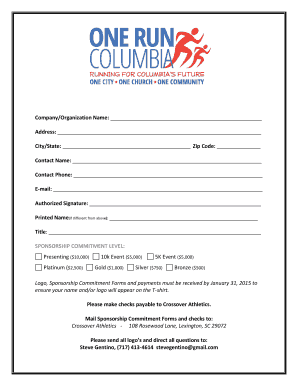
Filling out the Signature Over Printed Name form is a straightforward process. This guide provides clear instructions on how to complete each section of the form, ensuring that users can successfully submit their information online.

Follow the steps to complete the Signature Over Printed Name online.

  1. Click the ‘Get Form’ button to obtain the form and open it in your editor.
  2. Enter the company or organization name in the designated field. Make sure to provide the full and correct name to avoid any processing issues.
  3. Fill in the address, ensuring that all components, such as street address, city/state, and zip code, are accurately entered. This information is vital for official correspondence.
  4. Provide the contact name for the form. This should be the person responsible for any follow-up regarding this submission.
  5. Input the contact phone number, which should include the area code. This ensures easy communication if further clarification is needed.
  6. Fill in the email address of the contact person. Ensure it is correct to facilitate timely correspondence.
  7. Sign the form in the Authorized Signature section. This confirms your approval and agreement to the details provided.
  8. If your printed name differs from the contact name, provide it in the Printed Name section.
  9. Indicate your title or position within the organization, as this adds clarity to your role in the context of this agreement.
  10. Choose your sponsorship commitment level by selecting one of the available options. Ensure you understand each level’s requirements and benefits.
  11. After completing all fields, review the form for any errors or omissions. Once confirmed, proceed to save changes.
  12. Finally, you can download, print, or share the completed form as needed. This will ensure your submission is processed correctly.

Complete your documents online today for a seamless submission experience.

Get form

Experience a faster way to fill out and sign forms on the web. Access the most extensive library of templates available.
Get form

Related content

Signature Examples
by JT Smith · Cited by 4 — The person typed their name including the forward slashes to...
Learn more
PRINT NAME PRINT NAME & DATE SIGNATURE
CURRENT DATE, PRINTED. NAME, SSAN, & SIGNATURE. MARK BOX FOR. CURRENT MARITAL. STATUS...
Learn more
Self-signed confirmation - NamuWiki
Jun 8, 2025 — Simply put, if you write your name in print on a signature pad, it will be...
Learn more

Related links form

Moche Sex Pots - Latinamericanstudies Love Maps - 20 Questions. Document Is An Activity To Encouracge Communication Between Couples And DVC-V304 Catalog Sheet Certificate Of Occupancy Tenant

Questions & Answers

Get answers to your most pressing questions about US Legal Forms API.

Contact support

In Microsoft Word, you can place your signature over a printed name by inserting your signature image through the 'Insert' menu. After the upload, drag the image into position above your printed name, ensuring that it is clear and professionally displayed. This method effectively enhances the document's credibility.

To add a line in a signature over a printed name, use your document editing tools to create a line or draw it manually. Once the line is ready, insert your signature above the line, aligning it to ensure visual balance. This technique streamlines the document's presentation and emphasizes your signature.

In Google Docs, begin by uploading your signature image to the platform. After insertion, click and drag to position your signature directly over the printed name. This process allows your signature to enhance the document's authenticity and professionalism.

To convert your name into a signature, start by writing your name in a distinctive style. Experiment with different handwriting until you find one that feels authentic. Once satisfied, either scan your handwritten signature or create a digital version, which you can then use in various documents requiring a signature over printed name.

To insert a handwritten signature in Google Docs, create a signature image first. After that, access Google Docs, choose 'Insert,' and then select 'Image' to upload your signature. Position it over your printed name to achieve the desired effect, effectively completing your document.

Overlaying a signature in documents involves placing your signature image strategically over the printed name. Use the insert or picture feature in your document editor to upload your signature, and then adjust it to fit perfectly. This method ensures your signature stands out and maintains a professional look.

You can add a signature over printed name in a PDF using PDF editing software. Open your PDF file in the software, then use the 'Add Image' function to insert your signature image. Position it above your printed name to complete the process, and then save your changes.

To place a signature over a printed name in your documents, first ensure you have your signature ready as an image. Then, in your document editor, use the insert image feature to upload your signature. Adjust its size and position to align it properly over your printed name, ensuring that it appears clean and professional.

Printing your name underneath your signature serves to clarify your identity and reinforce the authenticity of your signature. It allows anyone reading the document to easily identify the signer and understand who is responsible for the content. This practice is particularly important in legal contexts, as it strengthens the significance of the signature and affirms the connection between the individual and their intentions, especially in regards to Signature Over Printed Name.

Yes, it is indeed signature over printed name, which means that your handwritten signature should be placed above your typed name. This distinction highlights the importance of personal acknowledgment in official documents. Failing to follow this format can lead to misunderstandings or misinterpretations of your intent. Thus, always ensure that your signature is placed correctly in relation to your printed name to comply with legal standards for Signature Over Printed Name.

Get This Form Now!

Use professional pre-built templates to fill in and sign documents online faster. Get access to thousands of forms.
Get form
If you believe that this page should be taken down, please follow our DMCA take down processhere.
Get Signature Over Printed Name
Get form
  • Adoption
  • Bankruptcy
  • Contractors
  • Divorce
  • Home Sales
  • Employment
  • Identity Theft
  • Incorporation
  • Landlord Tenant
  • Living Trust
  • Name Change
  • Personal Planning
  • Small Business
  • Wills & Estates
  • Packages A-Z
  • Affidavits
  • Bankruptcy
  • Bill of Sale
  • Corporate - LLC
  • Divorce
  • Employment
  • Identity Theft
  • Internet Technology
  • Landlord Tenant
  • Living Wills
  • Name Change
  • Power of Attorney
  • Real Estate
  • Small Estates
  • Wills
  • All Forms
  • Forms A-Z
  • Other Templates
  • Legal Hub
  • About Us
  • Help Portal
  • Legal Resources
  • Blog
  • Affiliates
  • Contact Us
  • Delete My Account
  • Site Map
  • Industries
  • Forms in Spanish
  • Localized Forms
  • State-specific Forms
  • Forms Kit
  • Real Estate Handbook
  • All Guides
  • Notarize
  • Incorporation services
  • For Consumers
  • For Small Business
  • For Attorneys
  • USLegal
  • FormsPass
  • pdfFiller
  • signNow
  • altaFlow
  • DocHub
  • Instapage
Form Packages
  • Adoption
  • Bankruptcy
  • Contractors
  • Divorce
  • Home Sales
  • Employment
  • Identity Theft
  • Incorporation
  • Landlord Tenant
  • Living Trust
  • Name Change
  • Personal Planning
  • Small Business
  • Wills & Estates
  • Packages A-Z
Form Categories
  • Affidavits
  • Bankruptcy
  • Bill of Sale
  • Corporate - LLC
  • Divorce
  • Employment
  • Identity Theft
  • Internet Technology
  • Landlord Tenant
  • Living Wills
  • Name Change
  • Power of Attorney
  • Real Estate
  • Small Estates
  • Wills
  • All Forms
  • Forms A-Z
  • Other Templates
Customer Service
  • Legal Hub
  • About Us
  • Help Portal
  • Legal Resources
  • Blog
  • Affiliates
  • Contact Us
  • Delete My Account
  • Site Map
  • Industries
  • Forms in Spanish
  • Localized Forms
  • State-specific Forms
  • Forms Kit
Legal Guides
  • Real Estate Handbook
  • All Guides
Prepared for you
  • Notarize
  • Incorporation services
Our Customers
  • For Consumers
  • For Small Business
  • For Attorneys
Our Sites
  • USLegal
  • FormsPass
  • pdfFiller
  • signNow
  • altaFlow
  • DocHub
  • Instapage
Social Media
Call us now toll free:
+1 833 426 79 33
As seen in:
© Copyright 1999-2026 airSlate Legal Forms, Inc. 17 Station Street, Ste. 203, Brookline, MA 02445
  • Your Privacy Choices
  • Terms of Service
  • Privacy Notice
  • Content Takedown Policy
  • Bug Bounty Program