Loading
Get Philhealth Form
How it works
-

Open form follow the instructions
-

Easily sign the form with your finger
-

Send filled & signed form or save
How to fill out the Philhealth Form online
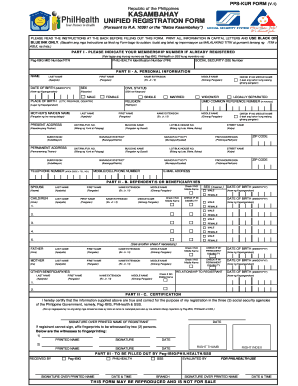
This guide provides step-by-step instructions on how to fill out the Philhealth Form online. It aims to assist users in accurately completing the form to ensure proper registration and benefits.
Follow the steps to successfully complete the Philhealth Form online.
- Click ‘Get Form’ button to obtain the form and open it in the editor.
- Part I requires you to indicate your membership number if you are already registered. Fill in your Pag-IBIG MID number, Philhealth ID number (PIN), and Social Security number.
- In Part II, section A, provide your personal information. Fill in your last name, first name, middle name (if applicable), name extension (if applicable), date of birth, sex, civil status, place of birth, religion, and your mother’s maiden name. Ensure all fields are completed in capital letters.
- Next, provide your current address and permanent address. Include details such as unit, building name, lot number, street name, barangay, municipality, province, and zip code.
- Also in Part II, section B, fill in the details of dependents or beneficiaries, starting with your spouse. This includes their last name, first name, middle name (if applicable), sex, and date of birth. Provide similar information for your children, ensuring to check if any have a disability.
- Finish Part II with section C, where you will provide a signature over your printed name to certify that the information is true. If you cannot sign, affix your fingerprints and have them witnessed by two persons.
- Lastly, once all sections are filled, review for accuracy. Save your changes, and choose to download, print, or share the form as necessary.
Complete your Philhealth Form online today to ensure you access your needed health services.
Finding your PhilHealth number is simple. You can check your number on the official PhilHealth website by utilizing their online services. Alternatively, if you have a copy of your PhilHealth Form from when you applied, your number will be listed there. If you need more assistance, visiting a PhilHealth office is a reliable option.