
Open form follow the instructions

Easily sign the form with your finger

Send filled & signed form or save
How to fill out the Eye Test Report Format online
Filling out the Eye Test Report Format online ensures that you accurately report the eye examination results for a staff member. This guide provides clear steps to help you complete the necessary fields with confidence and efficiency.
Follow the steps to accurately complete the Eye Test Report Format.
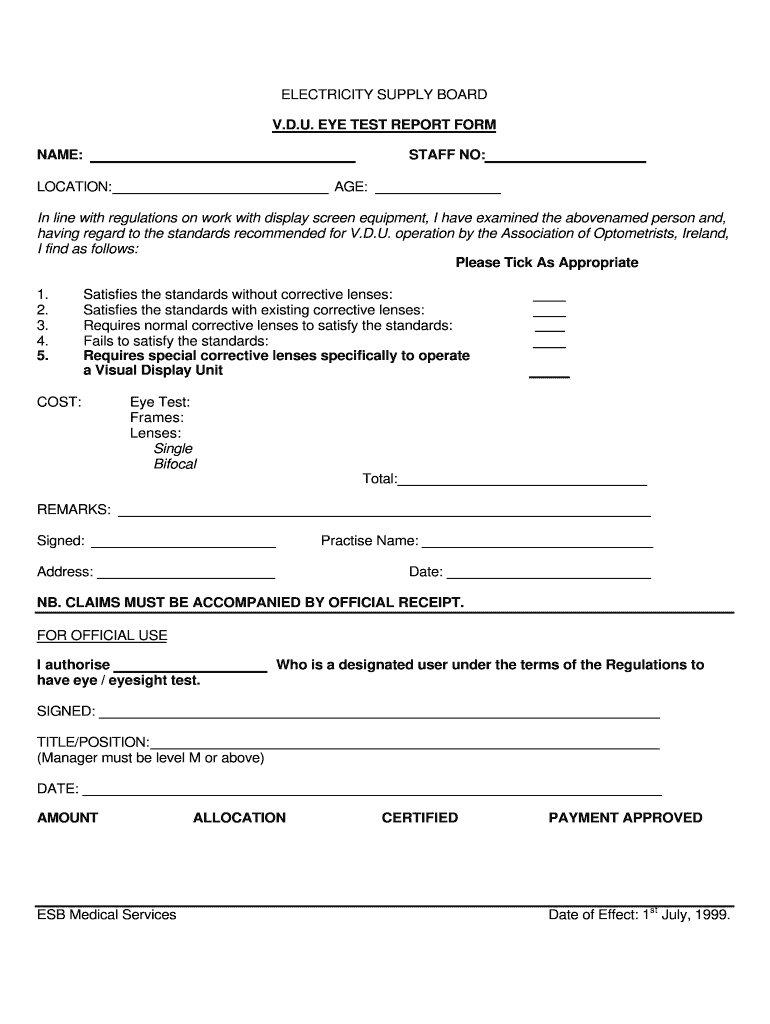
- Press the ‘Get Form’ button to access the Eye Test Report Format and open it in your preferred editor.
- In the first section, enter the person's name in the designated field. Ensure that the name is spelled correctly for accurate identification.
- Next, input the staff number in the appropriate section. This number is crucial for tracking and association with the individual's records.
- Fill in the location where the individual is based. This information helps in identifying the context of the eye test.
- Enter the age of the individual in the specified field. Age can influence certain eye test outcomes.
- Review the results of the eye examination. Indicate the appropriate option by ticking the box that reflects the individual's eye health based on the examination standards.
- In the cost section, provide details of the expenses incurred for the eye test, including breakdowns for eye test, frames, and lenses. Specify whether lenses are single or bifocal.
- Add any additional remarks if necessary to provide further context or information about the eye test.
- Sign the report to validate the examination results. You should also include your practice name and address.
- Enter the date when the eye test was conducted. This is essential for record-keeping and compliance.
- If applicable, fill in the section for official use by the designated user, including their title/position and the approval date.
- Once all fields are completed, save your changes, and proceed to download, print, or share the Eye Test Report Format as needed.
Complete your documents online and ensure compliance with eye test regulations.
Experience a faster way to fill out and sign forms on the web. Access the most extensive library of templates available.
Related content
DMV staff are trained to administer the eye test. a. This form should be used only for...
A clean tissue to cover each eye one at time, a quarter, and a pen and paper to record...
Oct 20, 2025 — It is a test that everyone goes through at least once in order to fit...
Get answers to your most pressing questions about US Legal Forms API.
How to document eye exam findings?
Documenting eye exam findings involves recording assessments comprehensively. Begin with patient identification, then clearly write down results of each test conducted. Using the Eye Test Report Format ensures that findings are consistent and legally sound, which is essential for patient care and follow-up.
How to write an eye report?
To write an effective eye report, ensure you gather all relevant data from the examination. Start with patient details, then document each test and its results in a systematic manner. Follow the Eye Test Report Format to standardize information, making it easy for others to understand.
How do you describe an eye assessment?
An eye assessment should provide a complete picture of a patient's visual health. Include details about the tests conducted, results obtained, and any issues observed during the examination. Structuring this information in a coherent Eye Test Report Format helps convey essential data effectively to fellow healthcare professionals.
How do you write the description of eyes?
Describing the eyes in an eye report involves noting their condition and any observed features. Focus on aspects such as pupil size, response to light, and overall eye appearance. Being specific helps in creating a comprehensive Eye Test Report Format, which is beneficial for tracking changes over time.
How do you write an eye report?
Writing an eye report involves compiling key findings from the examination. Start with basic patient details followed by the objectives of the exam. Clearly present results, observations, and recommendations in a structured way. Using an established Eye Test Report Format enhances readability and professionalism.
How do you write eye test results?
When writing eye test results, clarity is essential. Begin by noting the date of the test and the patient's information. Document each measurement from the exam, including visual acuity and any abnormalities. A clear Eye Test Report Format can help ensure that this information is easily interpreted by others.
How to fill vision in form?
Filling in the vision section of the Eye Test Report Format requires specific details. Start by entering the patient's personal information, including name and date of birth. Next, provide the results from the various visual acuity tests. Ensure accuracy, as this data is crucial for a thorough eye assessment.
How to read an eye test report?
To read an eye test report effectively, begin with the basics: visual acuity numbers and prescription details. Look for measurements pertaining to distance and near vision, as well as any notes on astigmatism or other refractive errors. The Eye Test Report Format should present these elements clearly, making it simpler for you to interpret your vision needs. Regularly reviewing your reports can aid in tracking your eye health over time.
How do I read my eye report?
Reading your eye report can seem daunting, but focusing on key sections simplifies the process. Start by noting the visual acuity lines, which tell you about your distance vision clarity. Your Eye Test Report Format will guide you through other critical metrics, such as prescription details or any diagnostic findings, empowering you to make informed decisions about your eye care. Take your time to understand each component for better eye health management.
How to interpret eye screening results?
Interpreting eye screening results involves assessing various aspects of your vision and overall eye health. The screening may indicate potential issues or confirm normal vision status. Reviewing these results in light of your Eye Test Report Format provides context, allowing you to grasp the significance of each finding. Always consider discussing these outcomes with an eye care professional for tailored guidance.
Use professional pre-built templates to fill in and sign documents online faster. Get access to thousands of forms.
If you believe that this page should be taken down, please follow our DMCA take down process here.